When a critical vulnerability hits the news, my board asks the same question yours does: “Are we protected?”
The honest answer is rarely, “Yes, we already patched it,” even when our threat researchers have been tracking the vulnerability for weeks. The patch may not exist yet. It may need testing, or the system can’t go offline until the next maintenance window. Some appliances can’t be patched at all.
Virtual patching changes your answer to the board. It lets you say, “We’re covered, and we’ve verified it” today, while the permanent fix works its way through testing and change control.
What is a virtual patch?
A virtual patch is a security rule, applied on the network or the endpoint, that blocks attempts to exploit a specific vulnerability without changing the vulnerable software.
Think of it as posting a guard at a door with a broken lock. The lock still needs replacing, but nobody gets through while you wait for the locksmith. A virtual patch doesn’t change the vulnerable system, so it doesn’t have to wait for a maintenance window.
Why virtual patching matters more now
AI didn’t create new gaps in security programs, but it did make them easier to find. Attackers now use AI to turn a newly disclosed vulnerability into a working exploit in days, sometimes hours.
So, when a critical vulnerability makes headlines, I’m watching two clocks. The first is how long it takes to know whether we’re exposed. The second is how long it takes to be protected. With traditional patching, both clocks run on the vendor’s timeline and our change calendar. But attackers aren’t waiting on either.
Proactive virtual patching shortens both clocks.
Know sooner
AI-driven risk prioritization in TrendAI Vision One™ matches new vulnerabilities against what you actually run and flags exploitable common vulnerabilities and exposures (CVE) that are still unprotected. Instead of working through thousands of common vulnerability scoring system (CVSS) results, your team starts with the few that matter.
Protect sooner
Research from the TrendAI™ Zero Day Initiative™ (ZDI) means TrendAI Vision One™ TippingPoint™ often gets pre-disclosure protection before a vendor patch exists, and sometimes before the vulnerability is public. According to the TrendAI™ 2026 Cyber Risk Report, network-level virtual patching can protect you up to 115 days before a vendor patch is released. When TrendAI™ ZDI discovered and reported the Oracle PeopleSoft Critical Vulnerability (CVE-2026-35273), we published detection rules within 24 hours of the advisory.
The goal isn’t to out-race attackers to the patch. It’s to stop letting the patch schedule decide how long you’re exposed.
Why "just patch it" isn't always an option
There's no patch yet
TrendAI™ ZDI reported one vulnerability that was still waiting on a patch about 120 days later.
The patch might break something
Patches need testing and some can take an appliance offline or clear forensic data you'd want to collect first.
The system can't go down
At a previous organization, we had OT devices in our warehouses with strict uptime requirements. Patching on short notice wasn't an option.
Nobody agrees who owns it
The OS team says the app needs patching, but the app team says it's not their problem. Meanwhile, the vulnerability sits unaddressed.
Virtual patching doesn't settle those debates, but it keeps you protected while they get settled.
How to put virtual patching to work
Clock one: Know sooner
1. Know what you're running
You can't shield what you can't see, and every organization deals with shadow IT, and poor technology hygiene, like outdated asset inventories, forgotten systems, and unmanaged devices, make those blind spots even bigger. A recommendation scan in TrendAI Vision One™ Endpoint Security finds the vulnerabilities in your environment and the rules that address them.
2. Prioritize by real-world risk, not CVSS alone
A CVSS score tells you how bad a vulnerability could be, not whether it’s a risk to you. AI-driven prioritization in TrendAI Vision One™ shows which highly exploitable CVEs in your environment are fully covered, partially covered, or not covered at all, so your team starts with the gaps that matter.
Not every CVE is a real threat. Many will never be exploitable, and the ones that will aren’t always the ones with the highest scores. Telling the difference comes down to the intelligence behind your decisions.
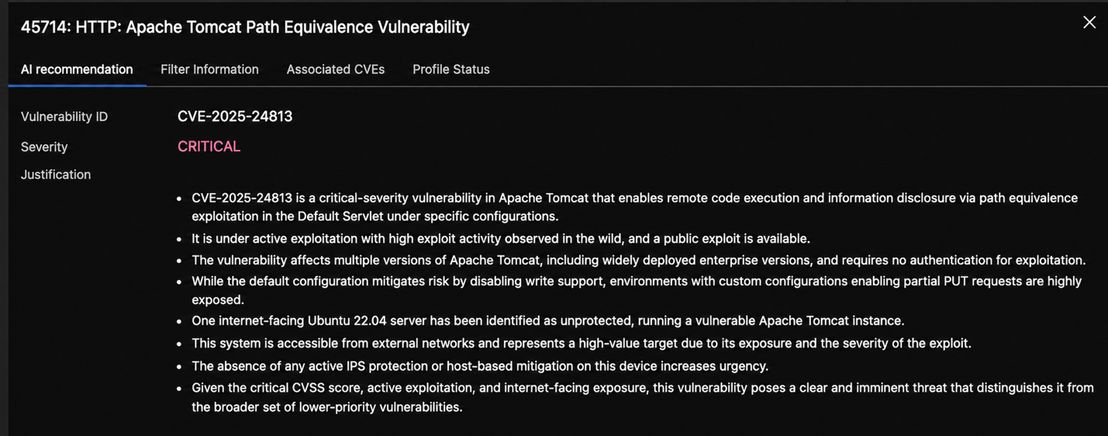
Clock two: Protect sooner
3. Cover the network and the endpoint
A former boss once asked how we could fully protect our environment. I asked if he was willing to fire all the employees (he wasn't). People are our largest attack surface, their laptops don't always sit on our network, and a traveling executive is a high-value target.
Virtual patching can be leveraged in TippingPoint on the network, and via intrusion prevention in Endpoint Security on the device, including servers and workloads. To be clear, a virtual patch only protects traffic that passes through your security controls. Anything that goes around them is still exposed and should be reported as open risk.
4. Turn on what's relevant, and automate the rest
Enabling every rule creates a real performance hit, so activate only what matches your environment.
All three tiers of Endpoint Security include intrusion prevention. Core and Essential start from a recommendation scan your team then maintains. Endpoint Security Pro scans and applies new rules automatically to servers and workloads. On the network, AI-recommended actions in TrendAI Vision One™ surface unblocked CVEs so you can deploy TippingPoint filters in a few clicks.
Automation only helps if someone already said yes. Decide who can approve protections before an incident, not during one. Pre-approve proven rules so they can go live without waiting on a change board, and save extra review for new rules on anything touching critical systems.

5. Treat every virtual patch as a bridge
Turning on a rule doesn't mean an asset is protected, so confirm the protection is active everywhere it needs to be and isn’t blocking normal business traffic.
Then use the time it buys you to test the real patch, schedule downtime, and settle ownership. Track each virtual patch to its permanent fix.
When the Oracle PeopleSoft zero-day (CVE-2026-35273) surfaced, TrendAI™ ZDI discovered and reported it, and we published detection rules within 24 hours of the advisory.
To be clear, a virtual patch stops future attacks, but it won’t undo a breach that already happened, so keep incident response running in parallel.
6. Report it as risk reduction
Ten years ago, many of us put patch counts in board reports. Today, boards want to know the risk and how fast it's shrinking. Virtual patching gives you clear answers: here's the exposure, here's what's shielded, and here's when the permanent fix lands. Track it with three numbers:
- Time to know
- Time to protect
- The percentage of affected assets covered
Frequently asked questions
| Question | Response |
|---|---|
| Is virtual patching the same as a web application firewall (WAF) rule? | A WAF rule is one form of virtual patching, but it only covers web traffic. Intrusion prevention–based virtual patching, like TippingPoint and Endpoint Security, covers a much wider range of systems and protocols across your network and devices. |
| How long should a virtual patch stay in place? | At least until the permanent patch is applied and verified. Many teams leave it on afterward; just review your rule sets periodically. |
| Does virtual patching slow down systems? | Not when it's tuned. Running only the rules your environment needs helps you keep performance steady. |
| Can it be deployed automatically? | Yes, with Endpoint Security Pro. |
| I use TrendAI™ Apex One or TrendAI™ Deep Security™. Can I still do this? | Yes. Both include intrusion prevention, and you can manage them from TrendAI Vision One™. |
The bottom line
You don't have to win the race to the patch. But you also don’t have to stand still.
Virtual patching doesn’t replace the need to patch, but it's a well-established layer of defense that gives your team room to do the job right instead of just fast.
In the end, both clocks run on intelligence. Knowing which vulnerabilities matter, and protecting against them before the patch arrives depends on how early and how accurately you see what’s coming.
About TrendAI Virtual Patching
Research from TrendAI™ ZDI and Cybersecurity and Infrastructure Security Agency (CISA) Known Exploited Vulnerabilities (KEV) intelligence underlies our virtual patching protection. That’s why TippingPoint and Endpoint Security customers are often protected from vulnerabilities before or after they’re made public.
Here are some practical resources to help protect your organization from emerging vulnerabilities:
- Learn the three steps to close your exposure window
- Learn about PHP2Shell and how to take action
- Blog: Brotli Flaw Behind 'Node2Shell': What to Patch and Where It Hides
- Blog: Two Critical PHP Flaws Leaked Before the Patch: What Organizations Should Do Now
- Watch our on-demand virtual patching demo to see it in action