
Key Takeaways
- TrendAI Vision One™ Services – Managed Detection and Response (MDR) investigated a cloud-only business email compromise (BEC) in which an adversary targeted a finance user with a spear-phishing email, bypassed multi-factor authentication (MFA) using an Adversary-in-the-Middle (AiTM) phishing page, and hijacked the live Microsoft 365 session token.
- The intrusion involved no malware and no endpoint compromise. Every stage, from initial access to the fraud itself, was carried out against the Microsoft 365 identity plane using a stolen session cookie replayed from commercial VPN infrastructure.
- The adversary planted three malicious inbox rules to silently auto-archive and mark as read incoming vendor and internal collection emails, concealing the fraud from the victim while the actor impersonated trusted vendors to reroute their payments to attacker-controlled bank accounts.
- The investigation hinged on identity telemetry (the anomalous session-token replay and inbox-rule creation from foreign IPs) rather than on any endpoint alert.
BEC remains a high-impact, low-complexity threat facing finance teams. A staple in the cyberattack arsenal, BEC leaves almost no footprint on the endpoint. Its only mark is a seemingly ordinary email exchange that ends with money in the wrong account.
The TrendAI Vision One™ MDR team investigated a textbook example of a modern, fully cloud-based BEC. A finance user received a spear-phishing email, clicked the link, and set off an AiTM relay. We trace the attack from the first click to its root cause.
Attack overview
Figure 1 traces the intrusion from the initial phishing lure through the AiTM credential-relay chain, session-token replay from VPN egress infrastructure, concealment via malicious inbox rules, and the resulting vendor payment-diversion.
A single click on the spear-phishing email set off the AiTM relay that captured not just the user’s password, but also the authenticated Microsoft 365 session itself, neutralizing MFA. From there the adversary operated entirely as the user reading mail, creating hidden inbox rules, and impersonating the organization’s vendors to divert a vendor payment.
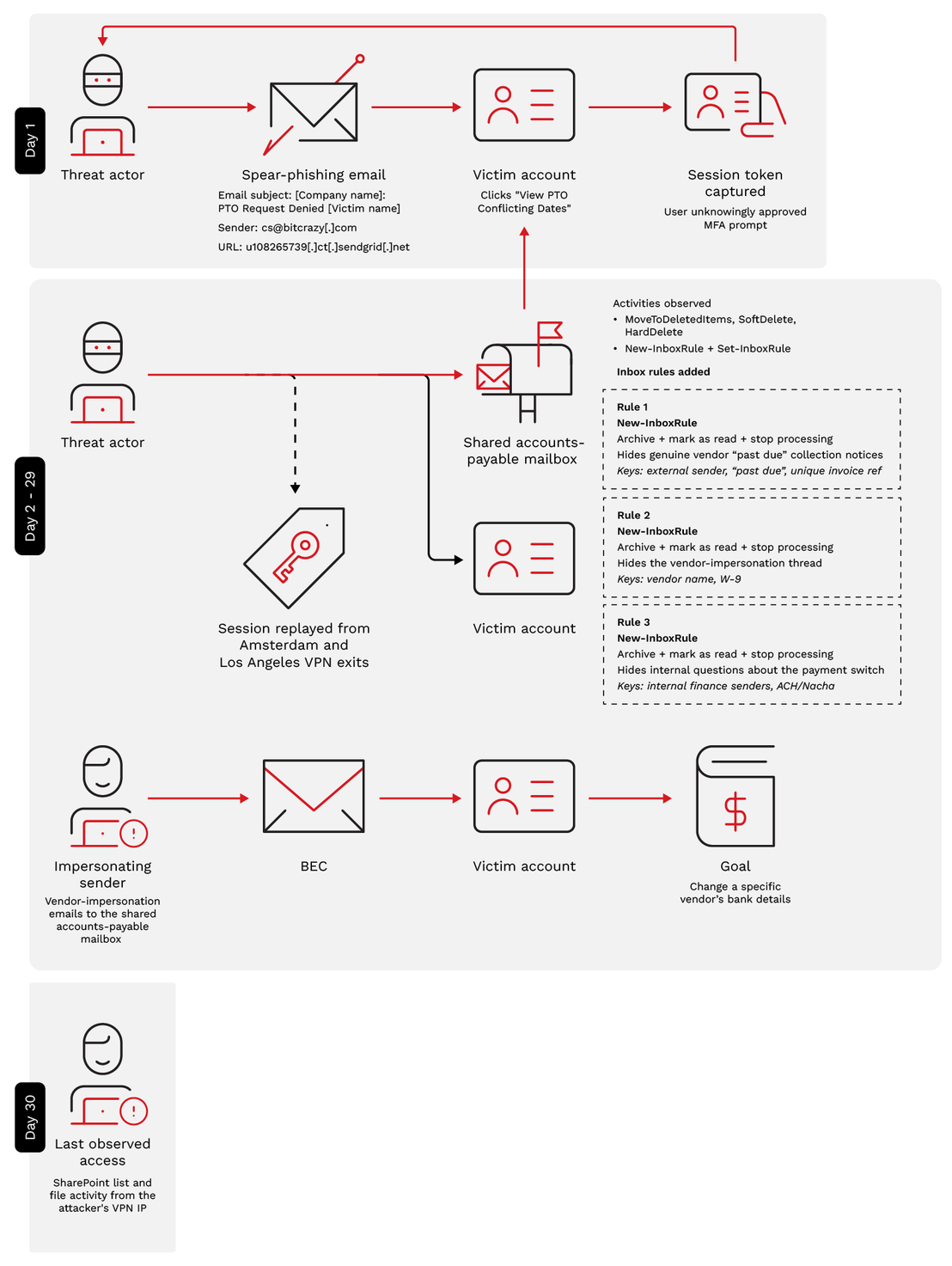
Host forensics confirmed the compromised endpoint was devoid of infostealers, remote access tools, and any sign of lateral movement. The activity was confined to the identity and email layer.
Initial access: One click to a stolen session
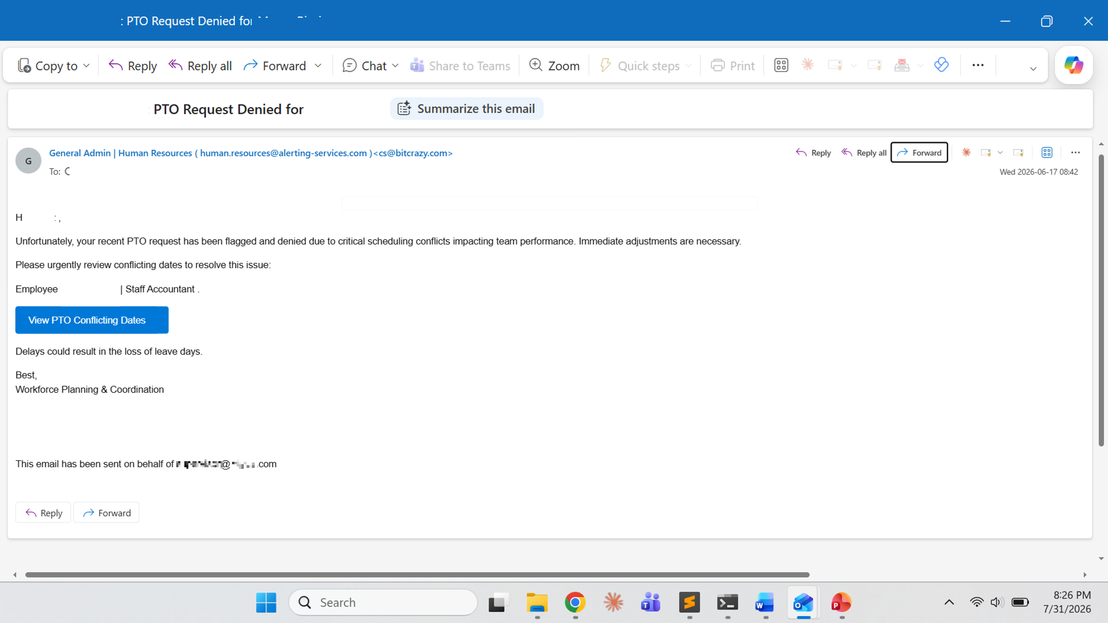
The spear-phishing email was an HR-themed “PTO Request Denied” notice. It was personalized to the targeted finance user, meaning it used their name, job title, and organization. This tailoring is what marks it as spear phishing and not commodity phishing. The adversary had done enough reconnaissance to know exactly who they were writing to.
The email’s call to action was a button labeled “View PTO Conflicting Dates.” It was really a SendGrid click-tracking link. A single click on that button was all the adversary needed. It launched a multi-hop redirect chain ending at a counterfeit Microsoft 365 sign-in page.
Analyzing the sender domain and email authentication
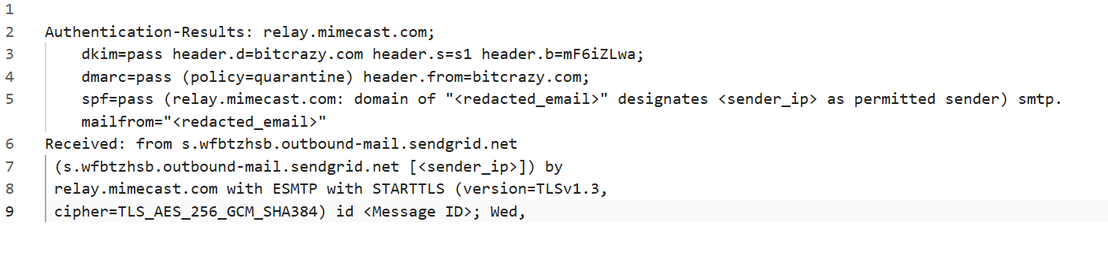
The email was sent from cs@bitcrazy[.]com through SendGrid. The fact that it was in the inbox means it passed Sender Policy Framework (SPF), DomainKeys Identified Mail (DKIM), and Domain-based Message Authentication, Reporting and Conformance (DMARC). Threat actors took advantage of the fact that bitcrazy[.]com was a legitimately authorized sending domain for that SendGrid account.
Spoofing the organization’s own mail domain would have failed DMARC. Instead, the message impersonated internal HR through a friendly-From display-name spoof. The From header read “General Admin | Human Resources (human.resources@alerting-services[.]com)” to mimic an internal HR mailbox, while the true header and envelope sender remained cs@bitcrazy[.]com. That mismatch is a hallmark of phishing.
Reconstructing the URL redirect chain from endpoint history
The phishing email and browser history confirm the initial attack chain. The click passed through a multi-hop redirect:
u108265739[.]ct[.]sendgrid[.]net → mauthcopilot[.]com → portalmyadminsigninapps.experiencewithreliability[.]de/0xrcY/ → fake Microsoft 365 sign-in page
The user unknowingly approved the MFA prompt, allowing the adversary to capture the authenticated session token. This stolen session token was then replayed from commercial VPN infrastructure, enabling the attacker to operate as the user and proceed with fraudulent activity.
The fraud unfolds: A two-phase vendor payment-diversion BEC
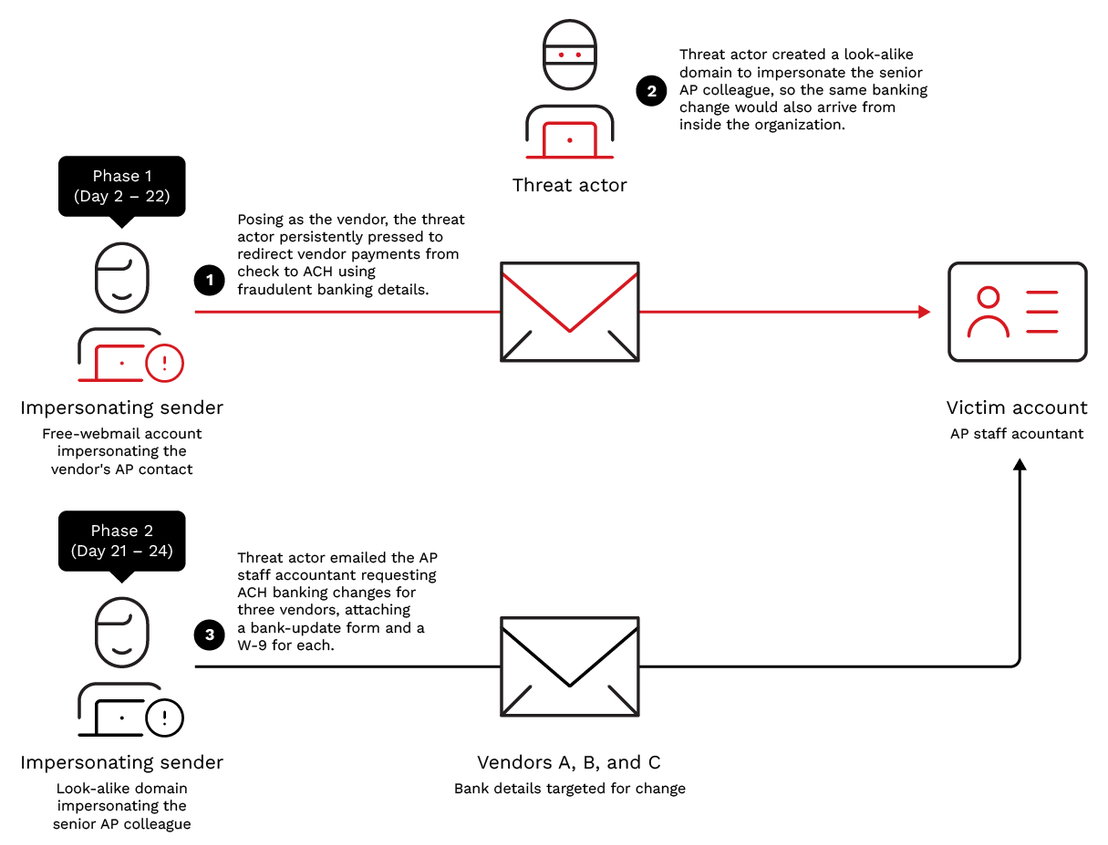
The fraud ran as two overlapping impersonation phases. Each phase involved a different trusted face and each was engineered to make a fraudulent bank-detail change look like routine accounts-payable (AP) housekeeping. Running both meant the same banking change was requested from outside the organization and from inside it, so each request appeared to corroborate the other.
The operation spanned 30 days, from the initial phishing on Day 1 to the last observed adversary action on Day 30. The bulk of this time was spent running fraudulent emails from Day 2 through 24. However, the threat actor continued accessing the mailbox and SharePoint even past this point and planted a further concealment rule.
Phase 1: Impersonating the vendor (free-webmail)
From: Attacker-controlled free-webmail account impersonating the vendor's accounts-payable contact
To: Customer's shared AP mailbox
Window: From Day 2 through 22
The first phase was a patient vendor-impersonation campaign targeting the organization's shared accounts-payable mailbox. Because the mailbox legitimately handled vendor invoices, remittance inquiries, and banking updates, the attacker only needed to blend into normal business communications.
Posing as the vendor's AP contact from a free-webmail account, the attacker began with a routine request to confirm receipt of approximately 20 legitimate outstanding invoices, immediately establishing credibility. The conversation then shifted to a request to replace paper checks with automated clearing house (ACH) payments. Following the customer's standard process, the AP team requested an ACH authorization form and a current W-9, both of which the attacker supplied to support fraudulent banking details.
Over the next three weeks and 11 email exchanges, the attacker maintained steady follow-ups until the vendor's payment instructions were redirected to an attacker-controlled bank account.
| Incident day | Message | What it did |
|---|---|---|
| Day 2 | Opener + forward | Sends a batch of ~20 genuine outstanding invoice numbers; floats switching payment from check to ACH |
| Days 6 - 13 | Sustained follow-ups | Supplies the requested ACH authorization form + W-9 carrying attacker banking details; nudges AP to update the vendor record |
| Days 20 - 22 | Escalation | Presses AP to confirm the ACH conversion so future payments route to the attacker-controlled account |
An atypical-travel anomaly was logged within days of the opening exchange. It later became the starting point for the investigation.
Concealment ensured the fraud remained undetected. Using the stolen session, the attacker anticipated that unpaid vendors would eventually send collection notices to the shared accounts-payable mailbox. They then created an inbox rule to automatically archive and mark as read those messages before stopping further rule processing. The victim never saw collection notices from the real vendor.
A second rule in the victim's mailbox hid the impersonation thread itself. Our investigation revealed that minutes afterward, mailbox audit logs recorded MoveToDeletedItems, SoftDelete, and HardDelete operations, consistent with the attacker removing evidence of emails that could have exposed the fraud.
Phase 2: Impersonating the organization (look-alike domain)
From: Attacker-controlled look-alike domain impersonating the organization's senior AP colleague
To: AP staff accountant (target), with the spoofed senior AP identity copied
Window: From Day 21 through 24
Phase 2 marked an escalation. At around Day 21 the attacker posed as the firm’s own senior AP colleague to force the fraudulent payment through.
| Incident day | Vendor targeted for bank update | Social engineering element | Attachments |
|---|---|---|---|
| Day 21 | Vendor A | Fabricated vendor verification thread | Bank-update form + vendor W-9 |
| Day 21 | Vendor B | Claimed verification with vendor representative | Bank-update form + vendor W-9 |
| Day 24 | Vendor C | Claimed verified banking update | Bank-update form + vendor W-9 |
The third concealment rule
Days after the impersonation emails wrapped up (around Day 29) the attacker planted a third and final concealment rule, this time aimed at scrutiny from the inside.
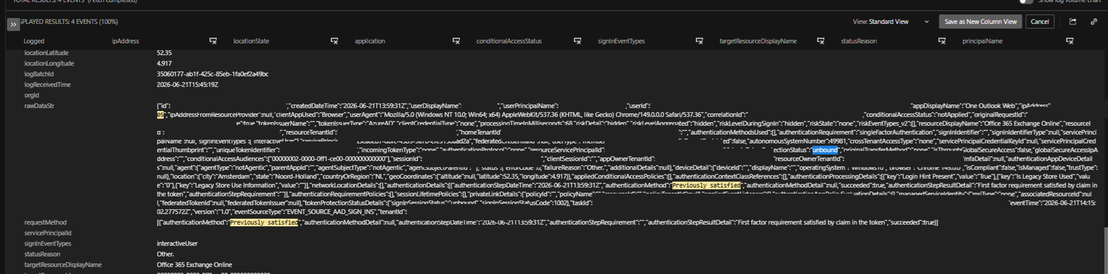
Sign-in telemetry confirmed the session token had been replayed. Every sign-in was single-factor, with MFA marked as previously satisfied, meaning satisfied by a claim already present in the token rather than a fresh challenge. The session also showed token protection as unbound and conditional access as not applied. No fresh MFA challenge occurred because the attacker replayed an already authenticated session cookie. Under normal circumstances, a sign-in from a new device or location would trigger MFA.
Created from a foreign VPN IP under the same hijacked session, it complemented the two Phase 1 rules that had buried external vendor thread. The attacker had achieved full control of both sides of the conversation: external vendor verification and internal payment scrutiny.
Threat actor activity continued past the impersonation emails. The last observed access came on Day 30, when SharePoint list and file activity was recorded from the same VPN IP. No further activity was observed after that date.
How MDR investigated the campaign
The MDR team was engaged to investigate. The team traced the case back to its root cause through host forensics, email and header analysis, and correlation of the identity trail. Containment was performed on the host, where no malware was found.
Atypical travel
The investigation found that the TrendAI Vision One™ platform had logged an atypical-travel anomaly on the finance user. The anomaly showed the same Microsoft 365 session authenticating from Amsterdam (VPN IP 1) and, roughly one minute later, from Los Angeles (VPN IP 2, an M247 commercial VPN exit). The physically impossible travel interval between the Netherlands and California indicated session-token replay rather than legitimate user activity from two locations.
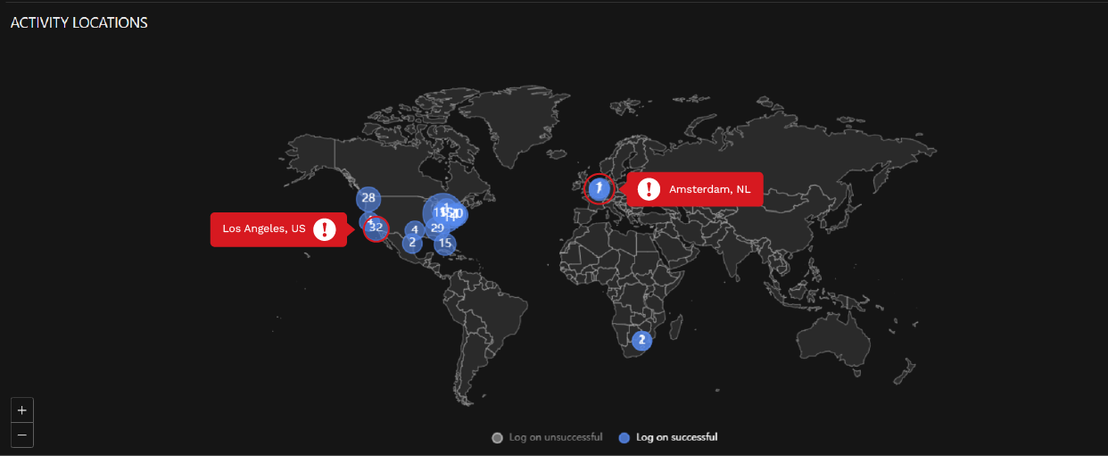
However, an atypical-travel detection alone is not sufficient to confirm account compromise and requires further validation. Additional investigation should focus on subsequent activity associated with the account to identify any suspicious follow-on actions.
Session-token activity
Sign-in telemetry confirmed the session token had been replayed. Every sign-in was single-factor, with MFA marked as previously satisfied, meaning satisfied by a claim already present in the token rather than a fresh challenge. The session also showed token protection as unbound and conditional access as not applied. No fresh MFA challenge occurred because the attacker replayed an already authenticated session cookie. Under normal circumstances, a sign-in from a new device or location would trigger MFA.
What was accessed
Tracking the same session across the tenant showed the adversary accessing Exchange Online, SharePoint, and Microsoft 365 Search as the victim user. The absence of failed logins despite MFA protection pointed to session hijacking rather than credential guessing. Tracing the session to its origin confirmed it was issued immediately after the user authenticated to the AiTM phishing page. The atypical-travel alert was the symptom of the AiTM session theft.
| Accessed under the hijacked session | What it gave the adversary |
|---|---|
| Exchange Online mailbox | Vendor threads and invoices correspondence—the raw material for the impersonation |
| Shared accounts-payable mailbox (via the user’s delegate access) | A second mailbox reached through the victim’s existing permissions—where the concealment rules were planted and the genuine “past due” vendor collections were hidden |
| SharePoint and Microsoft 365 search | Finance and SharePoint files previewed and accessed under the session (the specific documents were not captured in the audit export) |
| Microsoft 365 web services (broad) | Full access exercised, with no endpoint footprint |
Correlating three data sources
The team searched relevant telemetry using TrendAI Vision One™ XDR Data Explorer App and correlated three data sources under the product name (pname). These logs consolidate activity from multiple sources, enabling efficient identification, categorization, and retrieval of related events:
- Microsoft Entra ID: Entra ID sign-in activity
- Collaboration Sensor: Microsoft 365 mailbox audit activity
- Cloud Email and Collaboration Protection: Email activity
The team then analyzed related signals and correlated user accounts, IP addresses, and session activity to identify suspicious patterns.
Table 4 lists the signals that map to each step of this attack and the queries used to surface them.
| Signal | Where an MDR analyst works it in TrendAI Vision One™ | TrendAI Vision One™ Search query |
|---|---|---|
| Impossible or atypical travel | Under Possible Account Compromise – Impossible Travel Risk Factor, identify sign-ins from geographically distant locations within an unusually short timeframe (Figure 5). Investigate subsequent activities and accessed resources such as Mailbox, SharePoint, OneDrive associated with these sign-ins. | <account name> and <Source IP> |
| MFA previously satisfied — no fresh challenge | Search for Identity Activity, filtering single-factor sign-ins with MFA previously satisfied and Conditional Access not Applied. | <Source IP> and requestMethod:*previously satisfied* |
| Unbound session-token replay | Search for Identity Activity: correlate a single sessionId reused across multiple countries and ASNs, with token protection "unbound" and zero failed logins. | <userSessionId> and unbound |
| Suspicious inbox rules (New-InboxRule / Set-InboxRule) | Search for Collaboration Sensor for inbox rule creation from non-corporate IPs. | (<userSessionId> or <Source IP>) and actionName:("New-InboxRule" OR "Set-InboxRule") |
| Mailbox deletion bursts | Search for Collaboration Sensor, soft- and hard-delete events grouped by actor session and source IP. | (<userSessionId> or <Source IP>) and actionName:(HardDelete or SoftDelete) |
| Financial-change requests from untrusted senders | Cloud Email and Collaboration Protection + Search → Email Activity (sender address/domain and mail direction): flag free-webmail and look-alike-domain senders. | Not applicable |
MITRE ATT&CK mapping
The techniques observed in this intrusion map to MITRE ATT&CK® as summarized below. The full narrative for each is in the sections above.
| Tactic | Technique | Remarks |
|---|---|---|
| Initial Access | T1566.002 — Phishing: Spearphishing Link | HR "PTO Request Denied" lure hiding a SendGrid click-tracker link to the AiTM page |
| Credential Access | T1539 — Steal Web Session Cookie | AiTM proxy relayed the live sign-in and captured the post-MFA session cookie |
| Persistence | T1078.004 — Valid Accounts: Cloud Accounts | Stolen session token replayed from commercial-VPN IPs; MFA previously satisfied, token protection unbound |
| Defense Evasion | T1564.008 — Email Hiding Rules; T1070.008 — Clear Mailbox Data | Three inbox rules (Archive + Mark-as-Read + Stop-Processing) and mailbox-deletion bursts |
| Collection | T1114.002 — Remote Email Collection; T1213.002 — Data from Information Repositories: SharePoint | Vendor email threads and invoices collected; SharePoint/finance files previewed and accessed under the hijacked session |
| Impact | T1657 — Financial Theft | Fraudulent vendor bank-update forms submitted to divert vendor payments |
Conclusion
This BEC campaign is another illustration of where the enterprise perimeter really sits today: trust and identity. By stealing a single authenticated session, the minds behind this campaign gained everything they needed to impersonate a finance user and redirect real money.
The lesson here is that authentication does not equal legitimacy, and the earliest warnings are found in the identity and mailbox layer, not the endpoint. Host forensics found no malware and no lateral movement, which is why the endpoint had nothing to report. What exposed this intrusion was correlation: mailbox audit logs, Entra ID sign-in records, and email activity are each unremarkable alone and conclusive together.
Three controls we enumerate in our recommendations close the openings this attack relied on: a session token that could be replayed from any machine, and a banking change that was never verified outside email.
Recommendations
Organizations can reduce their exposure to this pattern with three controls:
- Consolidate endpoint, email, and identity telemetry with TrendAI Vision One™. This intrusion left no malware artifact; critical evidence was distributed across endpoint browser history, email activity, and Entra ID sign-in logs. TrendAI Vision One™ unified and correlated these signals into a single attack timeline, connecting the AiTM redirect chain, mailbox access, and session-token replay activity. This transformed isolated indicators into a confirmed incident and accelerated investigation and response.
- Enable token protection in Microsoft Entra ID Conditional Access. This would allow cryptographically binding each session or refresh token to the device it was issued on. A token lifted from that device cannot be replayed from any other machine.
- Implement a mandatory out-of-band vendor banking change verification process. Require dual approval and a call-back verification using a trusted phone number already maintained on file before approving any ACH or banking detail changes. This control provides an independent validation step and can prevent payment diversion even in scenarios where email accounts or user identities have been compromised.
TrendAI Vision One™ Threat Intelligence Hub
The TrendAI Vision One™ Threat Intelligence Hub provides the latest insights on emerging threats and threat actors, exclusive strategic reports from TrendAI™ Research, and the TrendAI Vision One™ Threat Intelligence Feed in the TrendAI Vision One™ platform.
Emerging Threats:
AiTM Session Theft Fuels Vendor Payment-Diversion BEC
TrendAI Vision One™ Intelligence Reports (IoC sweeping):
AiTM Session Theft Fuels Vendor Payment-Diversion BEC
TrendAI Vision One™ customers can retrieve the indicators associated with this activity for retrospective sweeping across their environments.