Key Takeaways
- TrendAI Vision One™ Services – Managed Detection and Response (MDR) 託管式偵測及回應服務調查了一起雲端變臉詐騙 (BEC) 攻擊,駭客使用魚叉式網路釣魚電子郵件攻擊金融業使用者,利用不肖中間人 (AiTM) 網路釣魚網頁來避開多重認證 (MFA),進而挾持了 Microsoft 365 連線階段權杖 (session token)。
- 這起入侵事件並未用到惡意程式,也未入侵端點。從突破防線到詐騙完成的每一階段,全部只用了一個偷來的連線階段 Cookie,駭客從一個商用 VPN 基礎架構回放 (replay) 這個 Cookie 來通過 Microsoft 365 身分認證。
- 駭客植入了三條惡意的收件匣規則,暗地裡自動將廠商的請款郵件以及內部相關郵件封存,並標示為已讀取,讓受害者察覺不到詐騙,並假冒受信任廠商的名義更改其收款銀行,讓款項轉到駭客掌控的銀行帳戶。
- 這起調查起因於身分識別監測資料出現異常現象 (從國外 IP 回放連線階段權杖,以及新增收件匣規則),而非端點上出現任何警訊 。
財務人員的資安第一課:如何識別低門檻、高風險的 BEC 詐騙? 作為網路攻擊的標準手段之一,變臉詐騙 (BEC) 幾乎不會在端點上留下任何痕跡,唯一留下的就是看似平凡的電子郵件往來記錄,以及錢最後進了壞人的帳戶。
TrendAI Vision One™ MDR 團隊最近研究了一起現代化純雲端變臉詐騙 (BEC) 的教科書案例。一名金融業使用者收到了一封魚叉式網路釣魚電子郵件,點選了其中的連結,因而觸發了 AiTM 中繼攻擊。我們從一開始的點選動作一路追蹤到問題的源頭。
攻擊簡介
圖 1 顯示整個詐騙的過程,從一開始透過 AiTM 登入憑證中繼攻擊來突破防線,接著利用 VPN 出口基礎架構回放 (replay) 連線階段權杖、利用惡意收件匣規則隱藏郵件,到最後讓廠商的款項被改匯到其他地方。
使用者只是點了一下魚叉式網路釣魚電子郵件中的連結,就觸發了 AiTM 中繼攻擊,駭客不僅取得了使用者的密碼,還拿到了通過認證的 Microsoft 365 連線階段本身,這使得多重認證 (MFA) 失去作用。接下來,駭客便完全以使用者的身分來閱讀郵件、建立隱藏的收件匣規則,隨後更假扮成該企業的外部廠商,將其申請的款項改匯到其他地方。
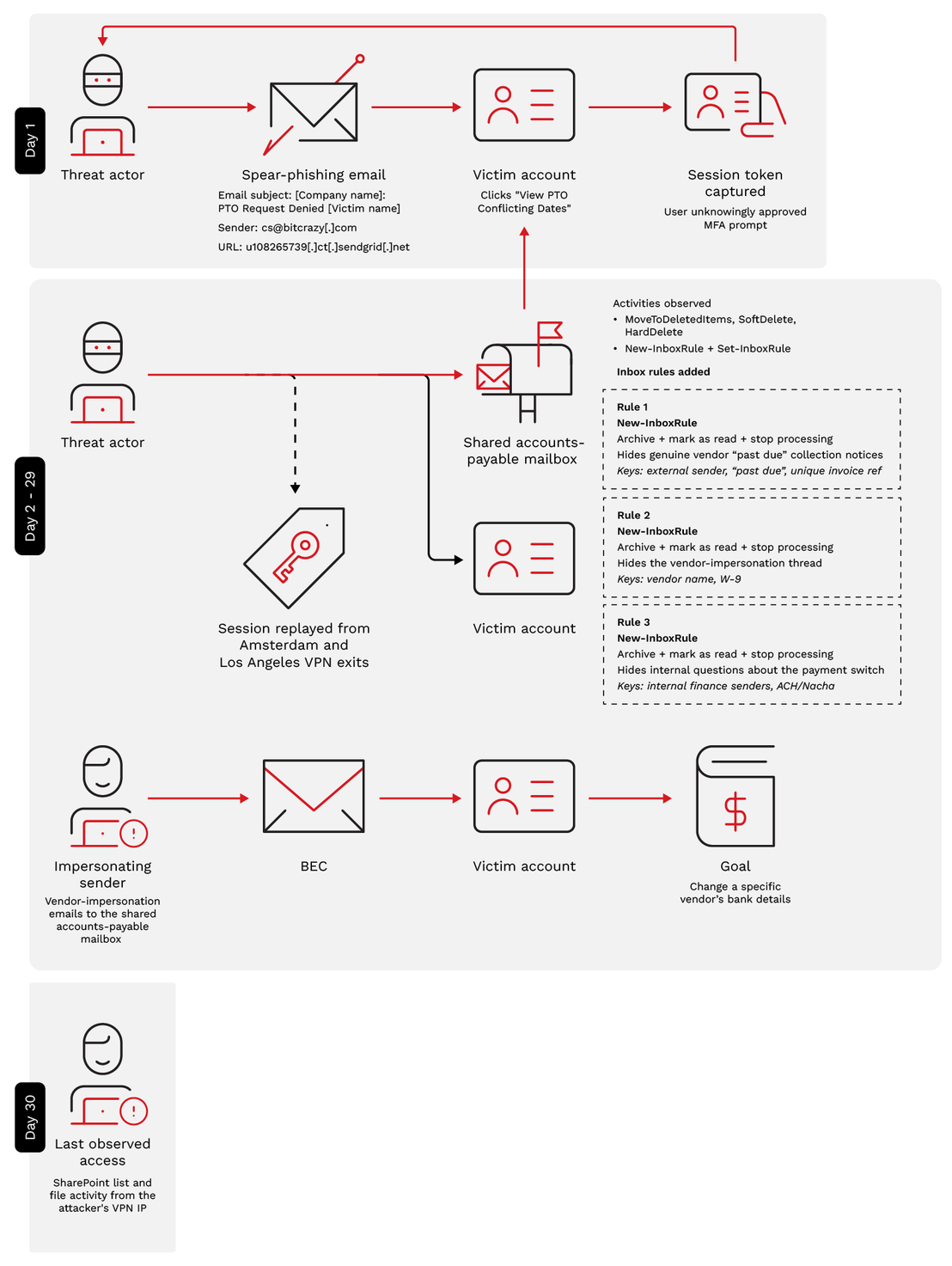
根據主機鑑識分析證實,遭入侵的端點上完全沒有資訊竊取程式、遠端存取工具,也沒有任何橫向移動的跡象。這起攻擊活動只侷限於身分認證層與電子郵件層。
突破防線:一鍵盜取連線階段
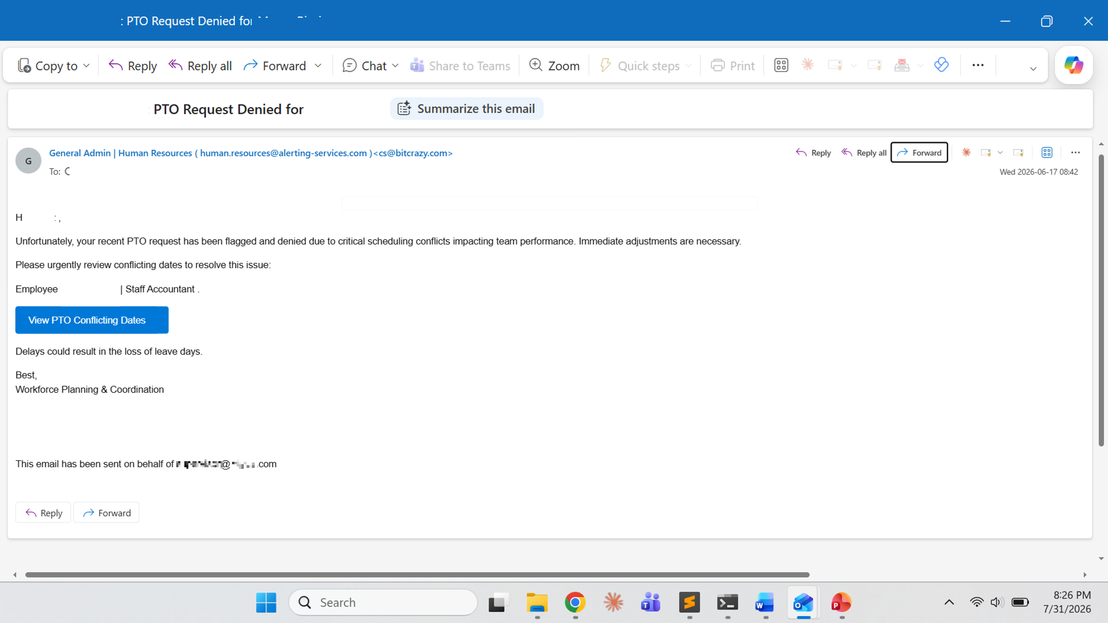
這封魚叉式網路釣魚郵件使用了人力資源相關的主題:「PTO Request Denied」(帶薪假申請被拒) 通知,郵件是針對財務部門使用者而客製化,使用了受害者的姓名、職稱和企業名稱,也因此被認定為魚叉式網路釣魚,而非一般的網路釣魚。駭客事先做足了功課,明確知道信件要寫給誰。
郵件內使用了一個「View PTO Conflicting Dates」(檢視帶薪假衝突日期) 按鈕來促使收件人採取行動。但這其實是一個 SendGrid 點按追蹤連結,駭客的唯一目的就是要讓使用者按下這個按鈕,因為這將啟動一個多重轉跳的重導鏈,最後到達一個假的 Microsoft 365 登入頁面。
分析寄件人網域與電子郵件認證
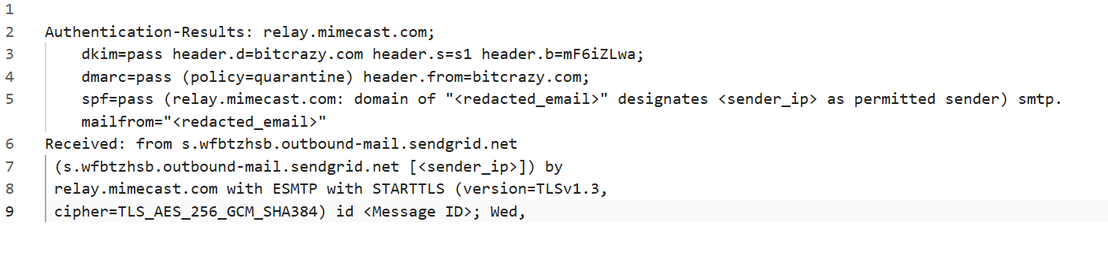
這封電子郵件是從 cs@bitcrazy[.]com 網域並經由 SendGrid 發送,從這封信出現在收件匣內這點來看,表示它已經通過了 Sender Policy Framework (SPF)、DomainKeys Identified Mail (DKIM) 以及 Domain-based Message Authentication, Reporting and Conformance (DMARC) 檢查。駭客利用了 bitcrazy[.]com 這網域是該 SendGrid 帳號合法授權的發信網域這一點。
駭客若假冒企業自己的郵件網域,郵件將無法通過 DMARC 檢查,所以,這封信使用了一個友善的寄件人顯示名稱來假扮成內部人力資源部門。寄件人標頭從外觀上看起來是「General Admin | Human Resources (human.resources@alerting-services[.]com)」(一般行政 | 人力資源),這是為了假扮成內部人力資源部門信箱,但其實真正的標頭和寄件人依舊是「cs@bitcrazy[.]com」。像這種顯示名稱與實際不符的情況,就是網路釣魚的典型特徵。
從端點的歷史記錄重建網址重導鏈
網路釣魚電子郵件和瀏覽器歷史記錄確認了最初的攻擊鏈。使用者點選之後經歷了一系列多重跳轉:
u108265739[.]ct[.]sendgrid[.]net → mauthcopilot[.]com → portalmyadminsigninapps.experiencewithreliability[.]de/0xrcY/ → 假的 Microsoft 365 登入頁面
使用者在不知情的狀況下核准了 MFA 提示,使得駭客取得了已通過認證的連線階段權杖。接著,駭客便從某個商用 VPN 基礎架構回放這個偷來的連線階段權杖,這樣駭客就能以使用者的身分執行詐騙活動。
詐騙如何開展:兩階段變臉詐騙 (BEC) 將廠商款項轉走
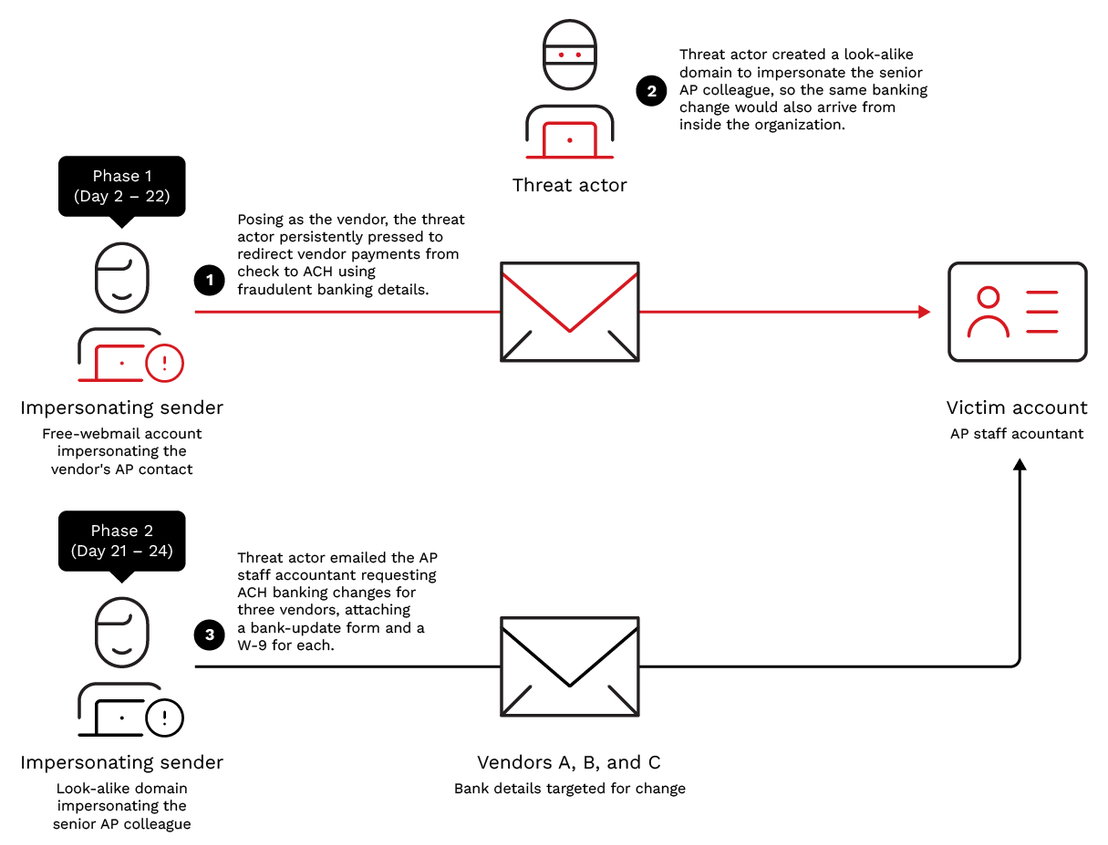
這起詐騙使用了兩個重疊的階段來分別假扮成不同的身分,每一階段各自使用一個受信任的身分,而且每一階段都設計得讓不肖的銀行資料變更看起來好像日常的應付帳款 (AP) 維護作業。這種雙管齊下的手法,意味著駭客得從企業外部和內部同時要求執行相同的銀行資料變更,讓兩邊可以互相呼應。
這起行動前後共歷經了 30 天:從第 1 天的網路釣魚,到最後第 30 天觀察到的駭客行動。其中大部分的時間是花在第 2 天到第 24 天的詐騙郵件往返。但即使在這之後,駭客還是繼續存取受害者的信箱和 SharePoint,並植入進一步的郵件隱藏規則。
第一階段:假扮成外部廠商 (使用免費網頁郵件)
寄件人: 使用駭客掌控的免費網頁郵件帳號,假扮成外部廠商的應付帳款聯絡人。
收件人: 受害企業內部共用的應付帳款聯絡信箱。
期間:第 2 天至第 22 天
駭客第一階段的工作是耐心地假扮成某家外部廠商,此階段的攻擊目標是受害企業內部共用的一個應付帳款聯絡信箱。由於該信箱負責處理正常的廠商發票、匯款查詢,以及收款銀行資料更新等動作,因此駭客只需混入正常的郵件往來即可。
駭客先從某個免費的網路郵件帳號假扮成某家廠商的應付帳款聯絡人,時不時向受害企業要求確認是否有收到應付帳款的發票,就這樣來回詢問了大約 20 張發票,藉此取得受害企業信任。接著,駭客發信要求受害企業將紙本支票改成透過自動轉帳 (ACH) 付款。根據受害企業的標準流程,其應付帳款團隊會要求對方提供一份 ACH 授權表單和一份有效的 W-9 表單,駭客便是提供這兩份表單作為假收款銀行的證明資料。
接下來的三個禮拜,雙方往返了 11 封電子郵件,駭客一直在持續追蹤對方的處理進度,直到受害企業將該廠商的收款銀行改成駭客掌控的銀行帳戶為止。
| Incident day | Message | What it did |
|---|---|---|
| Day 2 | Opener + forward | Sends a batch of ~20 genuine outstanding invoice numbers; floats switching payment from check to ACH |
| Days 6 - 13 | Sustained follow-ups | Supplies the requested ACH authorization form + W-9 carrying attacker banking details; nudges AP to update the vendor record |
| Days 20 - 22 | Escalation | Presses AP to confirm the ACH conversion so future payments route to the attacker-controlled account |
在駭客開始與受害企業接觸的前幾天,便出現了非典型的異常移動記錄,這便成了日後調查的起點。
此外,駭客還使用了一些隱藏手段來確保詐騙不會被察覺,駭客預料原本的廠商在遲遲未收到款項之後,最終會發催款通知到受害企業的應付帳款聯絡信箱,所以便利用偷來的連線階段,建立了一個收件匣規則,自動將這些信件歸檔並標示為已讀取,並阻止後續規則被繼續處理,所以受害企業從未見過原廠商的催款通知。
同時,駭客更在受害者的信箱內建立第二條規則來隱藏其假冒廠商身分與其往來的整串郵件。根據我們的調查顯示,幾分鐘之後,信箱稽核記錄檔就記錄到 MoveToDeletedItems、SoftDelete 以及 HardDelete 等動作,證明駭客移除了可能讓其詐騙曝光的電子郵件證據。
第二階段:假冒受害企業 (使用看起來很像的網域)
寄件人:駭客使用看起來很像的網域假扮成受害企業應付帳款部門的資深同仁。
收件人:應付帳款部門的會計人員 (攻擊目標),並 CC 給捏造的應付帳款部門資深同仁。
期間:從第 21 至第 24 天
第二階段象徵著攻擊開始升高,大約從第 21 天開始,駭客假扮成受害企業自己的應付帳款部門資深同仁,來迫使詐騙款項匯出。
| Incident day | Vendor targeted for bank update | Social engineering element | Attachments |
|---|---|---|---|
| Day 21 | Vendor A | Fabricated vendor verification thread | Bank-update form + vendor W-9 |
| Day 21 | Vendor B | Claimed verification with vendor representative | Bank-update form + vendor W-9 |
| Day 24 | Vendor C | Claimed verified banking update | Bank-update form + vendor W-9 |
第三條隱藏規則
在假冒電子郵件的最後收尾階段 (大概在第 29 天),駭客植入了第三條、也就是最後一條隱藏規則,目的是要防止內部審查。
從登入監測資料可確認駭客又重新回放了連線階段權杖,此時每一次的登入都只是單一認證,因為 MFA 認證已被標記為完成,意味著權杖內已帶有完成認證的聲明,無須再重新挑戰。而且,連線階段也顯示權杖並未被綁定,而且未套用條件式存取。由於駭客回放了一個已通過認證的連線階段 Cookie,因此才沒有出現新的 MFA 挑戰。在正常情況下,從新的裝置或地點登入應該會觸發 MFA 才對。
這條從外部 VPN IP 使用同一個被挾持的連線階段所建立的郵件規則,補強了第一階段兩條隱藏外部廠商郵件串的規則。至此駭客已經完全掌控了對話的雙方:外部廠商驗證與內部付款審查。
駭客的活動一直持續到假冒電子郵件結束之後,最後一次觀察到的駭客存取動作是在第 30 天,當天有記錄到來自同一 VPN IP 的 SharePoint 清單和檔案活動,此日期之後就未再觀察到進一步的活動。
MDR 如何調查這起攻擊行動
MDR 團隊參與了這起事件的調查,該團隊透過主機鑑識分析、電子郵件與標頭分析,以及身分識別記錄的交叉關聯來追溯案件的源頭。遏止動作是在主機進行上,但主機上卻找不到惡意程式。
非典型移動
經調查發現,TrendAI Vision One™ 平台記錄到該名財務部門使用者出現非典型的異常移動現象。該異常現象顯示,同一個 Microsoft 365 連線階段一分鐘前才從荷蘭阿姆斯特丹 (VPN IP 1) 登入,一分鐘之後竟然又從美國洛杉磯 (VPN IP 2,一個 M247 商用 VPN 出口) 連線。要在短時間內從荷蘭移動到加州是不可能的事,顯然這是有人在回放連線階段權杖,而非正常的使用者活動。
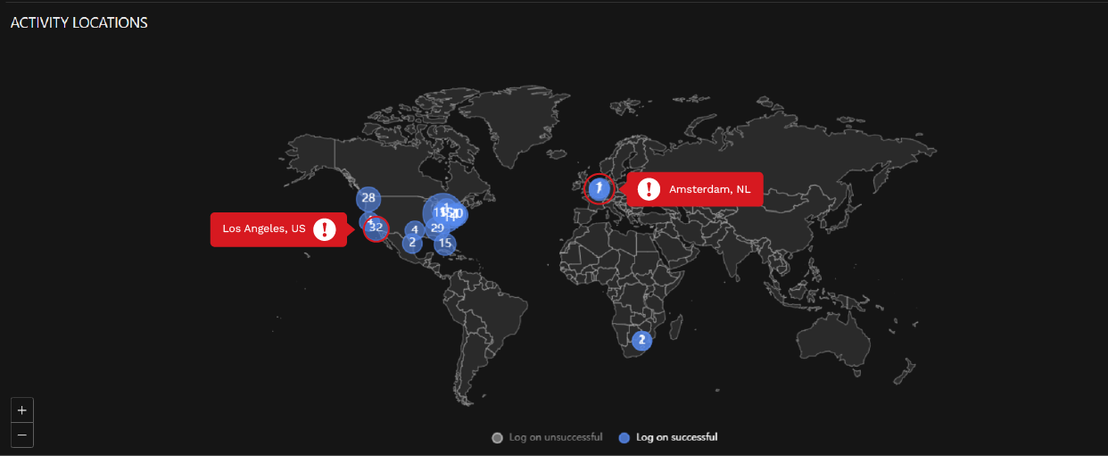
然而,光偵測到非典型的異常移動,並不足以確定帳號帳號遭到入侵,因此需要進一步驗證。進一步的調查應該將重點放在該帳號的後續活動,以便找出任何可疑的後續行動。
連線階段權杖活動
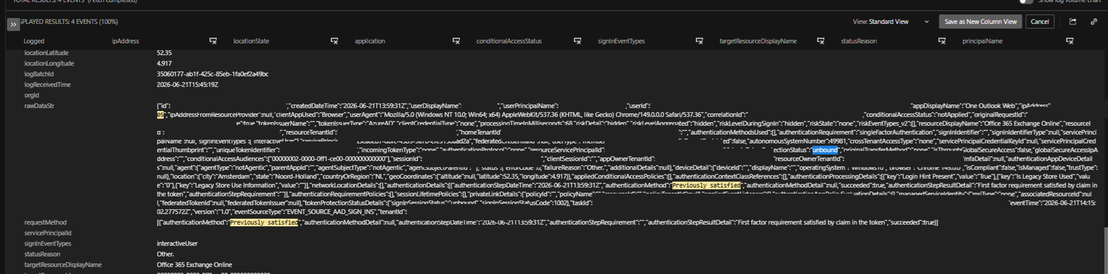
登入監測資料已確認駭客回放了連線階段權杖,此時每一次的登入都只是單一認證,因為 MFA 認證已被標記為完成,意味著權杖內已帶有完成認證的聲明,無須再重新挑戰。而且,連線階段也顯示權杖並未被綁定,而且未套用條件式存取。由於駭客回放了一個已通過認證的連線階段 Cookie,因此才沒有出現新的 MFA 挑戰。在正常情況下,從新的裝置或地點登入應該會觸發 MFA 才對。
駭客存取了什麼
在追蹤了該租戶的同一連線階段之後,駭客以受害使用者的身分存取了 Exchange Online、SharePoint 和 Microsoft 365 Search。在 MFA 啟用的狀況下竟然未出現登入失敗的情況,意味著駭客是挾持了連線階段,而非猜出了登入憑證。我們追蹤到此連線階段的源頭後,確認連線階段權杖是在使用者經由 AiTM 網路釣魚網頁進行認證之後所核發。非典型異常移動警報,就是 AiTM 連線階段遭竊後的症狀。
| Accessed under the hijacked session | What it gave the adversary |
|---|---|
| Exchange Online mailbox | Vendor threads and invoices correspondence—the raw material for the impersonation |
| Shared accounts-payable mailbox (via the user’s delegate access) | A second mailbox reached through the victim’s existing permissions—where the concealment rules were planted and the genuine “past due” vendor collections were hidden |
| SharePoint and Microsoft 365 search | Finance and SharePoint files previewed and accessed under the session (the specific documents were not captured in the audit export) |
| Microsoft 365 web services (broad) | Full access exercised, with no endpoint footprint |
交叉關聯三個資料來源
MDR 團隊使用 TrendAI Vision One™ XDR Data Explorer 應用程式搜尋了相關的監測資料,並交叉關聯了產品名稱 (pname) 底下的三個資料來源。這些記錄檔彙整了來自多個來源的活動,能有效發掘、分類及擷取相關的事件:
- Microsoft Entra ID:Entra ID 登入活動。
- 協同作業感測器:Microsoft 365 信箱稽核活動。
- 雲端電子郵件與協同作業防護:電子郵件活動。
隨後,MDR 團隊分析了相關的訊號並交叉關聯了使用者帳號、IP 位址以及連線階段活動來發掘可疑的模式。
表 4 列出對應至此攻擊每一步驟的訊號,以及用來找出這些訊號的查詢。
| Signal | Where an MDR analyst works it in TrendAI Vision One™ | TrendAI Vision One™ Search query |
|---|---|---|
| Impossible or atypical travel | Under Possible Account Compromise – Impossible Travel Risk Factor, identify sign-ins from geographically distant locations within an unusually short timeframe (Figure 5). Investigate subsequent activities and accessed resources such as Mailbox, SharePoint, OneDrive associated with these sign-ins. | <account name> and <Source IP> |
| MFA previously satisfied — no fresh challenge | Search for Identity Activity, filtering single-factor sign-ins with MFA previously satisfied and Conditional Access not Applied. | <Source IP> and requestMethod:*previously satisfied* |
| Unbound session-token replay | Search for Identity Activity: correlate a single sessionId reused across multiple countries and ASNs, with token protection "unbound" and zero failed logins. | <userSessionId> and unbound |
| Suspicious inbox rules (New-InboxRule / Set-InboxRule) | Search for Collaboration Sensor for inbox rule creation from non-corporate IPs. | (<userSessionId> or <Source IP>) and actionName:("New-InboxRule" OR "Set-InboxRule") |
| Mailbox deletion bursts | Search for Collaboration Sensor, soft- and hard-delete events grouped by actor session and source IP. | (<userSessionId> or <Source IP>) and actionName:(HardDelete or SoftDelete) |
| Financial-change requests from untrusted senders | Cloud Email and Collaboration Protection + Search → Email Activity (sender address/domain and mail direction): flag free-webmail and look-alike-domain senders. | Not applicable |
MITRE ATT &CK 對應
以下摘要列出此次入侵當中觀察到的 MITRE ATT&CK® 技巧,各項技巧的完整敘述請看前述各節的說明。
| Tactic | Technique | Remarks |
|---|---|---|
| Initial Access | T1566.002 — Phishing: Spearphishing Link | HR "PTO Request Denied" lure hiding a SendGrid click-tracker link to the AiTM page |
| Credential Access | T1539 — Steal Web Session Cookie | AiTM proxy relayed the live sign-in and captured the post-MFA session cookie |
| Persistence | T1078.004 — Valid Accounts: Cloud Accounts | Stolen session token replayed from commercial-VPN IPs; MFA previously satisfied, token protection unbound |
| Defense Evasion | T1564.008 — Email Hiding Rules; T1070.008 — Clear Mailbox Data | Three inbox rules (Archive + Mark-as-Read + Stop-Processing) and mailbox-deletion bursts |
| Collection | T1114.002 — Remote Email Collection; T1213.002 — Data from Information Repositories: SharePoint | Vendor email threads and invoices collected; SharePoint/finance files previewed and accessed under the hijacked session |
| Impact | T1657 — Financial Theft | Fraudulent vendor bank-update forms submitted to divert vendor payments |
結論
這起變臉詐騙 (BEC) 行動再次展現了今日企業的真正邊界在哪裡:信任與身分。這起攻擊背後的駭客只偷了一個已通過認證的連線階段,就能取得一切所需資訊來冒充某財務部門使用者,並且真的讓款項改匯到其他地點。
此案例給我們的教訓就是,通過認證不代表是真的,而且第一個警訊通常出現在身分認證層與郵件信箱層,而非出現在端點上。主機鑑識分析並未發現惡意程式,也沒有橫向移動跡象,這正是為何端點沒有發出警報。此事件之所以能夠曝光,全部有賴於交叉關聯的資訊:信箱稽核記錄、Entra ID 登入記錄,以及電子郵件活動記錄,這每一項單獨來看都沒什麼,但合在一起就能揪出駭客。
我們在建議中提出的三項控管措施,可以有效封鎖這起攻擊所使用的資安漏洞:一個可從任何電腦回放的連線階段權杖,以及從未經過電子郵件以外管道驗證的銀行資料變更。
建議
企業可藉由以下三種控管措施來降低對這類攻擊模式的曝險:
- 使用 TrendAI Vision One™ 將端點、電子郵件及身分監測資料彙整在一起。 此次入侵並未留下惡意程式檔案,所有關鍵證據都分散在端點瀏覽器歷史記錄、電子郵件活動以及 Entra ID 登入記錄檔中。TrendAI Vision One™ 可將這些訊號整合及交叉關聯成一份攻擊時間表,將 AiTM 重導鏈、信箱存取以及連線階段權杖回放活動串連在一起。如此就能將零散的指標轉化為確認的事件,加快調查及回應速度。
- 在 Microsoft Entra ID Conditional Access 當中啟用權杖保護。 這樣就能將每一連線階段或刷新權杖與當初核發的裝置綁定。取自該裝置的權杖將不能在任何其他裝置上回放。
- 強制要求經由其他管道驗證廠商的銀行資料變更。 要求在核准任何 ACH 自動匯款或銀行資料變更之前,都必須再次取得明確同意,並透過一個可信任且事先登記的電話號碼進行回撥驗證。這套控管機制能提供獨立的驗證步驟,即使在電子郵件帳號或使用者身分遭到外洩的情況下,也能防止款項被改匯到其他地方。
TrendAI Vision One™ Threat Intelligence Hub
TrendAI Vision One™ Threat Intelligence Hub 威脅情報中心提供了有關新興威脅與駭客集團的最新洞見、TrendAI™ Research 的獨家策略性報告,以及 TrendAI Vision One™ 平台的 TrendAI Vision One™ Threat Intelligence Feed 威脅情報來源。 platform.
新興威脅:
不肖中間人 (AiTM) 攻擊竊取連線階段從事變臉詐騙 (BEC) 導致廠商款項被改匯至其他地方
TrendAI Vision One™ Intelligence Reports (IoC 掃描):
不肖中間人 (AiTM) 攻擊竊取連線階段從事變臉詐騙 (BEC) 導致廠商款項被改匯至其他地方
TrendAI Vision One™ 客戶可取得與本案相關活動的指標來對其環境執行回溯掃描。