

Intercepting Impact: 2024 Trend Micro Cyber Risk Report
As cybercriminals shift their attacks with new technologies and strategies, maintaining visibility across the attack surface becomes increasingly challenging.
As cybercriminals shift their attacks with new technologies and strategies, maintaining visibility across the attack surface becomes increasingly challenging. Achieving one-hundred percent security is realistically impossible, and attempting to achieve it will progressively require an exponential amount of resources. It is therefore more productive to prioritize identifying the areas where the likelihood and impact of potential attacks on users and devices is highest.
With this report, Trend Micro shifts towards a risk-based approach in network defense by demonstrating a new technique that calculates risk based on the attack landscape, user exposure, and security configuration. We collect telemetry data from our Attack Surface Risk Management (ASRM) solution in our flagship cybersecurity platform Vision One, combined with our native eXtended Detection and Response (XDR) tools. This report is divided into two sections: the user side that covers risk in assets, processes, and vulnerabilities, and the adversary side, which maps adversary behaviors, MITRE and TTPs. The following data points are based on our telemetry for the first half of 2024 (December 25, 2023, to June 30, 2024).
Differentiating threat data and risk data
THREAT DATA
- Typically measures the prevalence and criticality of threats to users
- Analyzes threats themselves
- Attacks or attack attempts have already happened
RISK DATA
- Factors that contribute to the likelihood and impact of an attack
- Considers threat detection, system configuration, malicious activity, account and network security, and more
- Provides an insight on the likelihood of attacks or attack attempts
Asset Risk

What is the risk index?
The risk index metrics calculate the overall risk presented to enterprises through various risk organized in a catalog with three categories: Exposure, Attack, and Security Configuration.
Exposure Risk Factors
Risk Factor: Account compromise
| Indicator | Description |
|---|---|
| Leaked account | The detection of a user's account on the dark web |
| Suspicious user activity | Activity that may indicate the malicious intent of a user purposefully creating anomalous activity |
| Targeted user account | The most at-risk user accounts that exhibited high risk anomalous activities or were specifically targeted by malicious email campaigns during the evaluation period |
Risk Factor: Vulnerabilities
| Indicator | Description |
|---|---|
| OS vulnerability | The detection of exploitable operating system vulnerabilities on the endpoint |
| Application vulnerability | The detection of exploitable application vulnerabilities on the endpoint |
| Cloud VM vulnerability | The detection of exploitable operating system and application vulnerabilities in a cloud VM |
Risk Factor: Activity and behaviors
| Indicator | Description |
|---|---|
| Network activity | Anomalous or malicious network activity |
| Storage activity | Cloud storage use by the account appears abnormal compared to use by other company accounts |
| User activity | Abnormal user behavior patterns or preferences |
| Device activity | Abnormal device behavior patterns or preferences |
Risk Factor: Cloud app activity
| Indicator | Description |
|---|---|
| Cloud app reputation | Calculated by Trend Micro threat experts based on historical app data, known security features, and community knowledge |
Risk Factor: System Configuration
| Indicator | Description |
|---|---|
| Internet-facing asset configuration | Misconfigured settings on public-facing domains and IP addresses |
| Cloud infrastructure configuration | Misconfigured settings on cloud infrastructure, such as cloud instances and platforms |
| Identity and access configuration | Misconfigured settings on IAM services |
| Cloud service configuration | Misconfigured settings on cloud-based applications, software, and services |
| Endpoint configuration | Misconfigured security settings on endpoint devices |
Attack Risk Factors
Risk Factor: XDR detection
| Indicator | Description |
|---|---|
| Workbench alerts | Detection of malicious or risky events by XDR sensors |
| Targeted Attack Detection | Detection of early attack indicators through the scanning of global threat intelligence data |
Risk Factor: Threat detection
| Indicator | Description |
|---|---|
| Web threats | The web reputation score of the URLs the user visited or the detection of malicious activity within network traffic |
| Email threats | Detection of malicious or anomalous email activity |
| Network threats | Detection of malicious activity in monitored endpoint traffic |
| Endpoint threats | Detection of events on endpoints that may be malicious |
| Mobile device threats | Detection of possible malicious events on mobile devices |
| Connected app activity | Detection of possibly malicious events on Office 365 apps (Teams, SharePoint, OneDrive) |
Security Configuration Risk Factors
Risk Factor: Security Configuration
| Indicator | Description |
|---|---|
| Endpoint security | This is based on the deployment of Trend Micro products and the status of its settings that include agent and sensor deployment, key feature adoption, license health, and agent versions, plus adoption rates for key product features. Endpoint security considers: - The number of endpoint protection agents deployed throughout your network and on different operating systems throughout your network - The number of endpoint agents running end-of-life, older versions, or the latest version of the agent software - A list of the major protection features offered by agent and sensor products and the total number of endpoints to which each feature is applied, the number of endpoints with outdated patterns for each key feature, and the number of endpoints running up-to-date or outdated component versions; and the respective adoption rate and compliance information of each |
| Email security | Email security considers the following: - A list of configured Trend Micro email protection solutions and the number of assets protected, as well as the number of email accounts and domains for which each feature is enabled - A list of your email account assets that have Email Sensor detection enabled - The number of email accounts with and without a policy assigned - The number of email domains that are and are not properly configured |
| Network security | Network security considers the following: - The number of Deep Discovery Inspector appliances deployed in your environment - The number of network sensors enabled in your environment - The number of Virtual Network Sensor and Deep Discovery Inspector appliances that are properly connected and the number of appliances that are not receiving traffic - The software version status of your connected Virtual Network Sensor and Deep Discovery Inspector appliances, and the number of appliances using the latest version or outdated versions of components. - The major protection features offered by Virtual Network Sensor and Deep Discovery Inspector, and the number of appliances that have each feature enabled or configured, as well as the detailed adoption rate and compliance information |
Calculating risk scores
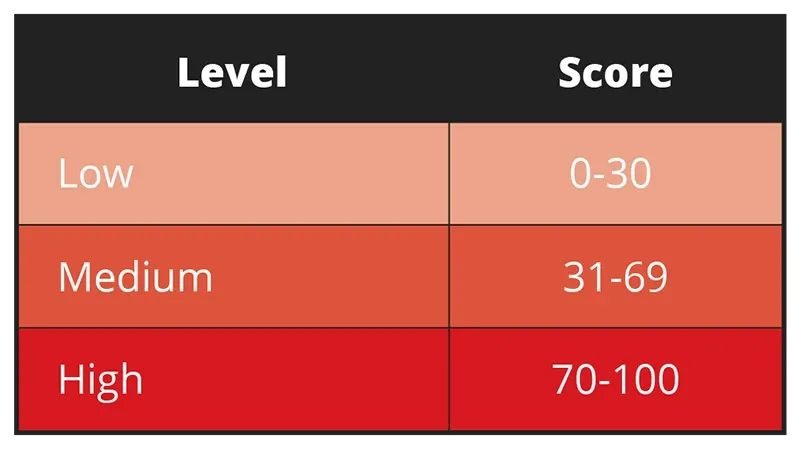
Trend Vision One uses the risk event catalog to formulate a risk score for each asset type and an index for organizations by multiplying an asset’s attack, exposure, and security configuration by the impact. The risk scores are calculated individually for every asset, with each score considering asset type and criticality. The result is an integer between zero and 100 that falls into one of three levels. Learn more with our Risk Index Overview and our technical report on how to understand risk score calculations.
Enterprise expansion full speed ahead, challenging the traditional approaches to security as SOCs catch up
Average risk index by region, company size, and industry
Overall figures show that enterprises average at medium-risk scores. This is a good indicator of good risk management practice: while companies could still get a high-risk score, they rarely persistently do so or stay within that level, indicating that they continuously monitor their risk score and mitigate as necessary to keep their index low or at least at an acceptable level.
The Americas ranked the highest among regions with an average risk index of 44.6, within the medium risk level. The past year was characterized by vulnerabilities in the region’s banking sector. Its critical infrastructure is also being targeted by Volt Typhoon, a hacker group that deploys malicious software that exploits vulnerabilities such as weak administrator passwords, factory-default logins, and devices that have not been updated.
Meanwhile, the Latin Americas since 2023 experienced an onslaught of online scams.
*Average risk index by region (1H 2024)

Large enterprises have the highest risk level among company sizes at 48.4, within the medium risk level. This could be attributed to the naturally wider attack surface of companies with more assets to equip over 10,000 employees, making it more difficult to patch and fix misconfigurations. Logically, fewer employees should make it easier for an enterprise to manage its risk levels, but other factors can still hinder this: non-application of best practices, poor cybersecurity hygiene, and lack of user education, among others. But as companies expand, so will the need for systems that simplify and unify security coverage without increasing bandwidth on SOCs and operations.
* Average risk index by company size (1H 2024)

The aerospace sector has the highest average risk index rating of 59.5, closely followed by the defense industry at 59.4, both within the medium-risk level. Organizations within these industries face a heightened risk of attacks as geopolitical tensions fuel cybercriminal motivations. The aerospace industry as critical infrastructure makes it more attractive and more vulnerable to cyberthreats; sensors on almost every part of aircraft exponentially increase potential attack vectors.
* Average risk index by industry (1H 2024)

Secure endpoints with zero-trust approach, educate users on security control compliance and against accessing risky cloud applications
Our telemetry shows that 3.9% of devices register a high-risk score, emphasizing the need for endpoint security, particularly on security configurations and user education to ensure that risk in minimized on every device under enterprises.
* Total high risk asset count by asset type (1H 2024)

In the first half of 2024, users accessed cloud applications with a high-risk level based on historical application data, known security features, and community knowledge at an average of 821 million times. Old and inactive accounts, accounts with disabled security controls, and sensitive data being sent outside the network are other risk events with high event counts. We recommend prioritizing user education, especially as enterprises rely more on cloud services.
* Top 10 risky events from (1H 2024)

While devices make up the most high-risk assets, a closer look at our asset analysis on accounts reveals that internal account assets have the highest average asset count with a high-risk score level, and the highest average asset count with a medium-risk score level. Guest accounts follow in terms of highest average asset count with a medium-risk score level. Security teams should check and monitor these types of accounts and look out for misconfigurations and vulnerabilities that could be leveraged by cybercriminals to gain a foothold on an enterprise’s network.
*Asset count by account type risk level (1H 2024)

As shown in Figure 4, devices have the highest average high-risk asset count at 620,610. Our telemetry reveals that of the total device count, there are more unmanaged devices.
Unmanaged devices are discovered by security solutions as not under Trend Micro control or oversight within an organization’s IT or security management systems; they pose greater risk to enterprises, as they are likely to lack updated endpoint protection. Managed devices, on the other hand, are detected as having installed and enabled Trend Micro endpoint security solutions, actively monitored and maintained by an organization’s cybersecurity team.
*Average Managed and Unmanaged Devices Count (1H 2024)

Maximize tools available, such as enabling advanced detection capabilities and behavior monitoring to identify risk ahead of attacks
Average mean time to patch (MTTP) by region, company size, and industry
Europe is the quickest region to patch vulnerabilities with an MTTP for the first half of 2024 averaging just over 26 days. Meanwhile, the Asia Pacific, Middle East, and Africa region patches vulnerabilities at over 28 days. The Americas has an average MTTP of just over a month, a good turnaround time – but could be better; its MTTP is above the overall average, and this region has the highest average risk index among the regions.
*Average MTTP by region (1H 2024)

Small businesses take the shortest amount of time on average to patch vulnerabilities, which could be attributed to a smaller attack surface that is easier to manage. Interestingly, enterprises with 2,000 to 5,000 employees struggle with patching, taking an average of 39 days to patch, which could be attributed to deprioritizing security as business expands. Large enterprises take the longest average time to patch; their SOCs naturally grapple with a larger attack surface and could also be bogged down by legacy internal applications that slow down patch roll out.
*Average MTTP by company size (1H 2024)

The defense industry takes the shortest average time to patch vulnerabilities at just over a week; an ideal MTTP, as the sector is a hot target due to its critical role in respective national securities, apart from the sector registering an average risk index rating of 59.4. Public safety, security and peace could be affected by how well the defense sector equips itself against cyberattacks. The aerospace sector takes twice as long as the defense industry to patch vulnerabilities; we recommend allotting resources to improve this.
*Average MTTP by industry (1H 2024)

As shown in Figure 4, devices have the highest average high-risk asset count at 620,610. Our telemetry reveals that of the total device count, there are more unmanaged devices.
Unmanaged devices are discovered by security solutions as not under Trend Micro control or oversight within an organization’s IT or security management systems; they pose greater risk to enterprises, as they are likely to lack updated endpoint protection. Managed devices, on the other hand, are detected as having installed and enabled Trend Micro endpoint security solutions, actively monitored and maintained by an organization’s cybersecurity team.
*Average Managed and Unmanaged Devices Count (1H 2024)
Security configuration analysis
Top 10 misconfigurations with the highest maximum risk score
Configuration issues we spotted in our telemetry emphasize the need for organizations to enable advanced detection capabilities and behavior monitoring in AI and ML technology to improve the ability to detect new threats. The list shows the configurations most widely detected in our customer environments.
- Vulnerability Protection Settings in Vision One Not Optimized
- Suspicious Connection Service Settings in Vision One Not Optimized
- Web Reputation Settings in Vision One Not Optimized
- Device Control Settings in Vision One Not Optimized
- Vision One Agent Not Supported
- Predictive Machine Learning Settings in Vision One Not Optimized
- Smart Feedback Settings in Vision One Not Optimized
- Anti-Malware Scanning Settings in Vision One Not Optimized
- Endpoint Sensor Settings in Vision One Not Optimized
- Behavior Monitoring Settings in Vision One Not Optimize
Attack Behavior Analysis

MITRE attack analysis
Cybercriminals continue to find ways to abuse legitimate tools to avoid detection, with Metasploit Meterpreter and DNS tunneling among the top detected MITRE sub-categories in our telemetry. Attackers are also working smarter by targeting the very services that should detect them, such as leveraging PowerShell scripts to interact with Local Security Authority Subsystem Service (LSASS).
Top detected MITRE sub-categories
- Detection for Metasploit Meterpreter
- LSASS Access via Suspicious Powershell Parameters
- High Volume Multiple SSH Connections
- DNS Tunneling
- Remote Code Execution via HTTP
- Powershell AMSI Scan Bypass
- Possible Renamed TCPDump Execution
- Screen Capture and Keylogging via Powershell
- Suspicious Command and Control Connection
- Behavior Monitoring Detection for Built-in Windows Tools
Exploitable vulnerabilities
Looking at the prevalent CVEs detected and the high exploit vulnerabilities across region and company size, organizations can see specifically see what the attackers are targeting and where they are at risk. A CVE’s risk event risk score is calculated based on the following formula:

In this formula, likelihood is the assessment result that considers CVE static attributes, exploit status, report status, threat intelligence, and mitigation measures (such as patch status, IPS enablement, among others). Criticality on the other hand, is the projected business impact of the affected asset.
We recommend identifying if you or your enterprise might be affected by the following vulnerabilities, and to patch as soon as possible.
Exploitable vulnerabilities
Top 10 riskiest CVEs, most detected and unpatched
This list shows the vulnerabilities sorted by how widely they are detected in our customer environments, with the most detected on top.
| Vulnerability ID | Summary | CVSS Severity |
|---|---|---|
| CVE-2024-30040 | Windows MSHTML Platform Security Feature Bypass Vulnerability | 8.8 High |
| CVE-2024-5274 | Type Confusion in V8 in Google Chrome prior to 125.0.6422.112 allowed a remote attacker to execute arbitrary code inside a sandbox via a crafted HTML page. (Chromium security severity: High) | 8.8 High |
| CVE-2024-30051 | Windows DWM Core Library Elevation of Privilege Vulnerability | 7.8 High |
| CVE-2024-4947 | Type Confusion in V8 in Google Chrome prior to 125.0.6422.60 allowed a remote attacker to execute arbitrary code inside a sandbox via a crafted HTML page. (Chromium security severity: High) | 8.8 High |
| CVE-2024-26169 | Windows Error Reporting Service Elevation of Privilege Vulnerability | 7.8 High |
| CVE-2023-5217 | Heap buffer overflow in vp8 encoding in libvpx in Google Chrome prior to 117.0.5938.132 and libvpx 1.13.1 allowed a remote attacker to potentially exploit heap corruption via a crafted HTML page. (Chromium security severity: High) | 8.8 High |
| CVE-2023-4863 | Heap buffer overflow in libwebp in Google Chrome prior to 116.0.5845.187 and libwebp 1.3.2 allowed a remote attacker to perform an out of bounds memory write via a crafted HTML page. (Chromium security severity: Critical) | 8.8 High |
| CVE-2023-4762 | Type Confusion in V8 in Google Chrome prior to 116.0.5845.179 allowed a remote attacker to execute arbitrary code via a crafted HTML page. (Chromium security severity: High) | 8.8 High |
| CVE-2023-6345 | Integer overflow in Skia in Google Chrome prior to 119.0.6045.199 allowed a remote attacker who had compromised the renderer process to potentially perform a sandbox escape via a malicious file. (Chromium security severity: High) | 9.6 Critical |
| CVE-2023-7024 | Heap buffer overflow in WebRTC in Google Chrome prior to 120.0.6099.129 allowed a remote attacker to potentially exploit heap corruption via a crafted HTML page. (Chromium security severity: High) | 8.8 High |
Risk Events
The following list highlights the critical vulnerabilities that were found in the first half of 2024. Notorious groups continue to develop their techniques for dropping ransomware, and other notable vulnerabilities could be used to target highly popular technology like iPhones and Android devices.
CVE-2024-30051
This vulnerability has been observed to be used to deliver the previously notorious banking Trojan and now malware delivery service Qakbot, which throughout the years priori its takedown in 2023 served as an initial infection vector for various ransomware attacks.
CVE-2024-26169
It is believed that cybercriminals linked to the BlackBasta ransomware group have exploited this vulnerability. Investigations revealed that an exploit tool for this CVE was deployed in a ransomware attack attempt, following an initial infection by the DarkGate loader which BlackBasta has been observed to use since the QakBot takedown.
CVE-2023-30040
This vulnerability can be abused by first convincing a user into downloading a malicious file sent via email or instant messenger. When the malicious file is run, cybercriminals can exploit the vulnerability to bypass OLE mitigations in Microsoft 365 and Microsoft Office and then execute their code.
CVE-2023-6345
This vulnerability poses risks ranging from crashes to the execution of arbitrary code (the open source 2D graphics library Skia is also used as a graphics engine by other products like ChromeOS, Android, and Flutter)
CVE-2023-4762
This vulnerability has been observed to be abused to drop a spying tool called Predator on target Android devices in Egypt.
CVE-2023-4863
This vulnerability has been observed to be abused to drop notorious spyware Pegasus on target iPhones. The libwebp buffer overflow leaves all major browsers vulnerable, as libwebp is widely used from Chrome to Linux distributions, and even to applications such as Telegram and 1Password. Microsoft has also released an advisory alerting users that thius vulnerability also impacts Edge, Teams for Desktop, Skype for Desktop, and Webp Image Extensions.
Conclusion and Recommendations

A risk-based approach to cybersecurity will shift an enterprise’s strategy from being reactive to proactive. By recalibrating to be more proactive, an enterprise can make their time and resource allocation more efficient even as it expands and demands more security coverage.
Adopt a risk-based approach to anticipate threats, strategize resource allocation, tailor security measures, and enhance situational awareness with the continuous discovery, assessment and mitigation of an enterprise’s IT ecosystem. By identifying high, medium, and low risk components of the attack surface, organizations can create an action plan to prevent attacks before they even happen and lower their overall risk in the near, medium, and long term.
Based on our telemetry from for the first half of 2024, we recommend the following best practices to begin improving your enterprise’s risk score.
- Optimize security settings to maximize product features and be alerted on misconfigurations.
- When a risky event is detected, contact the device and/or account owner to verify the event, and investigate the event using the Vision One Workbench. Utilize the Vision One Workbench search function to find more information about the event or check the event details on product management server.
- Disable risky accounts or reset them with a strong password and enable multi-factor authentication (MFA).
- Apply the latest patches or upgrade the version of applications regularly.
- Apply the latest patches or upgrade the operating system version regularly.