

Japan saw a surge in publicly disclosed security incidents in September 2026. Attacks on internet-facing systems, including web servers, were particularly prominent. In this article, a member of TrendAI™'s incident response team in Japan discusses the web server attacks observed during real-world incident response engagements and the defenses organizations need today.
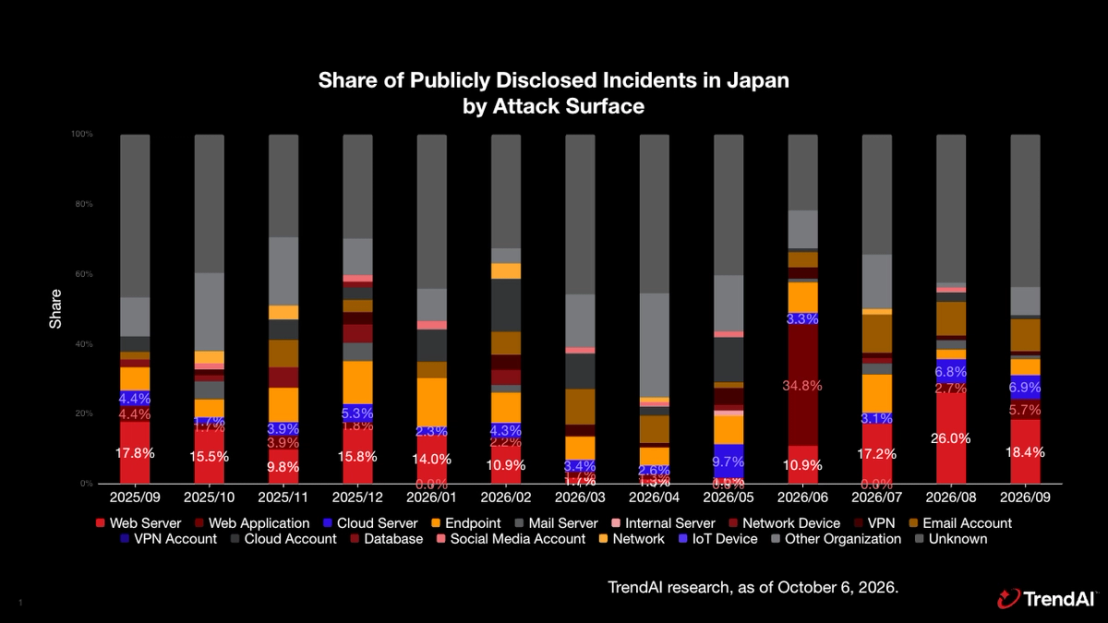
Rethinking Web Server Defense as Attacks Increase
Security Incidents Increasingly Begin with Web Servers
TrendAI™'s incident response team in Japan has handled many recent incidents that originated with attacks on public-facing systems such as web servers. In these cases, threat actors exploited CVE-assigned vulnerabilities in exposed applications or weaknesses in application design classified under the Common Weakness Enumeration (CWE). They then placed web shells or other suspicious files on the servers. From the compromised web server, the attackers moved laterally to other servers and systems and ultimately stole information.
Installing endpoint security products such as endpoint protection platforms (EPPs) on servers can detect malware through pattern files. However, many web shells and related files used to gain an initial foothold on web servers cannot be reliably detected from file-specific patterns alone. With organizations facing a wide range of cyberattacks, their highest priority should be to strengthen the configuration and architecture of web servers, which are a leading attack surface. This process is known as hardening, and it is essential to protecting servers from attack.
Three Priorities for Web Server Security
Organizations that expose services and applications through web servers should focus on three priorities: managing and remediating vulnerabilities to prevent compromise, limiting what attackers can do if a web server is compromised, and detecting anomalies quickly so they can safely isolate and recover the affected system.
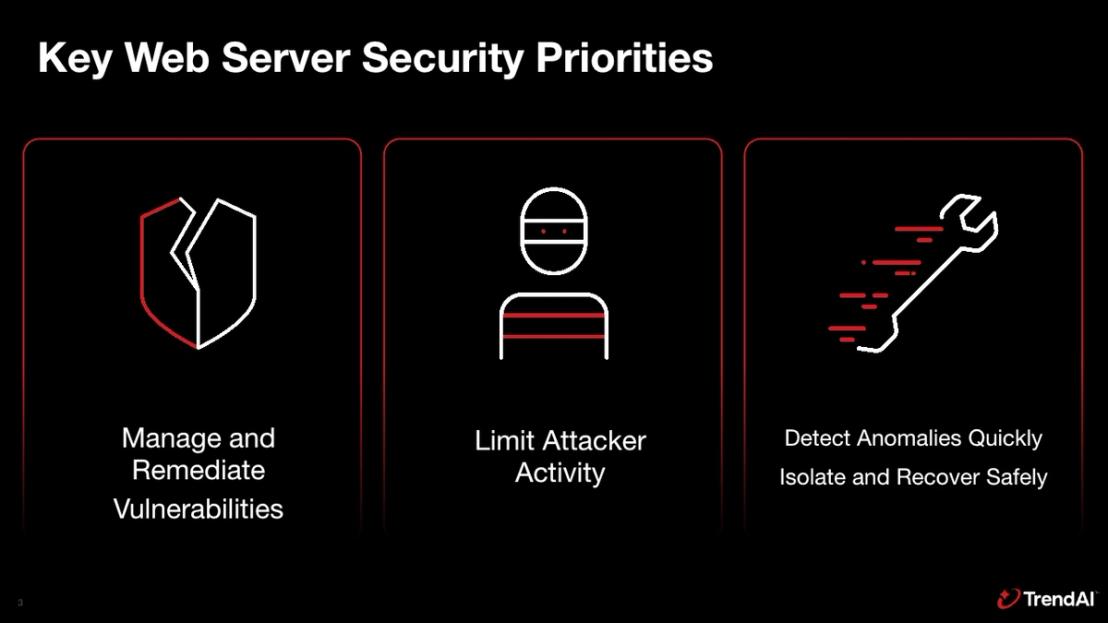
The following sections explain the typical attack sequence, key considerations for vulnerability management on public-facing servers, server hardening measures, and log management practices that support incident readiness.
How Recent Attacks in Japan Unfolded
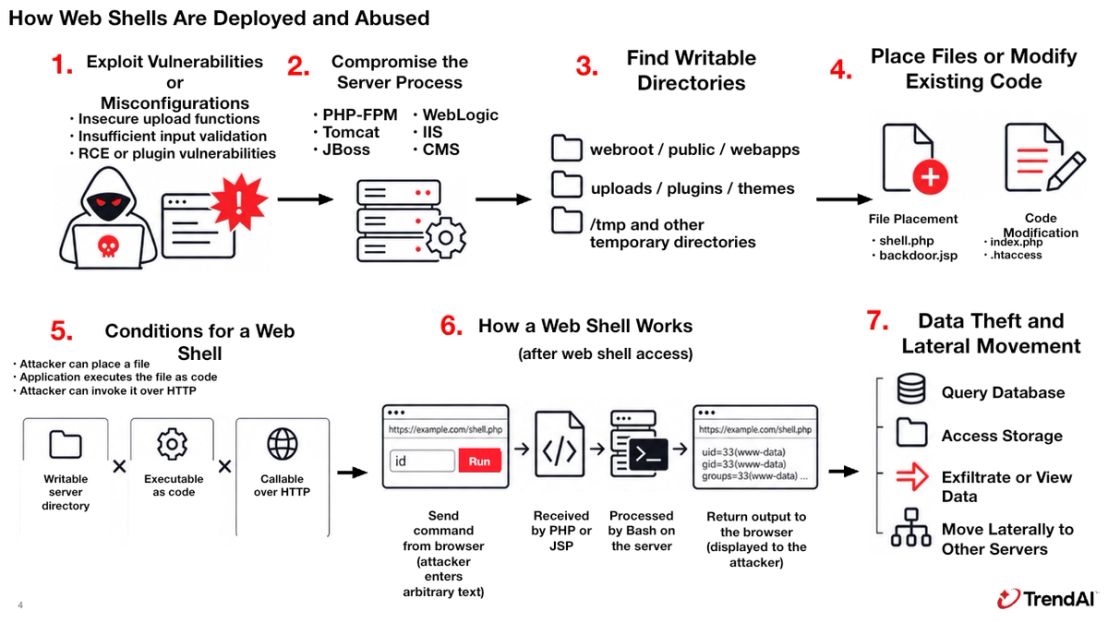
How Threat Actors Abuse Web Shells
A common pattern among affected organizations is that threat actors install a web shell, use it to explore internal servers, and steal information. A web shell is a malicious program that processes instructions received over the web on the server. For example, when an attacker sends an instruction through a web browser, the server may execute Bash or another command processor, allowing the attacker to list files or access other servers. The browser is only the interface. The commands themselves run on the compromised host, such as the web server.
Threat actors commonly deploy web shells by exploiting insecure upload functions, vulnerabilities in applications or libraries, or weaknesses in administrative and login functions. If PHP or JSP files can run in a location where external users can write files, an attacker may be able to install a web shell there.
TrendAI incident response engagements have frequently found that attackers operate these web shells to send commands, query databases connected to the compromised server, and steal information. Commands launched through the web shell may run with ordinary operating system privileges on the web server, which can allow attackers to search for information and connect to databases.
Vulnerability Management to Reduce the Likelihood of Compromise
Vulnerabilities That Undermine Web Server Security
In many cases supported by the incident response team, attackers entered through poorly managed servers. Common conditions included web servers that lacked security controls because of operational constraints, old vulnerabilities that remained unaddressed, and maintenance settings that had been temporarily opened but never restored.
A server with no sensor to detect attacks and exploitable vulnerabilities that remain unpatched for long periods is an attractive target. Without sensors or monitoring, an organization may miss the start of a compromise, early signs of an attack, and subsequent attacker activity. This lack of visibility can allow the threat actor to compromise other systems.
The traditional approach of applying every newly released patch, or patching only vulnerabilities rated High or above under the Common Vulnerability Scoring System (CVSS), is no longer sufficient. As with software supply chains, organizations need to know which libraries, packages, and configuration files are present on every public-facing system they build and operate. They must maintain an inventory of the software and versions running on each server and evaluate patches promptly as information becomes available. Because CVE assignments, vulnerability disclosures, and cyberattacks are all increasing, however, threat actors may exploit a vulnerability before engineers can assess and remediate it.
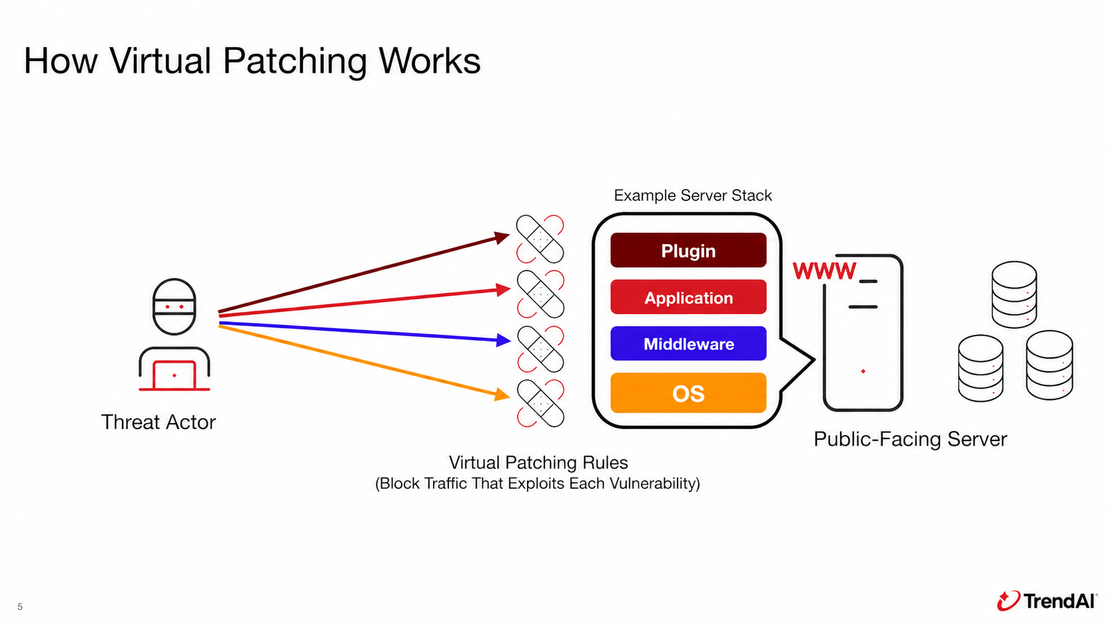
Virtual Patching as a Compensating Control
Virtual patching is one effective way to address this risk. It reduces the chance that attackers will exploit a vulnerability while server administrators are reviewing the disclosure and preparing to apply the official patch. By automatically enforcing rules that block traffic attempting to exploit a specific vulnerability, virtual patching can temporarily reduce exposure until the permanent patch is installed. One practical approach is to deploy the virtual patch immediately, then apply the official patch within the next several days.
Not every weakness receives a CVE identifier. Applications can also contain weaknesses categorized under CWE. If a web server accepts text or numeric input and passes it to server-side processing, the application must validate and constrain that input and reject inappropriate values. Organizations need to account for these weaknesses as well as CVE-assigned vulnerabilities to keep their servers secure.
Detection and Response Through Asset Management and Monitoring
Making the Web Server Security Posture Visible and Manageable
Servers must remain in a managed state, including with respect to vulnerabilities. Unknown programs may be running, administrators may not know who logged in, configurations may have changed, or teams may incorrectly assume that security controls are active. Organizations need monitoring, systems, and operational processes that confirm servers remain managed and that weaknesses attackers could target are not present.
Deploying a security product or control is only the beginning. Organizations need an operating model tailored to their environment, a process for reducing environment-specific false positives, visibility into detections, and the ability to investigate when action is required. Monitoring for the following environmental changes can help:
- An unexpected service or process starts.
- A new user is added, or a new cron job or systemd service appears.
- Files in the web-accessible area or configuration files change.
- The web server initiates communication with a destination it does not normally contact.
- EPP, endpoint detection and response (EDR), log forwarding, or another security function stops.
Some of these events can occur during legitimate updates, application changes, or upgrades. They are also artifacts commonly left when a threat actor attacks a web server. Effective web server asset management therefore needs to extend beyond tracking the number of servers and their operating systems. Organizations now need to protect and monitor system configurations, vulnerabilities, logs, configuration-file changes, and the operational status of security products.
This approach also enables earlier detection during an incident. Instead of starting from scratch to determine when a file appeared, whether a destination belongs to a legitimate service, or whether a logged-in user is part of normal operations, teams can identify anomalies and make investigation and containment decisions more quickly when they already understand the environment's normal state.
Protecting Web Servers from Suspicious Files
Effective Hardening for Public-Facing Servers
Many organizations run public-facing servers, including web servers, on Linux or other Unix-like operating systems. The following hardening practices provide a useful basis for reviewing whether an organization has appropriate controls in place.
1. Do Not Allow the Web Server Process to Modify Application Code
An application generally has no reason to rewrite itself or create new program files. If engineers validate and deploy all code changes through a controlled process, any attempt by the web server process to add code or programs to the application can be treated as suspicious and blocked. Restrict read and write permissions for both the directories the process uses for legitimate business operations and the directories it needs to run. These controls can prevent a web shell from being installed and executed.
2. Control Read and Write Permissions in Web Server Directories
Where possible, place uploaded files on a separate host or in a location the web server does not process. Preventing uploaded content from being executed directly as PHP, JSP, or another program reduces the risk that the server will load it as a web shell. For PHP, limit the files that can be invoked over HTTP to the required entry points and restrict the extensions PHP-FPM will process. For Apache Tomcat, consider disabling unnecessary automatic deployment.
3. Remediate Vulnerabilities and Review the Implementation
Review applications running on the web server to determine whether features that are unnecessary for service delivery are enabled or in use. Loading an unnecessary library introduces risk if that library contains a vulnerability.
The inventory must cover the operating system, PHP, Java, frameworks, plugins, and their dependent libraries. A single vulnerability may not allow an attacker to complete every stage of an attack, but multiple weaknesses can combine into a complex attack path.
Applications should validate the length, type, and range of input and pass it safely to downstream processing. SQL input should be separated from executable commands. Text displayed to users should be encoded so the application does not interpret it as code, and every user action should be checked against the permitted scope. If the organization cannot make these changes promptly, it should restrict or disable the affected feature or process. A web application firewall (WAF) and virtual patching can also mitigate the risk, but neither replaces remediation of the underlying vulnerability.
Protecting Databases Connected to Web Servers
Protecting Critical Assets Behind the Web Server
After compromising a server, threat actors typically target the assets they actually want: databases containing business data or personal information. They may attempt to steal this information for sale or extortion. The following four measures can help protect these critical assets.
1. Apply Least Privilege to Application Database Accounts
When an application connects from a web server to a database, restrict its account to only the tables, views, and operations the application requires. Limiting what the account can read and change can reduce the amount of data exposed if the web server is compromised. It may also make unexpected activity easier to detect.
2. Establish a Baseline of Normal SQL Queries
Applications that process fixed or well-understood business data generally execute a predictable set of SQL query patterns. If a security product can monitor or restrict SQL queries, it may be able to detect and reject queries that the application does not normally use. Detecting an unusual SELECT statement can provide early warning of malicious activity.
3. Enable Database Auditing for SELECT and Other Queries
Recording only successful and failed database logins leaves out critical evidence during a data breach. Audit logs should record table access, data definition language (DDL) operations, permission changes, exports, and data access through SELECT queries. These records can help determine the scope of an incident. Because database auditing is often disabled by default, organizations should enable it deliberately, tune the volume of logs, and establish an operating process for monitoring and retention. During an incident, these records can provide essential evidence for establishing the impact.
4. Understand External Traffic Volumes and Exfiltration Paths
Organizations need to know how an attacker could remove data after gaining database access. Possible paths include direct commands through a web shell, an executable installed to exfiltrate data, or a remote connection to an external system. Understanding these paths and recording and monitoring both normal and attack-related traffic can help organizations prevent exfiltration or detect and respond to it earlier.
Potential AI Involvement Does Not Change the Fundamentals
Possible Links Between AI Abuse and Observed Cyberattacks
The web shell abuse cases, security principles, and defenses described above represent only part of the picture. During TrendAI incident response engagements, several characteristics raised the possibility that AI may have been operating behind some of these attacks.
The observed characteristics and log patterns included the following:
- Comments in deployed web shells or suspicious files contained the name of the targeted organization or service.
- The exploited vulnerability was not a recently disclosed exploit already widely recognized as being used in the wild. This suggests that the attack drew on information outside the established practices commonly followed by human attackers.
- Attackers responded to failed attempts and revised their approach faster than in earlier incidents.
- After identifying a promising target, the attackers did not scan exhaustively. They used the responses they received to narrow their attacks and distinguish success from failure, suggesting that they were searching for the shortest path to compromise.
Based on the author's incident response experience, attacks on public-facing servers now show noticeable differences from cases handled before 2025. The distinction between attacks conducted manually by a human threat actor and those that may be driven by AI, together with the increasing sophistication of cyberattacks, is becoming more apparent. There is not yet conclusive evidence that AI was directly used in these attacks, but the logs clearly show behavior that differs from earlier incidents.
What Organizations Should Address Before Focusing on AI Abuse
Whether or not AI is assisting the threat actor, public-facing information assets such as web servers are always exposed to attack. Organizations need to prepare to respond correctly when an attack occurs regardless of whether AI is involved. Even if AI-driven attacks increase, the fundamental security measures organizations must take will not change substantially.
Organizations still need to identify the assets they must protect, allocate resources, implement appropriate controls, and regularly review and monitor those controls. Teams that already have these measures in place should review them again. Organizations that have left weaknesses unaddressed should treat this as an opportunity to tighten their defenses.
In an environment where cyberattacks are frequent, organizations that already operate systems reliably while applying patches and managing configurations as part of routine operations have built a strong foundation. To give customers, employees, and the engineers responsible for those systems greater confidence, organizations should reassess whether they have sufficient visibility into server operations and whether their operational controls are working as intended.