


8Base Ransomware Infographic


First detected in March 2022, 8Base is an active ransomware group that positions itself as “simple penetration testers” to justify its double-extortion strategy, which involves encrypting data and threatening to expose sensitive information. The gang adopts a name-and-shame tactic, claiming in its leak site to exclusively target organizations that “have neglected the privacy and importance of the data of their employees and customers” and revealing confidential data to potentially cause harm to its victim’s brand and reputation.
What organizations need to know about 8Base ransomware
Despite branding itself as “pen testers,” the 8Base gang is financially motivated. In October 2023, it targeted healthcare and public health sector organizations in the United States, prompting the Health Sector Cybersecurity Coordination Center (HC3) to publish an analyst note about the group.
8Base also drew attention for its similarities with the RansomHouse ransomware with regard to ransom notes and copies it used in its leak sites. The 8Base ransomware also makes use of the Phobos ransomware version 2.9.1, which uses SmokeLoader for initial obfuscation for ingress, unpacking, and loading of the payload.
The 8Base ransomware primarily gains initial access through phishing emails, but samples of the ransomware have been observed as having been downloaded from domains that appear to be associated with SystemBC, a proxy and remote administration tool (RAT). 8Base was also found to be using a batch file named defoff.bat (detected as KILLAV) to disable components of Windows Defender and to allowlist the malware path through Windows Management Instrumentation command-line (WMIC).
In September 2023, an 8Base leak site duplicate was discovered on the darknet, reportedly associated with a group known as CryptBB; however, 8Base denied the association and asserted that the duplicate site was an imitation. In the same month, the 8Base group unintentionally leaked some information about its leak website, linking the website to a private GitLab server called Jcube-group.
Top affected countries and industries according to Trend Micro threat intelligence data
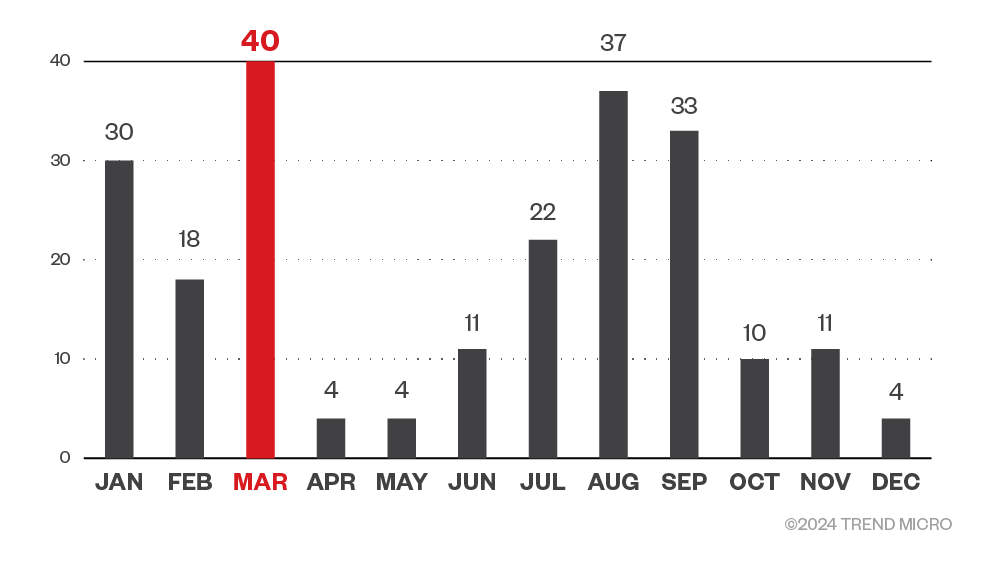
Based on Trend threat intelligence data, there were 224 attack attempts by 8Base in 2023, with the gang’s criminal activity against Trend customers peaking in March.
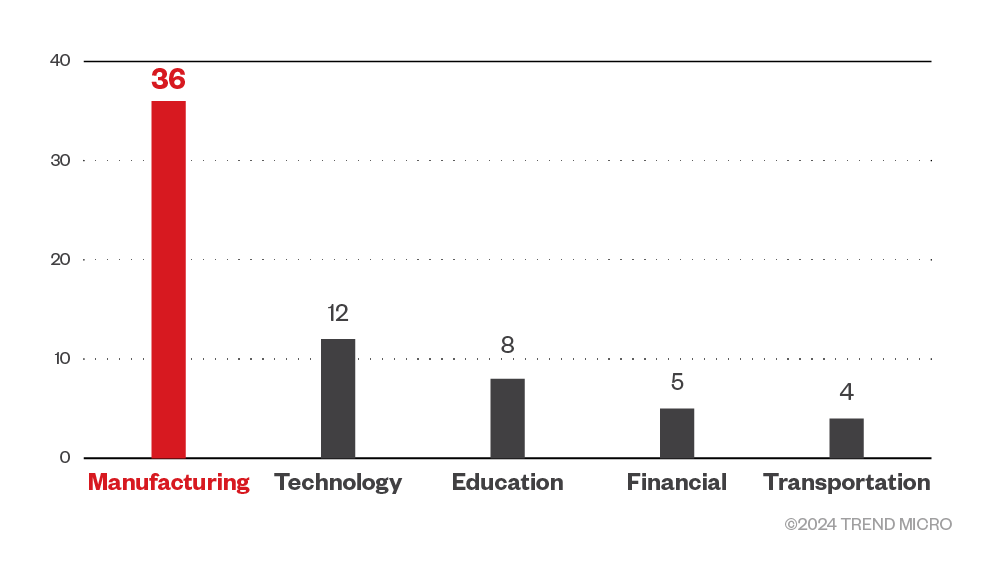
Organizations in the manufacturing industry were targeted the most by 8Base ransomware, while companies in the technology industry were also largely targeted. Beyond the top five industries specified in Figure 2, organizations in healthcare, oil and gas industries, and the government were also targeted by 8Base. It should be noted that the data in Figure 2 covers Trend Micro customers who have chosen to provide information on the industry they belong to.
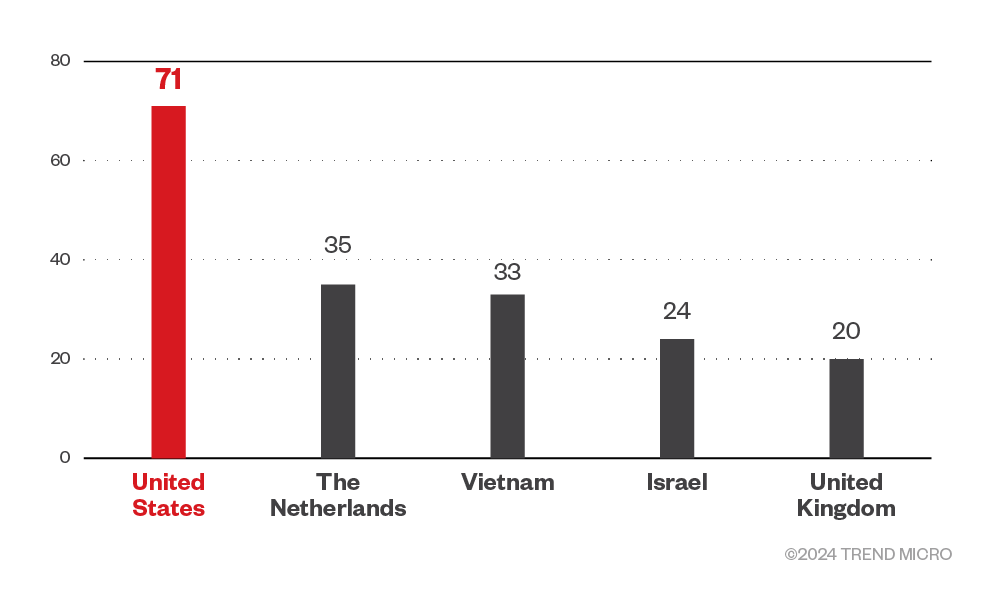
Meanwhile, Trend threat intelligence showed that the 8Base ransomware targeted America the most with 71 infected machine detections from January 2023 to March 2024 data. Curiously, threat actors behind the ransomware also targeted the small western European country of the Netherlands with 35 detections. Vietnam, Israel, and the United Kingdom were also in the gang’s top targeted countries.
Targeted regions and industries according to 8Base ransomware’s leak site
This section looks at data based on attacks recorded on the leak site of the 8Base ransomware from May 2023 to March 2024.
Based on a combination of our open-source intelligence (OSINT) research and an investigation of the leak site, the 8Base ransomware gang targeted organizations in North America the most, while also spending significant time on European corporations.
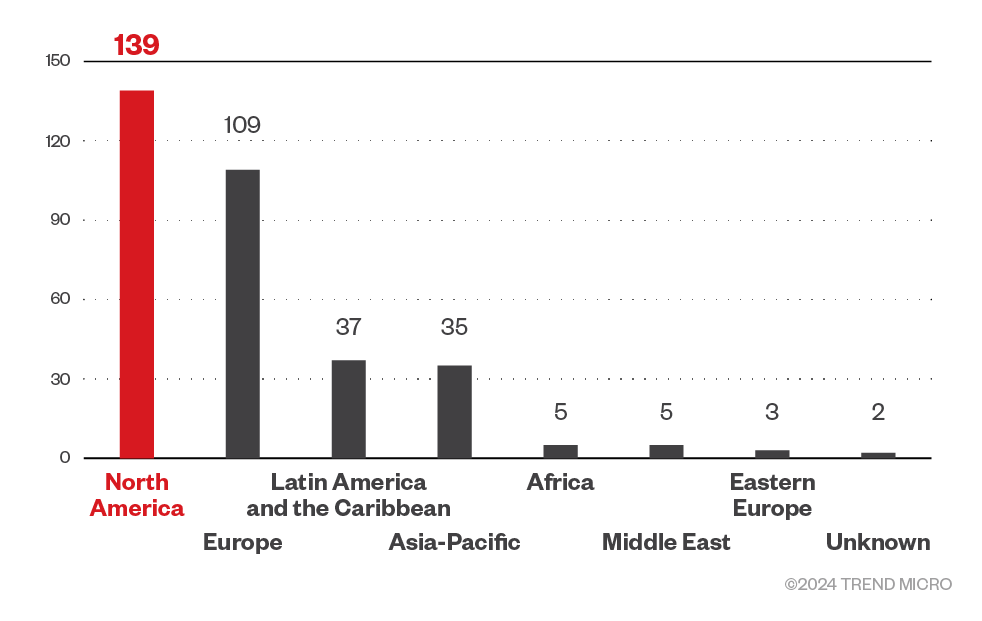
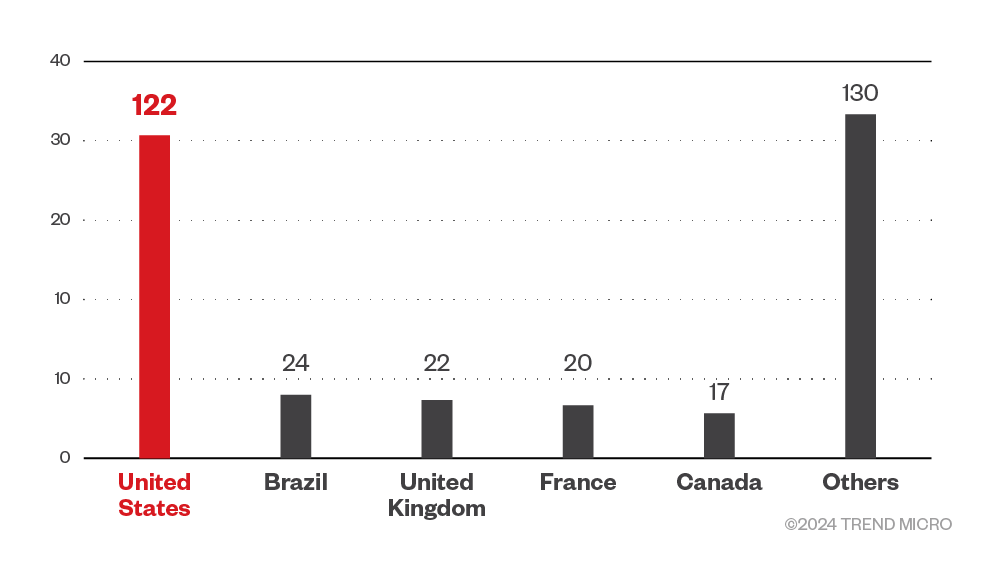
A closer look shows that the gang’s efforts were significantly focused on American organizations, but it also targeted Brazilian institutions as well as those from the United Kingdom, France, Canada, and Australia. Interestingly, 8Base ransomware also targeted smaller countries such as Costa Rica, Croatia, and the Bahamas.
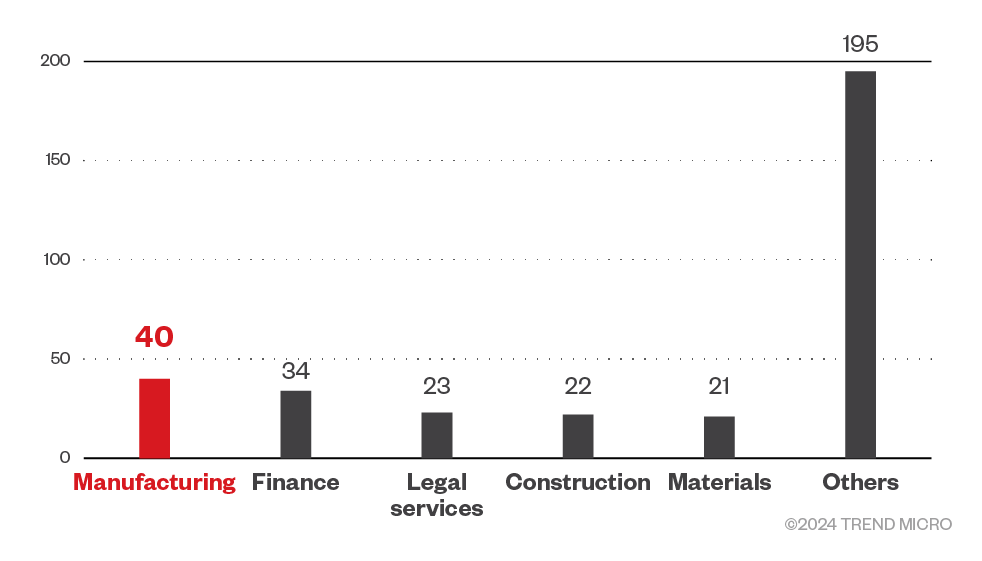
Threat actors behind 8Base ransomware targeted a wide range of sectors including real estate businesses, legal services companies, and hospitality-related establishments. However, they focused their efforts the most on businesses in the manufacturing and finance sectors.
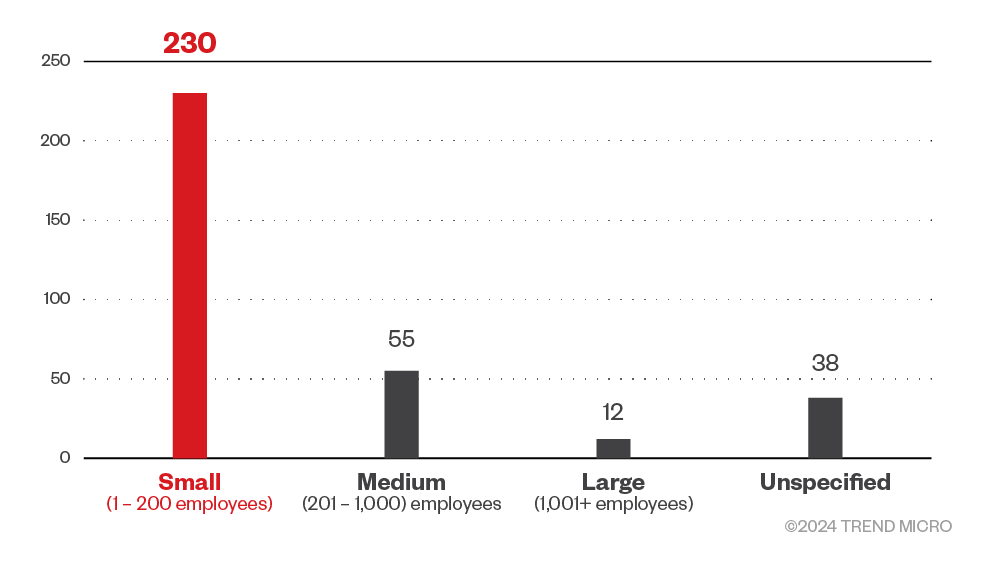
The 8Base ransomware targeted small business the most, despite or perhaps because the gang positioned themselves as pen testers; penetration testing usually aims to identify weak spots in a system’s defenses that can be taken advantage of by attackers. It could be assumed that instead of big corporations, the gang targeted small business to teach them a “lesson” while also gaining profit.
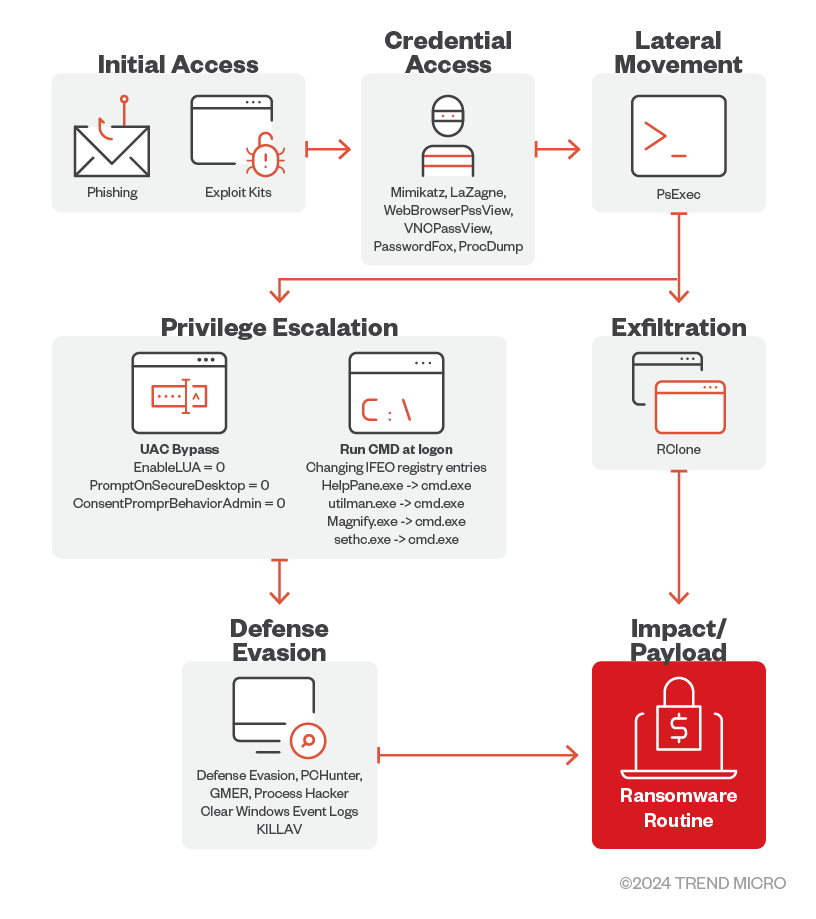
Infection chain and techniques

Initial Access
The 8Base ransomware primarily uses phishing scams for initial access.

Credential Access
8Base operators use MIMIKATZ, LaZagne, WebBrowserPassView, VNCPassView, PasswordFox, and ProcDump to retrieve passwords and credentials on their victim’s machines.

Defense Evasion
For its defense evasion, the 8Base ransomware drops and executes a batch file named defoff.bat detected as KILLAV to disable components of Windows Defender.
The 8Base ransomware also uses garbage codes, deletes shadow copies, bypasses Cuckoo Sandbox, clears Windows event logs, disables firewalls, and uses SmokeLoader to decrypt and deliver the payload.
8Base operators also uses other tools such as PCHunter, GMER, and Process Hacker.

Lateral Movement
It has been observed that the 8Base ransomware operators use PsExec to deploy the batch file as well as the ransomware binary.

Privilege Escalation
8Base ransomware operators modified certain registry entries to bypass User Access Control (UAC).
They also modified IFEO registry keys to attach cmd.exe to accessibility programs that are accessible from the lock screen.

Exfiltration
The threat actors behind 8Base ransomware have been detected using the third-party tool and web-service RClone to exfiltrate stolen information.

Impact
The 8Base ransomware uses AES-256 algorithm to encrypt target files and then encrypts each encryption key using RSA-1024 with a hardcoded public key. The encrypted key is then appended to the end of each encrypted file. It has an embedded configuration (decrypted during runtime) which contains the file extensions, file names, and folders to avoid.
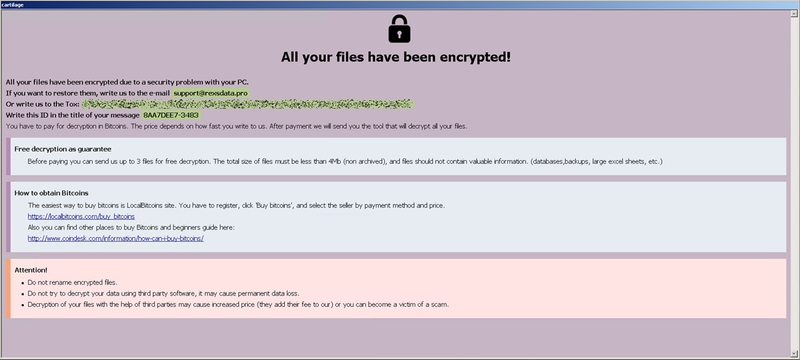
It drops the following ransom notes:


Additional information
The 8Base ransomware terminates the following processes to avoid conflict in its encryption routine:
msftesql.exe
sqlagent.exe
sqlbrowser.exe
sqlservr.exe
sqlwriter.exe
oracle.exe
ocssd.exe
dbsnmp.exe
synctime.exe
agntsvc.exe
mydesktopqos.exe
isqlplussvc.exe
xfssvccon.exe
mydesktopservice.exe
ocautoupds.exe
agntsvc.exe
agntsvc.exe
agntsvc.exe
encsvc.exe
firefoxconfig.exe
tbirdconfig.exe
ocomm.exe
mysqld.exe
mysqld-nt.exe
mysqld-opt.exe
dbeng50.exe
sqbcoreservice.exe
excel.exe
infopath.exe
msaccess.exe
mspub.exe
onenote.exe
outlook.exe
powerpnt.exe
steam.exe
thebat.exe
thebat64.exe
thunderbird.exe
visio.exe
winword.exe
wordpad.exe
8Base ransomware avoids encrypting files with the following extensions:
8base
actin
dike
acton
actor
acuff
file
acuna
fullz
mmxxii
6y8dghklp
shtorm
nurri
ghost
ff6om6
mnx
backjohn
own
fs23
2qz3
top
blackrock
chcrbo
g-stars
faust
unknown
steel
worry
win
duck
fopra
unique
acute
adage
make
adair
mlf
magic
adame
banhu
banjo
banks
banta
barak
caleb
cales
caley
calix
calle
calum
calvo
deuce
dever
devil
devoe
devon
devos
dewar
eight
eject
eking
elbie
elbow
elder
phobos
help
blend
bqux
com
mamba
karlos
ddos
phoenix
plut
karma
bbc
capital
wallet
lks
tech
s1g2n3a4l
murk
makop
ebaka
jook
logan
fiasko
gucci
decrypt
ooh
non
grt
lizard
flscrypt
sdk
2023
vhdv
fdb
sql
4dd
4dl
abs
abx
accdb
accdc
accde
adb
adf
ckp
db
db-journal
db-shm
db-wal
db2
db3
dbc
dbf
dbs
dbt
dbv
dcb
dp1
eco
edb
epim
fcd
gdb
mdb
mdf
ldf
myd
ndf
nwdb
nyf
sqlitedb
sqlite3
sqlite
8Base ransomware avoids encrypting files with the following strings: :
info.hta
info.txt
boot.ini
bootfont.bin
ntldr
ntdetect.com
io.sys
suppo
bin.exe
MITRE tactics and techniques
T1566 - Phishing:
Based on reports, 8Base ransomware gains initial access primarily through phishing emails. Once the victim engages with the phishing elements, an exploit kit will be executed.
T1547.001 - Registry Run Keys / Startup Folder:
It creates the following registry entries for its autorun technique:
• HKEY_LOCAL_MACHINE\ SOFTWARE\Microsoft\Windows\ CurrentVersion\Run
• {malware name} = %AppDataLocal%\{malware name}.exe
• HKEY_CURRENT_USER\ Software\Microsoft\Windows\ CurrentVersion\Run
• {malware name} = %AppDataLocal%\{malware name}.exe
It also drops a copy of itself on the %User Startup% folder.
T1134.001 - Token Impersonation/Theft
If the system OS version is > 6, it duplicates the token of explorer.exe
T1134.002 - Create Process with Token
8Base ransomware then creates a process using the API CreateProcessWithTokenW and the duped token of explorer.exe.
T1548.002 - Bypass User Account Control
It adds registry entries to bypass User Access Control (UAC)
• ADD HKLM\SOFTWARE\Microsoft\Windows\CurrentVersion\Policies\System /v EnableLUA /t REG_DWORD /d 0 /f
• ADD HKLM\SOFTWARE\Microsoft\Windows\CurrentVersion\Policies\System /v PromptOnSecureDesktop /t REG_DWORD /d 0 /f
• • ADD HKLM\SOFTWARE\Microsoft\Windows\CurrentVersion\Policies\System /v ConsentPromptBehaviorAdmin /t REG_DWORD /d 0 /f
T1546.008 - Accessibility Features
It modifies the following IFEO registry keys to attach cmd.exe to accessibility programs that are accessible from the lock screen:
• HelpPane.exe - ADD "HKLM\SOFTWARE\Microsoft\Windows NT\CurrentVersion\Image File Execution Options\HelpPane.exe" /f /v Debugger /t REG_SZ /d "C:\Windows\system32\cmd.exe"
• utilman.exe - ADD "HKLM\SOFTWARE\Microsoft\Windows NT\CurrentVersion\Image File Execution Options\utilman.exe" /f /v Debugger /t REG_SZ /d "C:\Windows\system32\cmd.exe"
• Magnify.exe - ADD "HKLM\SOFTWARE\Microsoft\Windows NT\CurrentVersion\Image File Execution Options\Magnify.exe" /f /v Debugger /t REG_SZ /d "C:\Windows\system32\cmd.exe"
• sethc.exe - ADD "HKLM\SOFTWARE\Microsoft\Windows NT\CurrentVersion\Image File Execution Options\sethc.exe" /f /v Debugger /t REG_SZ /d "C:\Windows\system32\cmd.exe"
T1027.001 - Binary Padding
8Base ransomware uses garbage codes to make analysis difficult and confusing.
T1497.001 - System Checks
It uses SetErrorMode function to bypass Cuckoo Sandbox by terminating the process if the return value is 0x400.
T1562.004 - Disable or Modify System Firewall
It executes the following to disable firewall:
• netsh advfirewall set currentprofile state off
• • netsh firewall set opmode mode=disable
T1140 - Deobfuscate / Decode Files or Information
It uses SmokeLoader to decrypt and deliver the 8Base ransomware payload.
T1070.001 - Clear Windows Event Logs
Using wevtutil.exe, it clears Windows event logs.
T1083 - File and Directory Discovery
It enumerates and looks for files to encrypt in all local drives.
It contains a specific list of extensions and folders that it can use to verify which files to avoid encrypting (this can be found in the “Infection chain and techniques” section).
T1082 - System Information Discovery
It obtains the OS major version to check if it is < 6
This ransomware also retrieves the volume serial number which will be used in generating the file extension that it will append on encrypted files.
T1135 - Network Share Discovery
It uses WNetEnumResource() to crawl network resources.
T1057 - Process Discovery
This ransomware enumerates processes for the purpose of terminating them to avoid conflict in its encryption routine. See the list of processes it terminates in the additional information provided at the end of the article.
T1486 - Data Encrypted for Impact
It uses AES-256 to encrypt target files and then encrypts the encryption key used using RSA-1024 with a hardcoded public key appended to the end of each encrypted file. It has an embedded configuration, decrypted during runtime, which contains the file extensions, file names, and folders to avoid. It avoids encrypting certain files. See the list of extensions it avoids encrypting in the additional information provided in the "Infection Chain and techniques" section.
It avoids encrypting files with the certain strings in their file name. See the full list in the additional information provided at the end of the article.
It avoids encrypting files found in the following folders:
• c:\windows
• c:\programdata\microsoft\windows\caches
It appends the following file extension to encrypted files:
• id[{Volume Serial Number}-{Generated ID}].support@rexsdata.pro].8base
It drops the following ransom notes:
• %Desktop%\info.txt
• %Desktop%\info.hta
T1490 - Inhibit System Recovery
It uses Vssadmin, WMIC, BCDEdit, and wbadmin to remove volume shadow copies.
T1218.005 - System Binary Proxy Execution: Mshta
It executes the following command to display the ransom note after encryption:
• %System%\mshta.exe %Desktop%\info.hta
Summary of malware, tools, and exploits used
| Initial Access | Phishing | Technique |
| Credential Access | Mimikatz | Hacktool |
| LaZagne | Hacktool | |
| WebBrowserPassView | Hacktool | |
| VNCPassView | Hacktool | |
| PasswordFox | Hacktool | |
| ProcDump | Tool | |
| Lateral Movement | PsExec | Tool |
| SystemBC | Tool | |
| Defense Evasion | KILLAV | Malware |
| SmokeLoader | Malware | |
| PCHunter | Tool | |
| GMER | Tool | |
| Process Hacker | Tool | |
| Exflitration | RClone | Tool |
| Impact | Phobos Ransomware | Malware |
Security recommendations
While the threat actors behind the 8Base ransomware position themselves as penetration testers, their attacks on organizations cannot be seen as a “public service,” since the group extorts and profits off its victims. Organizations should conduct their own penetration tests and find out weaknesses in their systems before cybercriminals can take advantage of them in the guise of teaching lessons in security. As evidenced in the profile of 8Base ransomware’s victims, no business is too small for a robust and comprehensive security system.
To shield themselves against 8Base ransomware and other similar threats, organizations can implement security frameworks that allocate resources systematically to establish a strong defense strategy.
The following are some best practices that organizations can consider to safeguard themselves from ransomware infections:
Audit and inventory
- Take an inventory of assets and data.
- Identify authorized and unauthorized devices and software.
- Make an audit of event and incident logs.

Configure and monitor
- Manage hardware and software configurations.
- Grant admin privileges and access only when necessary to an employee’s role.
- Monitor network ports, protocols, and services.
- Activate security configurations on network infrastructure devices such as firewalls and routers.
- Establish a software allowlist that executes only legitimate applications.

Patch and update
- Conduct regular vulnerability assessments.
- Perform patching or virtual patching for operating systems and applications.
- Update software and applications to their latest versions.

Protect and recover
- Implement data protection, backup, and recovery measures.
- Enable multifactor authentication (MFA).

Secure and defend
- Employ sandbox analysis to block malicious emails.
- Deploy the latest versions of security solutions to all layers of the system, including email, endpoint, web, and network.
- Detect early signs of an attack such as the presence of suspicious tools in the system.
- Use advanced detection technologies such as those powered by artificial intelligence (AI) and machine learning.

Train and test
- Regularly train and assess employees in security skills.
- Conduct red-team exercises and penetration tests.
A multilayered approach can help organizations guard possible entry points into the system (endpoint, email, web, and network). Security solutions that can detect malicious components and suspicious behavior can also help protect enterprises.
- Trend Vision One™ provides multilayered protection and behavior detection, which helps block questionable behavior and tools early on before the ransomware can do irreversible damage to the system.
- Trend Cloud One™ Workload Security protects systems against both known and unknown threats that exploit vulnerabilities. This protection is made possible through techniques such as virtual patching and machine learning.
- Trend Micro™ Deep Discovery™ Email Inspector employs custom sandboxing and advanced analysis techniques to effectively block malicious emails, including phishing emails that can serve as entry points for ransomware.
- Trend Micro Apex One™ offers next-level automated threat detection and response against advanced concerns such as fileless threats and ransomware, ensuring the protection of endpoints.
Indicators of compromise (IOCs)
The IOCs for the threat discussed in this article can be found here. Actual indicators might vary per attack.
Trend Vision One Hunting Query
Trend Vision One customers can use the following hunting query to search for 8Base ransomware within their system:
fullPath:"*.8base" OR fullPath:"*.eight" OR fullPath:"*\\info.hta" OR fullPath:"*\\info.txt" OR (processFilePath:"*\\mshta.exe" AND objectFilePath:"*\\info.hta")