Key Takeaways
- Anubis is an emerging Ransomware-as-a-Service (RaaS) operation that combines file encryption with file destruction — a rare dual-threat capability.
- The ransomware has an optional "wipe mode" feature which permanently erases the contents of the files. This suggests that the threat actor could wipe their victim's files if the ransom is not paid.
- Anubis runs a flexible affiliate program, offering negotiable revenue splits and supporting additional monetization paths like data extortion and access sales.
- Active since December 2024, Anubis has claimed victims in multiple sectors including healthcare and construction, across regions such as Australia, Canada, Peru, and the U.S.
- Trend Vision One™ detects and blocks the IOCs discussed in this blog. Trend Vision One customers can also access hunting queries, threat insights, and threat intelligence reports to gain rich context and the latest updates on Anubis.
A new ransomware-as-a-service (RaaS) group has emerged and has been making a name for itself in 2025. Anubis is a recently identified group that sets itself apart by partnering encryption with more destructive capabilities—wiping directories which severely impact chances of file recovery. Given its brief history and use of a multi-layered extortion model, Anubis has all the markings of an evolving and flexible RaaS operation.
Trend™ Research has observed specific command line operations for these destructive actions, including attempts to change system settings and wipe directories. This entry takes a closer look into these capabilities.
Origins
Anubis joined the X (formerly Twitter) in December 2024. Around the same time, our team identified a sample called Sphinx, which appeared to be in development, evidenced by its ransom note that lacked both a TOR site and a unique ID, as shown in Figure 1.
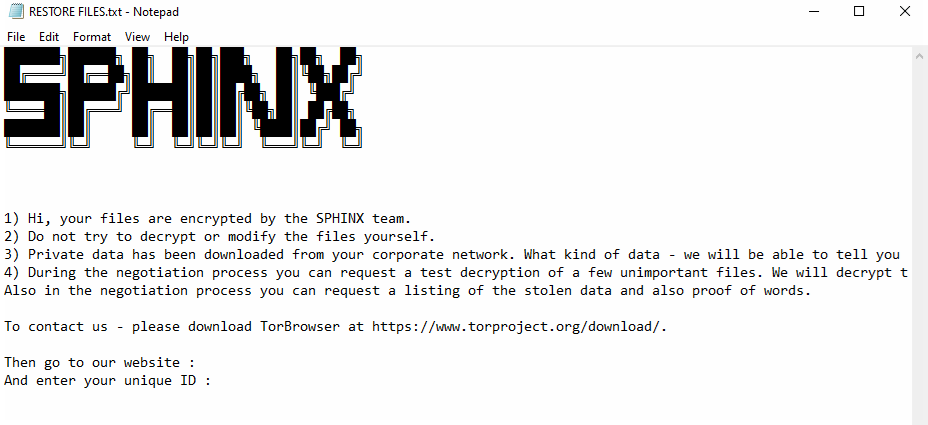
When we compared the binaries of Anubis and Sphinx, they were highly identical, with only a minor difference—the function that generated the ransom note. These observations suggest that while the core of the malware remained the same, the messaging and branding were updated for the malware’s eventual debut as Anubis.
Affiliate program monetization
By 2025, Anubis officially became active on cybercrime forums. Representatives of Anubis have been observed on both RAMP and XSS, using the monikers “supersonic” and “Anubis__media” respectively. Both accounts posted in Russian.
On February 23, 2025, “superSonic” advertised a “new format” of affiliate programs on the RAMP forum. All their proposed revenue-share structures are open to negotiation for long-term cooperation. Other research has already covered the group’s RAMP posting, which outlines Anubis’s capabilities along with the structure of their affiliate programs. This is notable because the group appears to go beyond typical RaaS and double extortion for monetization, offering additional affiliate programs such as a data ransomware affiliate program and an access monetization affiliate program.
Victimology
In terms of activity, seven victims have been listed on the group’s leak site as of writing. The group has targeted a range of industries, including healthcare, engineering, and construction, across multiple regions, such as Australia, Canada, Peru, and the United States. The wide range of targets suggests an opportunistic approach across different regions and industries.
Anubis’s file-wiping function
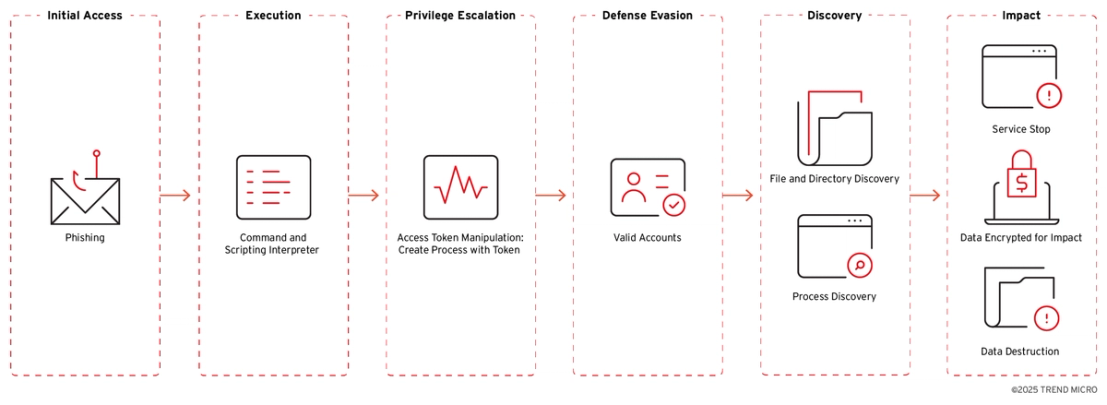
What further sets Anubis apart from other RaaS and lends an edge to its operations is its use of a file wiping feature, designed to sabotage recovery efforts even after encryption. This destructive tendency adds pressure on victims and raises the stakes of an already damaging attack. Figure 2 outlines the techniques Anubis uses to deliver, execute, and enforce this dual-threat behavior.
Initial Access
T1566 - Phishing
The initial entry vector is established through spear phishing emails that include malicious attachments or links. These emails are carefully constructed to appear as if they come from trusted sources, luring recipients into opening the attachments or clicking the links.
Execution
T1059 - Command and Scripting Interpreter
The ransomware takes multiple parameters as input and depends on them to function properly.
| Parameters | Description |
| "/KEY=" | Key |
| "/elevated" | elevate privilege |
| "/WIPEMODE" | wipe mode |
| "/PFAD=" | directories to exclude |
| "/PATH=" | specific paths should be encrypted |
Defense Evasion
T1078 - Valid Accounts
The process first checks for admin privileges, and if detected, displays the message "Admin privileges detected. Attempting to elevate to SYSTEM..."
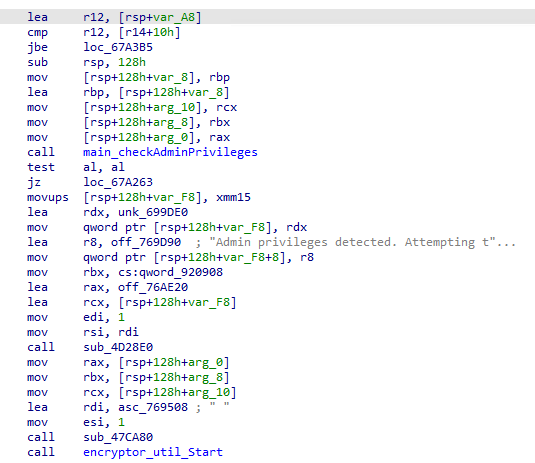
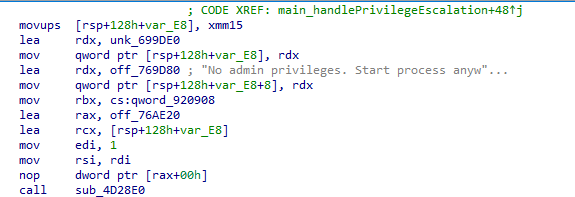
Otherwise, it prompts the user with "No admin privileges. Start process anyway?" and waits for input, while also having the capability to re-launch itself with the /elevated parameter upon gaining higher privileges. These interactive prompts show that the malware is still being improved and developed.
Privilege Escalation
T1134.002 - Access Token Manipulation: Create Process with Token
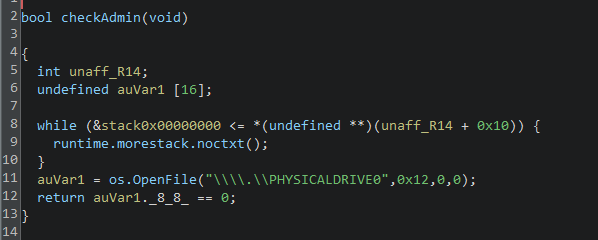
The program performs a check to determine if the current user has administrative privileges by attempting to access the system's primary physical drive, typically referred to as "\.\PHYSICALDRIVE0". This is a low-level operation that generally requires elevated permission.
The code checks if the current user has special permissions (administrative rights) by trying to access the main hard drive of the computer.
Discovery
T1083 - File and Directory Discovery
Here is the list of folders avoided during encryption:
| windows, system32, programdata, program files, program files (x86), AppData, public, system volume information, \\system volume information, efi, boot, public, perflogs, microsoft, intel, .dotnet, .gradle, .nuget, .vscode, msys64 |
Impact
T1490 - Inhibit System Recovery
The ransomware runs the command vssadmin delete shadows /for=norealvolume /all /quiet to delete all Volume Shadow Copies on the specified drive, thereby inhibiting the ability to restore files from previous versions.
T1489 - Service Stop
For a full list of terminated processes and disabled or stopped services, refer to the list of Indicators of Compromise (IoCs).
T1486 - Data Encrypted for Impact
The encryption uses Elliptic Curve Integrated Encryption Scheme (ECIES) and is publicly available in GitHub written in Go.
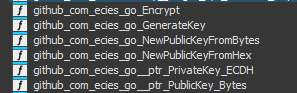
Upon checking, the ECIES library for its encryption algorithm is similar to EvilByte/Prince ransomware.

Drops Icons and Wallpaper Image
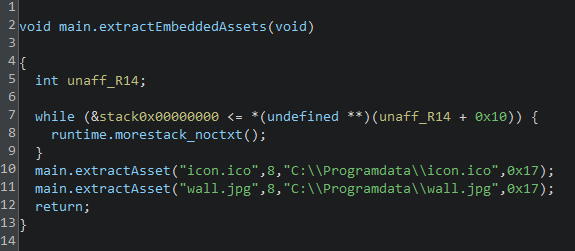
The code extracts two files, "icon.ico" and "wall.jpg", from the program and saves them to the computer's "C:\Programdata" folder.
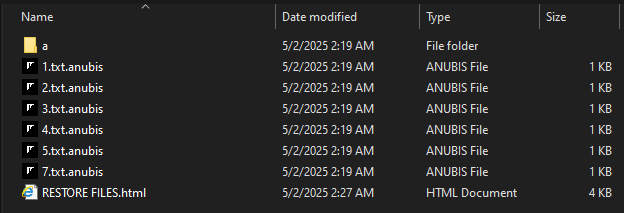
It modifies the icons of encrypted files to instead use its logo, which is shown in Figure 9.

It also attempts to change the wallpaper using a file named "wall.jpg," but this action failed in our testing since no such file was dropped.

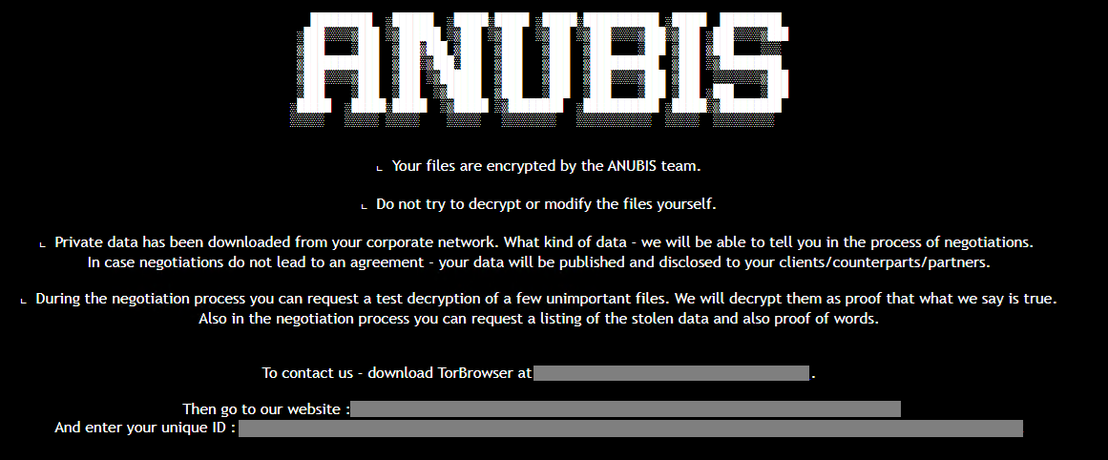
The Anubis ransom note employs a double extortion strategy, threatening to publicly release stolen data if their demands are not fulfilled.
T1485 - Data Destruction
Wiper
Additionally, the ransomware includes a wiper feature using /WIPEMODE parameter, which can permanently delete the contents of a file, preventing any recovery attempt.
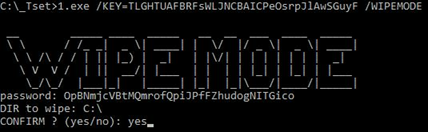
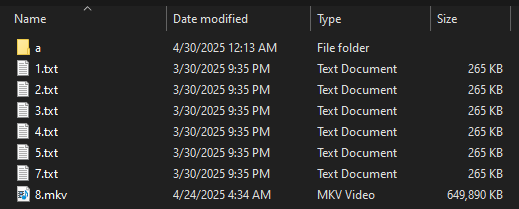
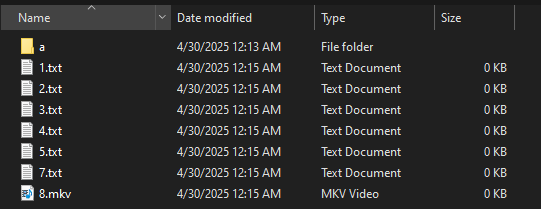
Figures 14 and 15 show the before and after using the wipe mode which erases the contents of the file.
| Tactic | Technique | ID |
| Initial Access | Phishing | T1566 |
| Execution | Command and Scripting Interpreter | T1059 |
| Privilege Escalation | Access Token Manipulation: Create Process with Token | T1134.002 |
| Defense Evasion | Valid Accounts | T1078 |
| Discovery | File and Directory Discovery | T1083 |
| Discovery | Process Discovery | T1057 |
| Impact | Service Stop | T1489 |
| Impact | Data Encrypted for Impact | T1486 |
| Impact | Data Destruction | T1485 |
Conclusion and recommendations
The emergence of the Anubis marks a significant evolution in the landscape of cyberthreats, particularly with its dual-threat ransomware capabilities and flexible affiliate programs. By combining RaaS with added monetization strategies, such as data ransomware and access monetization affiliate programs, Anubis is maximizing its revenue potential and expanding its reach within the cybercriminal ecosystem. Its ability to both encrypt and permanently destroying data significantly raises the stakes for victims, amplifying the pressure to comply—just as strong ransomware operations aim to do.
Given the tactics discussed—such as spear-phishing, command-line execution, privilege escalation, shadow copy deletion, and file wiping—security measures that address these are critical in defending against Anubis. Additionally, maintaining offline and offsite backups can help mitigate the impact of Anubis’s wiping capabilities.
To proactively defend against attacks utilizing Anubis ransomware, enterprises should implement a comprehensive security strategy that includes the following best practices:
- Email and web safety: Exercise caution with email and web practices. Avoid downloading attachments, clicking on links, or installing applications unless the source is verified and trusted. Implement web filtering to restrict access to known malicious websites. This should help avoid the initial entry of similar threats.
- Data backup: Regularly back up critical data and implement a robust recovery plan. This includes maintaining offline and immutable backups to ensure file recovery even if files are encrypted or wiped.
- Access control:Limit administrative rights and access privileges to employees only when necessary. Regularly review and adjust permissions to minimize the risk of unauthorized access.
- Regular updates and scanning: Ensure that all security software is updated regularly and conduct periodic scans to identify vulnerabilities. Use endpoint security solutions to detect and block malicious components and suspicious behavior.
- User education: Conduct regular training sessions for employees on recognizing social engineering tactics and the dangers of phishing. This awareness can significantly reduce the likelihood of falling victim to such attacks
- Multilayered security approach: Adopt a multilayered defense strategy that includes endpoint, email, web, and network security. This approach will help protect against potential entry points into the system and enhance overall threat detection capabilities.
- Sandboxing and application control: Use sandboxing tools to analyze files before they are executed, ensuring that any suspicious files are scanned for potential threats. Enforce application control policies to prevent the execution of unauthorized applications and scripts.
- Monitoring for abnormal activity: Implement security information and event management (SIEM) tools to monitor for unusual script executions and outbound connections. This proactive monitoring can help identify and mitigate threats before they escalate.
Proactive security with Trend Vision One™
Trend Vision One™ is the only AI-powered enterprise cybersecurity platform that centralizes cyber risk exposure management, security operations, and robust layered protection. This comprehensive approach helps you predict and prevent threats, accelerating proactive security outcomes across your entire digital estate. Backed by decades of cybersecurity leadership and Trend Cybertron, the industry's first proactive cybersecurity AI, it delivers proven results: a 92% reduction in ransomware risk and a 99% reduction in detection time. Security leaders can benchmark their posture and showcase continuous improvement to stakeholders. With Trend Vision One, you’re enabled to eliminate security blind spots, focus on what matters most, and elevate security into a strategic partner for innovation.
Trend Micro™ Threat Intelligence
To stay ahead of evolving threats, Trend customers can access Trend Vision One™ Threat Insights, which provides the latest insights from Trend Research on emerging threats and threat actors.
Trend Vision One Threat Insights
Emerging Threats: Anubis Ransomware: The Dual Threat of Encryption and Destruction
Trend Vision One Intelligence Reports (IOC Sweeping)
Anubis Ransomware: The Dual Threat of Encryption and Destruction
Hunting Queries
Trend Vision One Search App
Trend Vision One customers can use the Search App to match or hunt the malicious indicators mentioned in this blog post with data in their environment.
Detection of Potentially Malicious Command Execution
processCmd: /\/KEY=[A-Za-z0-9]{30,} \/(?:WIPEMODE|elevated)/More hunting queries are available for Trend Vision One customers with Threat Insights Entitlement enabled.
Indicators of Compromise (IoC)
The indicators of compromise for this entry can be found here.